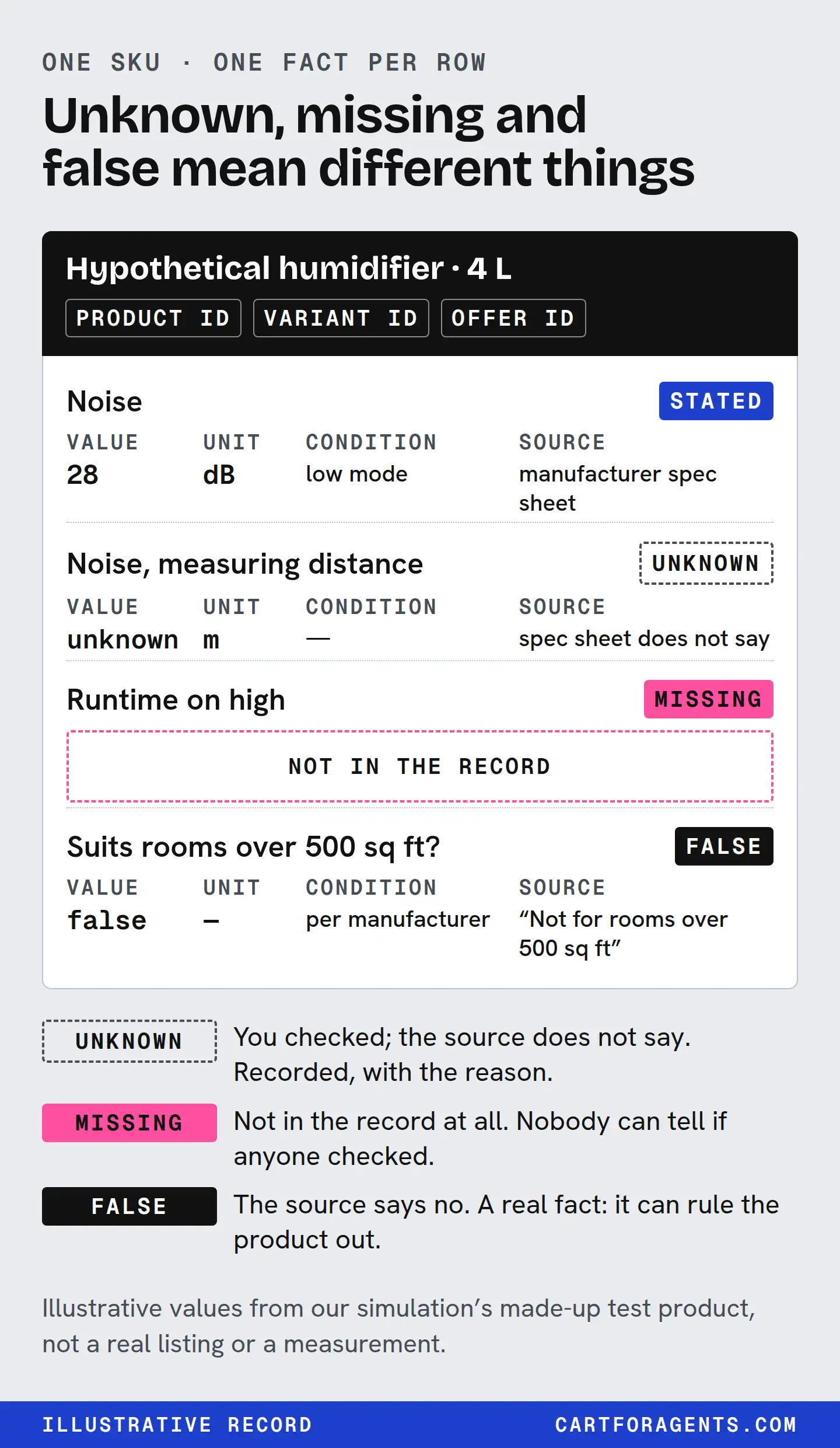
Build one record for each variant you sell. Each row holds one fact: the value, its unit, the condition it was measured under, where the fact came from, when you last checked it, and what the product is not for. If you haven’t verified something, write “unknown” and the reason, and don’t fill the gap with a guess.
That record comes before feed fixes, schema markup or copywriting. Every one of those is a copy of the record, and a copy can’t be more accurate than its source. This is a template you keep, not a score, and no platform requires this exact format.
The examples below come from searches we ran in Shopify’s agent catalog on October 26, 2026, and from a controlled simulation. Neither one shows what an assistant actually tells shoppers.
The template: one row per fact
Use a spreadsheet. One row per fact, per variant.
| Column | What goes in it | Example |
|---|---|---|
| Product | Your product ID and name | Bedroom humidifier |
| Variant | The exact size, colour or model the fact belongs to | 4 L, white |
| Fact | The thing a shopper asks about | Noise level |
| Value | The number or the exact statement | 30 |
| Unit | The unit, written out | dB(A) |
| Condition | When the value holds: setting, distance, temperature, load, test method | Low setting, 1 m, lab test |
| Status | Measured by you, from the manufacturer, from a third-party test, or unknown | Manufacturer test report |
| Source | The document a person can open to check it | Test report page 4 |
| Checked | The date someone last confirmed it | 2026-10-27 |
| Not for | A use, size or situation it doesn’t suit, if you know one | Rooms over 40 m² |
| If unknown, why | “Not tested”, “manufacturer doesn’t state”, “varies by setting” | — |
The example column is illustrative. It shows the format, not a real product or a real measurement. Never copy its numbers into a listing.
Two columns do most of the work and are the ones merchants skip: condition and if unknown, why. A value without its condition can make a product look suitable when it isn’t. An empty cell with no reason looks the same as a cell somebody forgot.
A worked record: the “21 dB” humidifier
On October 26 we searched Shopify’s agent catalog for “humidifier for dry winter air large room quiet top fill”. One listing in the top 10 printed “21dB Quiet”. Another said it “runs quietly enough to leave on overnight”. We wrote that contrast up here.
The number is the better answer. You can compare a number; all you can do with an adjective is repeat it. But watch what happens when you build a record from only what that “21 dB” listing published:
| Fact | Value and unit | Condition | Status |
|---|---|---|---|
| Noise level | 21 dB (weighting not stated) | Unknown: setting, distance and method not published | Seller statement |
| Room coverage | 700 ft² (about 65 m²) | Unknown: ceiling height, setting and starting humidity not published | Seller statement |
| Runtime | 100 hours | Unknown: setting not published | Seller statement |
| Tank | 11 L | Not needed | Seller statement |
| Fill style | Top fill | Not needed | Seller statement |
| Not for | None published | — | Unknown |
Three of the four numbers have no condition attached. That doesn’t make the listing wrong. It means anyone comparing it with another humidifier can’t tell whether “21 dB” was measured on the lowest setting at arm’s length or on the setting the shopper will actually use.
It wasn’t alone. Four of the ten product descriptions in that result printed a decibel figure, and none of the four said which setting, at what distance or by what method. Three descriptions described noise in words only. Three said nothing about noise at all. If you also count the specification lists Shopify generates, six of the ten records carried a decibel figure. None of the ten titles did.
The merchant can fix this in an afternoon, because the missing pieces are usually in a test report or manual they already have. The finished row looks like this:
| Fact | Value and unit | Condition | Source |
|---|---|---|---|
| Noise level | 21 dB(A) or dB, as tested | [setting] at [distance], [method] | Manufacturer test, [report name, page] |
The brackets are deliberate. We don’t know the real values, and you shouldn’t invent them either. If the report doesn’t exist, the honest row says “condition unknown: not tested”, which is still more useful than a bare number.
Bind every fact to the exact variant
Shopify’s Global Catalog finds products first, then evaluates a specific product or variant to get its options, price and checkout link. Offers from several merchants can sit under one clustered product. A fact attached to the wrong variant can travel with the wrong offer.
Split your facts into two kinds:
| Kind | Examples | Changes when |
|---|---|---|
| Product facts | Noise, capacity, dimensions, materials, temperature rating, compatibility | The product or variant changes |
| Offer facts | Price, stock, shipping time, return window, ships-to countries | Daily, or per market and per store |
Keep them in separate rows with separate checked dates. OpenAI says ChatGPT ranks merchants for a product on factors such as availability, price, quality and whether the seller is the maker or primary seller, and that price and shipping changes can take time to show up. Good product facts don’t settle the offer side, and a stale shipping row can undo a good product row.
We saw why the binding matters in a travel-backpack search from the same day. Two catalog records for what looks like the same 28-litre backpack carried different dimensions. One record’s generated spec list gave 19.7 x 11.2 x 7.5 in. The other record’s own description, and its generated list, gave 11.2 in high, 7.5 in wide and 2.4 in deep. We don’t know whether they’re the same variant or which figure is right. Neither does a shopper asking “will it fit under the seat”, until someone says which dimensions belong to which variant.
Require units and conditions, then check the arithmetic
A value is only comparable when its unit and condition travel with it. The usual failures by category:
| Category | Bare value | What the condition needs to say |
|---|---|---|
| Humidifier noise | “26 dB” | Setting, distance, dB or dB(A), method |
| Humidifier runtime | “up to 62 hours” | Which output setting |
| Room coverage | “up to 536 ft²” | Setting, ceiling height if stated |
| Winter clothing | “rated to -30°C” | Which part (whole garment or hood), activity level, who rated it |
| Bags | “carry-on compliant” | External dimensions, packed or empty, which airline’s limit |
Check the arithmetic too. One listing in the humidifier result stated a 6.2 L tank, 320 mL/h of mist output and “up to 62 hours” of runtime in the same paragraph. At 320 mL/h, 6.2 L lasts about 19 hours. The 62-hour figure needs an average of about 100 mL/h, so it has to be a lower setting. The listing didn’t say so. Your record should hold both numbers, each with the setting it belongs to.
The “minus 30” lesson, which was our mistake
Our homepage illustrates the problem with a shopper who wants a parka rated to minus 30. That parka is an illustration, not something we found. The real case behind it is less flattering to us. When we searched for “toddler snowsuit rated for minus 30”, two listings did state -30 °C. Our first text matcher reported them as missing because it didn’t know that “minus 30” and “-30 °C” mean the same thing. That was our error, not the merchants’.
There are two lessons. On our side, any checker has to normalize numbers and units before it calls a fact missing. On the merchant side, write the value as a number with its unit and scope, “-30 °C”, and keep that phrasing the same across title, description and spec table.
Scope matters as much as format. One of those two listings rated the insulation in the hood to -30°C. That’s a narrower claim than “this snowsuit is rated to -30°C”, and the record should keep the word hood.
Keep the source as the fact gets copied
Between your test report and a shopper’s screen, a fact can be copied four or more times:
- Your source: the test report, manual or spec sheet.
- Your product page and admin fields: what you publish.
- The catalog record: what Shopify sends to AI channels. Shopify says some fields, including the description, technical specifications and top features, are generated or enriched by Shopify and labelled Inferred. It says they may vary in accuracy and aren’t merchant-authored source text.
- The assistant’s display: OpenAI says ChatGPT may write simplified titles and descriptions and add labels such as “Budget-friendly”, which it says aren’t guarantees.
Each step can drop a condition, change a number or fill a blank. In our October 26 searches we found examples of all three. Where a generated value doesn’t appear in the merchant text we received, we can’t tell where it came from. It may come from data we didn’t see. That’s why your own record needs a source column.
| What the merchant description said | What Shopify’s generated spec list said | What changed |
|---|---|---|
| “21dB”, “100H”, “11L”, “700ft²” | 11 liters, 700 sq ft; no noise or runtime value | Two facts dropped |
| “up to 32 hours” | “Up to 36 hours” | Number changed |
| “low noise level”, “up to 25 hours” | “26 dB”, “Up to 25 hours (low mode)” | Number and setting appear that weren’t in the description we received |
| No room size stated | “Maximum Room Area: 150 m²” (150 is also in the model name) | Value appears with no visible source |
| Hood insulation “rated to -30°C” | “Insulation: … rated to -30°C” | Scope dropped |
These are five records from two searches. They aren’t an error rate, and we didn’t check any product against its manufacturer documents. They show why “it’s on my page” doesn’t mean “that’s what was received”.
Unknowns and exclusions are facts too
Unknown is not zero. Across all 162 of our searches, a product-level rating was absent on 440 of 1,620 returned listings. 106 of those 440 still had a rating on the first variant returned, so 334 had neither. A blank is unknown. It isn’t zero reviews, and it doesn’t mean nobody supplied a rating anywhere. The same goes for a missing decibel figure. Your record should say which kind of blank it is: “not tested”, “tested, not published” or “manufacturer doesn’t state”.
Exclusions protect the right buyer. “Not for rooms over 40 m²” or “not for opaque colour coverage” tells a shopper and an agent when to look elsewhere. Only write an exclusion you can stand behind, and don’t bury it below the fold. A true “not for” line can cost you a pick from a buyer who would have returned the product anyway.
Never invent a value to fill a blank. No decibel figure, runtime condition, temperature rating, certification or “compliant” claim goes in without a source.
Check one record against what’s received
The whole method fits into five steps:
- Pick one variant that sells and the three questions customers already email you about. For a humidifier: how loud, how big a room, how long between refills.
- Fill the rows from source documents, not from your current copy. Mark unknowns with a reason.
- Compare the record with your product page, your admin fields and the catalog record where you can see it. Shopify’s Catalog Mapping can pull data from custom fields such as metafields, so check that the fields you rely on are mapped.
- Fix one fact everywhere. Put the value, unit and condition in visible text on the page, in the matching admin field and in the feed. Google says AI Overviews and AI Mode need no special markup beyond normal Search practice, so the useful work is making the fact plain and consistent.
- Date it. Write the checked date, and put a recheck date on offer facts.
Here is step 3 run on the “21 dB” listing, using what Shopify’s catalog actually returned:
| Fact | In the description | In Shopify’s generated spec list | Result |
|---|---|---|---|
| Noise | 21 dB, no condition | Absent | Gap: add value with condition to a structured field |
| Room coverage | 700 ft² | 700 sq ft | Match; condition still unknown |
| Tank | 11 L | 11 liters | Match |
| Runtime | 100 h, no setting | Absent | Gap |
| Power use | Not stated | “Not specified” | Consistent unknown |
What the evidence supports, and what it doesn’t
We tested this in a simulation. We placed an invented humidifier among seven real catalog listings, and six AI models from Claude, GPT and Gemini each picked two of the eight, so chance alone would pick it a quarter of the time. The models saw only snippets we supplied and never opened a page.
| Humidifier listing | Claude (3 models) | GPT-6.1-Sol | Gemini 3.8 Flash | Gemini 3.1 Pro |
|---|---|---|---|---|
| Vague copy | 3/180 | 0/60 | 6/60 | 3/54 |
| Facts as a spec line | 134/180 | 20/60 | 19/59 | 15/55 |
Vague copy was shut out by every model. Stating the facts got the product considered, but whether it won depended on what the shopper asked for. Claude models picked the factual version about three times in four overall. GPT and Gemini split cleanly. We gave them a detailed shopper brief: a light sleeper with a 450 sq ft bedroom, a budget under $90, who hates refilling daily. That brief asked for room coverage and runtime. In the snippets the models saw, only our product stated a room size, and it was the only listing under USD 90 that did. Several competitors already stated a runtime. GPT and Gemini still picked it every time that brief was used (20 of 20, 19 of 19, 15 of 15). With a one-line ask or no shopper at all, they picked it 0 times in 120 sessions. They chose the real listings that already printed 21, 26 or 28 dB, one of them at about half the price.
We wrote that brief to fit the test product, so it shows facts matching stated needs, not what a random shopper does. The lesson still holds for your record: publish the facts that answer the needs your customers actually state, especially the ones competitors leave out. Once everyone prints a decibel number, a generic “quiet humidifier” comparison turns on who is quieter or cheaper. The full write-up has the detail, including a lip gloss whose stated facts won on every model.
That supports one claim: when fit facts are disclosed, a model choosing from a fixed set can match them, and when they aren’t, it mostly won’t. It doesn’t tell you your rank in ChatGPT, and it doesn’t measure sales.
The documentation supports the record’s structure: catalogs evaluate specific variants, generated fields can vary in accuracy, assistants rewrite titles and labels, and offer facts move on their own schedule. None of these sources publishes ranking weights, and none promises that a complete record gets picked.
Your next step
Open your best-selling variant and fill five rows for the three questions customers ask most. For each value, write the unit, the condition and the document it came from. Then put the record next to your product page and mark every number that appears without its condition. That marked-up page is your fix list.