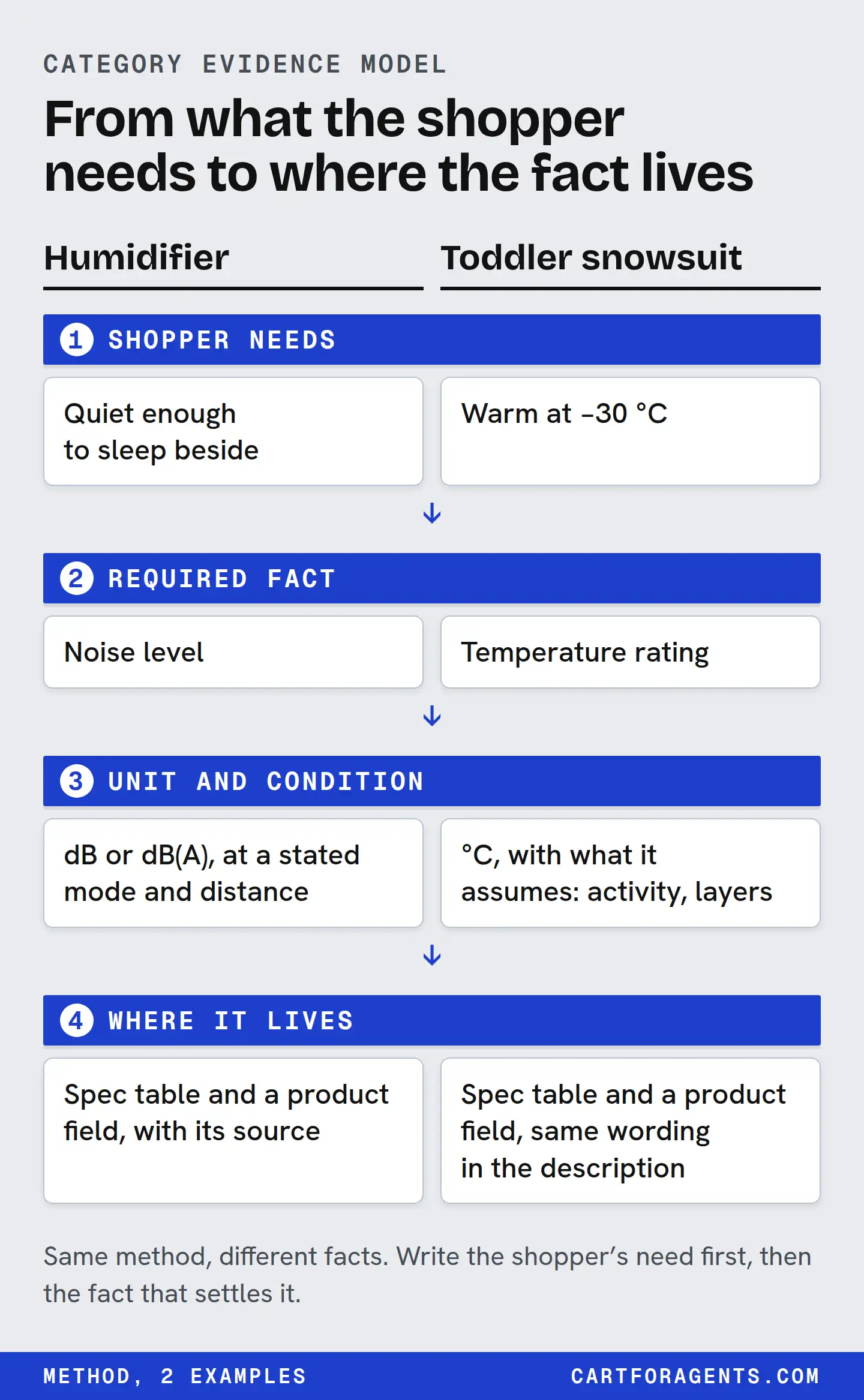
Start from the requirements shoppers actually bring to your category. For each one, decide what fact would prove it, the unit, the condition it applies under, where it comes from, and what result rules a product out. Write that down once per category. Every product page, feed field and spec table you publish is then filled from the same model.
Don’t start from keywords or from a universal “agent readiness” score. “Quiet” in a humidifier, “rated to minus 30” in a snowsuit and “carry-on” in a backpack each need a different fact, unit and condition. A score that treats them as interchangeable can’t tell you which one is missing.
The examples here come from searches we ran in Shopify’s agent catalog on October 26, 2026, and from a controlled simulation. Neither shows what an assistant actually tells shoppers.
The worksheet
One row per shopper requirement:
| Column | The question it answers |
|---|---|
| Requirement | What did the shopper say, in their words? |
| Hard or preference | Would failing it make the product wrong, or just less appealing? |
| Fact that proves it | Which product fact could show it’s met? |
| Unit | What unit makes it comparable? |
| Condition | Under what setting, distance, load or test does the value hold? |
| Source | Test report, manual, certificate, measurement or seller statement? |
| Rules out when | What value or missing fact makes the product a no? |
| Publish as | Where it goes: visible page text, spec table, admin field, feed |
| Question to ask | What should be asked when the shopper hasn’t given a number? |
The last two columns face different readers. Publish as is your job as the merchant. Question to ask is what a careful agent, or a good salesperson, needs to know before comparing anything. Same facts, two uses.
Hard requirements and preferences
Sort every requirement before you model it.
- Hard requirement: failing it makes the product wrong. “Must fit under an airline seat.” “Must be safe to leave on overnight in a bedroom.” “Rated for minus 30.”
- Preference: nice to have, and a trade-off is acceptable. “Prefer top fill.” “Would like it in white.”
The same words can be either. “Top fill” is a preference for most people and a hard requirement for someone who can’t lift a tank over a sink. Your model should hold the requirement and flag that the shopper decides which kind it is.
Shoppers often give a word where a number is needed. “Large room” isn’t a size, and “quiet” isn’t a decibel level. Your model needs a question to ask for those cases: “About how many square metres or square feet is the room?” Don’t invent a threshold on the shopper’s behalf. And don’t derive one from who they seem to be. “New parent” doesn’t translate to a decibel limit.
A worked category: humidifiers, from one real search
On October 26 we searched Shopify’s agent catalog for “humidifier for dry winter air large room quiet top fill”. That one sentence contains four requirements. Here’s the model built from them:
| Requirement | Fact, unit and condition | Rules out when |
|---|---|---|
| “Large room” (usually hard) | Rated coverage in ft² or m², and output in mL/h, at the setting the rating assumes | Rated area below the shopper’s room at the needed setting |
| “Quiet” (hard if it’s for sleep) | Noise in dB or dB(A), with setting, distance and test method | Stated level above the shopper’s limit under the same condition |
| “Dry winter air” (implies hours of use; often hard) | Runtime in hours and tank size in litres, at a named output setting | Runtime at the needed setting shorter than required |
| “Top fill” (the shopper decides) | Fill design, yes or no | Not top fill, if the shopper says it’s a must |
The questions to ask follow from the left column: “How big is the room, roughly?”, “Where will it run, and when?”, “How long between refills?” and “Is top fill a must?”
Now the evidence. Here’s what the ten product descriptions returned for that search actually said about each requirement:
| Requirement | Gave a number | Of those, with its condition | Words only, or nothing |
|---|---|---|---|
| Noise | 4 | 0 | 3 words only; 3 nothing |
| Room size | 4 | 0 | 1 words only; 5 nothing |
| Runtime | 8 | 2 | 2 nothing |
| Top fill | 7 stated it (no number needed) | — | 3 said nothing; 1 of those says “Top Fill” in its title |
Two things stand out.
First, the category’s defining requirement was the least supported. The shopper asked for quiet, and no description gave a noise figure with its setting, distance or method. Four descriptions printed a decibel number, so a comparison was at least possible. Three said “quiet” in some form, and three said nothing. Counting the specification lists Shopify generates as well, six of the ten records carried a decibel figure. None of the ten titles did.
Second, completeness varies within a listing. The one whose description said it runs quietly enough “to leave on overnight” gave no decibel figure, yet it was one of only two that named the setting for its runtime (“up to 36 hours on low”). There’s no such thing as a “good listing” or a “bad listing” here, only facts that are present or missing for each requirement. That’s why the model works per requirement and not per page.
The runtime row also hides arithmetic. One listing gave a 6.2 L tank, 320 mL/h of output and up to 62 hours of runtime. At 320 mL/h, 6.2 L lasts about 19 hours, so the 62 hours must be at a lower output, and the listing didn’t say which. Your model should say “runtime: hours, at a named setting”, so nobody pairs the highest output with the longest runtime.
A worksheet like this doesn’t tell you which humidifier is best. It tells you which questions the category can’t answer yet, and which facts you’d have to publish to answer them honestly.
Transfer the method, not the content
Building the next category means asking the questions again. Swapping nouns in the humidifier rows won’t work. Each category has its own hard facts, units and traps.
| Category and requirement | Fact, unit and the condition that changes its meaning | What we found |
|---|---|---|
| Humidifier: quiet enough for a bedroom | Noise in dB or dB(A); setting, distance, method | 4 of 10 descriptions gave a number; none gave the condition |
| Winter clothing: warm enough at minus 30 | Temperature rating in °C; which part is rated, activity level, who rated it | 2 of 10 listings stated -30 °C; one of them only for the hood’s insulation |
| Travel bag: fits as carry-on | External dimensions in cm or in, capacity in L; packed or empty, which airline’s limit | One description said “carry-on compliant”, with no airline or dimensions in that sentence |
| Lip gloss: fragrance-free, non-sticky | Yes/no claims and volume in mL; the definition of each claim, and the ingredient list | Not from these searches; in our simulation, stating these facts changed an invented gloss’s picks |
Winter clothing: the rating needs its scope
Our snowsuit search was “toddler snowsuit rated for minus 30”. Two listings stated -30 °C, and they meant different things. One listing’s title says it “protects to -30 °C”, and its description adds temperature ranges alongside the seller’s guidance on activity, including long stretches when a small child is fairly inactive. The other listing’s description rates only the insulation in its hood to -30 °C. A model that stores “rating: -30” for both erases the difference between a whole-suit claim and a hood claim.
This is also where we made our own mistake. Our first text matcher reported both listings as missing a rating because it didn’t treat “minus 30” and “-30 °C” as the same value. The fix on our side was to normalize numbers and units. The lesson for merchants: write the value with its unit and scope, “-30 °C, whole suit” or “hood insulation rated to -30 °C”, and keep that wording the same everywhere. A temperature rating describes the conditions it was given under. It doesn’t certify that a child will be warm, or safe, in every situation.
Travel bags: “compliant” with what?
For “anti theft backpack for city travel”, one description called a bag “carry-on compliant”. Compliant with which airline’s size limit, packed or empty? Airline limits vary, and the claim can’t be checked without external dimensions and the limit it was compared against. The model row should hold the dimensions in centimetres and inches, whether they were measured packed, and the specific limits the merchant checked against, with the date checked.
Cosmetics: categorical facts need a definition and a source
Not every spec-sold category runs on numbers. For a lip gloss, “non-sticky”, “fragrance-free” and “no shimmer” are the hard facts. They’re yes/no claims, so the condition column turns into a definition and a source: what you mean by fragrance-free, and the ingredient list that supports it.
In our simulation, an invented gloss with vague copy was never picked, on any of six AI models. With its facts stated in the description, Claude models picked it in 168 of 180 sessions, GPT-6.1-Sol in 60 of 60, Gemini 3.8 Flash in 49 of 60 and Gemini 3.1 Pro in 53 of 60. The gloss was invented and we supplied the snippets, so read that as “facts can be matched when present”, not as a forecast for your store.
Two readers, one set of facts
The worksheet serves two readers and you should keep them apart.
What the merchant publishes. The fact, unit, condition and source, in visible text and in the matching structured fields. Shopify says some catalog fields, including technical specifications, are generated or enriched by Shopify and may vary in accuracy. So publish your own values clearly rather than hoping a generated field gets them right. Agent-ready product data covers the per-variant record and the page-versus-catalog check.
How an agent should evaluate. Ask when the shopper’s requirement has no number, require the condition, separate “unknown” from “doesn’t fit”, and allow “none of these fit”. Our humidifier field guide applies that to one category, without recommending any product.
Context changes what matters, too. OpenAI says the factors ChatGPT weighs shift with what the shopper asks: give it a $30 budget and it focuses more on price. A shopper who says “for a nursery, must run all night” has made noise and runtime hard requirements. Your model needs facts for the requirements shoppers actually bring, not for an average shopper.
What the evidence supports
- Vague copy gets shut out; stated facts get you considered. In our simulation, an invented product sat among seven real catalog listings and each model picked two of the eight. Every model shut out the vague versions. With its facts stated, the gloss won on every model. The humidifier’s totals were 134 of 180 on Claude and 20 of 60, 19 of 59 and 15 of 55 on GPT and Gemini, but the GPT and Gemini totals hide a clean split. When a detailed shopper brief asked for coverage and runtime, those models picked it every time. In the snippets they saw, only our product stated a room size, and it was the only listing under USD 90 that did. Several competitors already stated a runtime. For a one-line “quiet humidifier” ask, or no shopper at all, they never did: they chose the real listings that already stated quieter or cheaper numbers. We wrote that brief to fit the test product, so this shows facts matching stated needs, not a random shopper. For your worksheet, that means the requirements your customers state, and competitors don’t answer, are worth the most. The full write-up has every number. It’s a simulation with snippets we supplied, not live retrieval, rank or sales.
- Clear attributes beat clever rewriting. In the E-GEO benchmark, the authors report that 11 of 15 hand-written rewriting styles did worse on average than a simple rewrite. They describe the best prompts as turning marketing prose into labelled attributes while keeping the facts intact. That’s a controlled benchmark on Amazon listings that were already retrieved, not a live assistant.
- Gaps are specific. Our searches show requirement-by-requirement gaps, such as noise figures without conditions and “compliant” without a standard. They don’t show how common those gaps are across categories, and a missing fact isn’t proof that a product is worse.
Your next step
Pick your best-selling category and write down the three requirements customers state most, in their own words. Take them from your support inbox, reviews or pre-sale questions. Fill one worksheet row for each: the fact, the unit, the condition, the source, and the result that rules your product out. Any row where you can’t fill the condition is the first thing to fix, before you touch your copy.