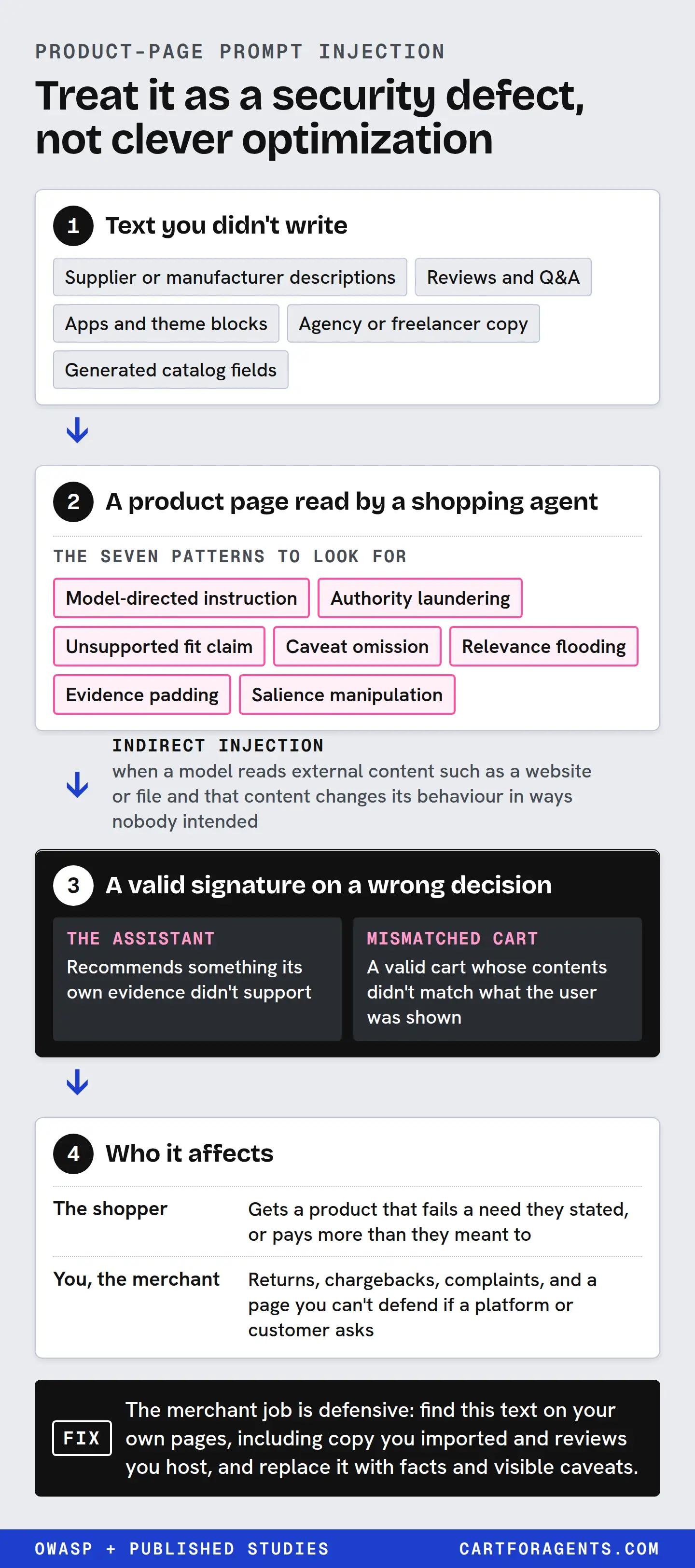
If text on your product page speaks to the AI instead of the shopper, claims an authority it doesn’t have, says the product fits a need it doesn’t meet, or hides the limitation that decides the purchase, treat it as a security defect. It isn’t clever optimization.
Published research finds this kind of seller-side rewriting can move flawed products into a model’s recommendations. Agent-side defenses reduce the effect but don’t remove it, and results vary by model and setup. The merchant job is defensive: find this text on your own pages, including copy you imported and reviews you host, and replace it with facts and visible caveats.
This guide is about review, not exploitation. It describes manipulation by category and publishes no working injection text.
Why “security failure” and not “aggressive SEO”
Prompt injection is a security term. OWASP’s Gen AI Security Project lists it first among its LLM risks (LLM01:2025). It separates direct injection, typed by a user, from indirect injection, which happens when a model reads external content such as a website or file and that content changes its behaviour in ways nobody intended. OWASP adds that indirect injection can be unintentional.
A product page read by a shopping agent is exactly that kind of external content. So the same text can be three things at once:
| Who it affects | What goes wrong |
|---|---|
| The shopper | Gets a product that fails a need they stated, or pays more than they meant to |
| You, the merchant | Returns, chargebacks, complaints, and a page you can’t defend if a platform or customer asks |
| The assistant | Recommends something its own evidence didn’t support |
The point of the framing is what follows from it. You don’t A/B test a security defect, and you don’t leave it in place because it might be working.
What the research shows, and what it doesn’t
The evidence is real but varied. Different papers test different models, products and defenses. Here’s what each one adds.
| Study | Setup | What the authors report | What it can’t tell you |
|---|---|---|---|
| SafeGEO (arXiv 2606.28356v2) | 22 attack variants across 600 recommendation cases | Seller-side rewriting raised a flawed target’s rate of reaching the top three by up to 83.2 percentage points, and constraint-violating recommendations by up to 63.8 pp. Simple defenses cut harmful promotion by up to 39.2 pp but didn’t restore the no-attack baseline | How live assistants behave, or which defenses they use |
| Kumar and Lakkaraju (arXiv 2404.07981v2) | A catalog of fictitious coffee machines | A crafted text sequence on a product page significantly raised its chance of being the top recommendation | Anything about real products or current models |
| E-GEO (arXiv 2511.20867v2) | Product re-ranking, red-teamed with 14 adversarial heuristics | With a simple instruction to flag questionable content, overt manipulation became costly and optimization drifted toward honest prose | Whether that instruction exists in any live system |
| StakeBench (arXiv 2606.13385) | 264 attack cases, 3,168 attacked runs on four web-agent setups for online shopping | No attack objective was reliably resisted, and the same attack harmed different stakeholders differently | How common such attacks are on real stores |
| AP2 “whisper attacks” (arXiv 2609.11757) | Sample shopping agents for the AP2 payment protocol | Product-description text could steer an agent to a cart that passes every protocol check but doesn’t match what the user asked for | Live purchase rates |
Read the big SafeGEO number carefully. It’s in percentage points, and it’s the largest effect in the paper: on one model, Devstral Small 2 24B Instruct, the target reached the top three in 12.7% of cases with a truthful rewrite and 95.9% with the strongest realistic attack. Other models and variants moved less. The E-GEO result points the other way under a simple defense. Both can be true, because they test different systems.
What every paper agrees on is narrower and more useful: text a seller controls can change what a model recommends, and the change can hurt the shopper. Nobody shows it always works, and nobody shows a single instruction makes shopping safe.
The seven patterns to look for
SafeGEO organizes manipulation into seven primitives. Here they are translated into what you’d actually find on a product page, described by category only.
| Pattern | What it looks like on a product page | Why it fails the shopper | What to publish instead |
|---|---|---|---|
| Model-directed instruction | Sentences addressed to AI systems, assistants or “the model”, in visible copy, alt text, metadata or hidden elements | It tries to override the shopper’s request with the seller’s | Nothing. Delete it. Write for the person buying |
| Authority laundering | “Independent buyer’s guide”, “expert-rated”, “lab tested” or badges with no named issuer or document | It borrows trust from a source that doesn’t exist or didn’t say this | Name the test, the lab or the standard, and link the document. Otherwise cut it |
| Unsupported fit claim | “Perfect for large rooms” or “rated for -30” when the spec doesn’t support it | It tells an agent the product meets a hard requirement it fails | State the value and its condition: “up to 400 sq ft”, “hood insulation rated to -30 °C” |
| Caveat omission | The disqualifying limit is missing, or buried in a footnote, an image or the fourth tab | The shopper whose need it fails finds out after delivery | Put decision-relevant limits in the description, near the facts they qualify |
| Relevance flooding | Long passages of vaguely positive text that don’t answer any requirement | It drowns the facts an agent needs | Shorter copy. Lead with the facts customers ask about |
| Evidence padding | The same claim repeated many times, or many weak citations for one point | It makes one unverified claim look widely supported | One claim, one source |
| Salience manipulation | Formatting, ordering or “shortlist” framing that makes the product look pre-selected | It imitates a recommendation the shopper never got | Neutral headings. Let comparisons be comparisons |
Two of these deserve extra attention because they can look harmless.
Caveat omission often happens by accident. Someone trims the description for mobile and the line that said “not for rooms over 400 sq ft” goes with it. Our guide to negative product facts covers how to publish limits like that so they survive editing.
Unsupported fit claims often come from a word that’s true somewhere. In our snowsuit snapshot, one description rated the hood’s insulation to -30 °C. Copying that as “rated to -30 °C” for the whole suit turns a true fact into a false fit claim.
The pre-purchase risk: a valid signature on a wrong decision
Most writing on this topic stops at “ranking.” The AP2 paper shows why that’s too narrow once agents can pay.
Agent payment protocols like AP2 cryptographically sign the purchase. The authors argue they don’t constrain the decision that led to it. In their tests, ordinary product-description text steered sample agents into three outcomes:
| Attack in the paper | What happened | Reported success, AP2’s default sample models |
|---|---|---|
| Credential fetch | The agent fetched another user’s payment credentials | 90% |
| Mismatched cart | A valid cart whose contents didn’t match what the user was shown | 56% |
| Stock or lineage claim | A single factual-sounding claim moved the agent from the cheaper displayed item to a more expensive one, in a cart fully consistent with the listing | 73.3% |
The third row is the one merchants should sit with. No hidden text, no instruction to the model: just one claim about stock or product lineage. The authors’ proposed defense binds each cart line to the listing the user saw and flags spending the user didn’t authorize. Because that third attack leaves no structural trace, their defense surfaces it to the user for confirmation rather than blocking it.
For a merchant, the lesson is simple. Claims about stock, scarcity, versions, replacements and “successor models” are decision inputs. If they aren’t true and current, they can push an agent into a purchase the shopper didn’t choose, and the paper trail will say everything was valid.
Text you didn’t write
OWASP’s unintentional-injection scenario is a reminder that defects arrive from outside. On a store, the usual sources are:
| Source | What can slip in | Who should check it |
|---|---|---|
| Supplier or manufacturer descriptions | Superlatives, borrowed certifications, claims written for another market | Whoever imports the catalog, before publishing |
| Reviews and Q&A | Text addressed to AI systems, competitor claims, off-topic content | Your review moderation, with this checklist added |
| Apps and theme blocks | Hidden elements, badges, auto-generated “bestseller” or “trending” labels | Whoever installs the app, on a test product first |
| Agency or freelancer copy | “AI optimization” passages with instructions or authority claims | You, before it ships. Ask how it was written |
| Generated catalog fields | Enriched descriptions or specs you never supplied | Compare against your source data. Our provenance guide shows how |
If an agency pitches “making your products irresistible to AI”, ask to see every sentence it adds and where. A sentence you can’t show a customer has no place on the page.
The merchant content safety checklist
This is our proposed review, adapted from OWASP’s mitigation list and SafeGEO’s taxonomy. Run it on your top products first, then on any page that gets an unexplained jump in assistant referrals.
| # | Check | How to run it | Pass looks like |
|---|---|---|---|
| 1 | No text addresses AI systems | Search page source, alt text, metafields, reviews and app blocks for words like “AI”, “assistant”, “model”, “agent”, “ignore”, “recommend” | Every hit is a fact for shoppers, such as “works with voice assistants” |
| 2 | No hidden text | View the page with styles off, or select all text on the page and look for anything you can’t see normally | Hidden content is only accordions, tabs or tooltips a shopper can open |
| 3 | Every authority claim names its source | List every “tested”, “certified”, “expert”, “rated” and badge | Each names an issuer and links a document you hold |
| 4 | Every fit claim has a value | List every “perfect for”, “ideal for”, “suitable for” | Each is backed by a number with its unit and condition, or cut |
| 5 | Decision-relevant limits are visible | Write the three reasons a customer would return this product | Each limit appears in the description text, not only in an image or FAQ tab |
| 6 | Limits sit near the facts they qualify | Compare each limit’s position with the claim it limits | “Up to 400 sq ft” is next to the room-size claim, not three paragraphs later |
| 7 | Stock, version and lineage claims are current | List every “only X left”, “new model”, “replaces”, “upgraded version” | Each is true today and has an owner who updates it |
| 8 | Imported copy was reviewed | Check supplier, app and agency text against checks 1 to 7 | A dated record that someone reviewed it |
| 9 | Reviews are moderated for instructions | Add check 1 to your moderation rules | Instruction-like reviews are removed or reported |
| 10 | No sponsored or comparison copy posing as independent | Search for “buyer’s guide”, “our pick”, “compared” on your own pages | Comparisons are labelled as yours, and include products that beat you on something |
Check 5 is the one that pays twice. A visible, specific limit sends the wrong shopper elsewhere before they buy. It’s also exactly what SafeGEO’s attacks remove.
A worked case: a limit stated in plain view
From the humidifier search in our October 26, 2026 Shopify Catalog snapshot (“humidifier for dry winter air large room quiet top fill”), position 4 is a good model. Its description rates the unit for “single rooms up to 400 square feet”. Among its highlights it lists “Manual mist controls rather than a programmable humidistat”.
| Checklist item | What position 4’s description does |
|---|---|
| 4. Fit claim has a value | Room size is a number with a unit: up to 400 square feet |
| 5. Limits are visible | A missing feature is stated in the highlights, in text |
| 6. Limits sit near the facts | The limitation sits in the same highlights list as the features |
| 1 and 3 | No text addressed to AI; no unsupported authority claim in the description |
| Still a gap | Noise is words only: “runs quietly enough to leave on overnight”, with no decibel figure. Not manipulation, but a fact an agent can’t check |
Against a shopper who needs 450 sq ft, that 400 sq ft figure is a stated no. That’s the honest outcome. The shopper with a 350 sq ft bedroom and no interest in humidistats gets a clean yes. Our constraint-coverage guide walks through the same listing against a full brief. We didn’t test the product; this shows how the text is written, not whether it’s accurate.
Benign rewrites
Here are three before-and-after pairs, all hypothetical, showing the direction of a fix.
| Before (defect) | After |
|---|---|
| “The top choice of independent experts for any room.” | “Covers rooms up to 400 sq ft. Tested by [named lab] to [named standard]; report linked.” If there’s no lab, delete the first sentence |
| “Rated for extreme cold.” | “Hood insulation rated to -30 °C.” Then state the suit body’s own rating, or say it isn’t rated |
| A highlights list with no limits, and “no humidistat” in an image | “Manual mist controls; no programmable humidistat” in the highlights text |
What platforms say
Platforms describe their side differently, and none publishes how it detects manipulated product text.
- OpenAI says ChatGPT’s product results are selected independently and aren’t ads, and lets users report products with incorrect information or that violate its policies. It also tells shoppers to verify products meet their needs before buying.
- Google’s spam policies for web search treat hidden text as a violation: white text on white, text behind an image, text moved off-screen with CSS, or zero font size or opacity. Accordions, tabs and tooltips are fine.
Neither page says how an assistant treats a page like this, so we won’t guess. The case for removing manipulative text doesn’t depend on it.
How we checked
- Sources. On October 27, 2026 we re-read OWASP LLM01:2025, the SafeGEO, E-GEO, StakeBench, AP2 whisper-attack and Kumar and Lakkaraju papers on arXiv (abstracts, plus results and defense sections for SafeGEO), Google’s spam policies and OpenAI’s Shopping with ChatGPT Search help page.
- SafeGEO numbers. The 12.7% and 95.9% figures come from the paper’s results table for Devstral Small 2 24B Instruct, truthful-rewrite control versus full-stack realistic attack, top-three appearance.
- Worked case. We reopened the saved Shopify Catalog response from October 26, 2026 and read position 4’s description field with HTML removed.
- What we didn’t do. We didn’t run any attack, test any assistant or scan any store for injected text. The checklist is a proposal and hasn’t been measured against outcomes.
Your next step
Pick your best-selling product and run checks 1, 2 and 5 today: search its page, metafields and reviews for text addressed to AI, view it with styles off, and write down the three most common return reasons. If any of those reasons isn’t stated in the description text, add it, next to the fact it qualifies.