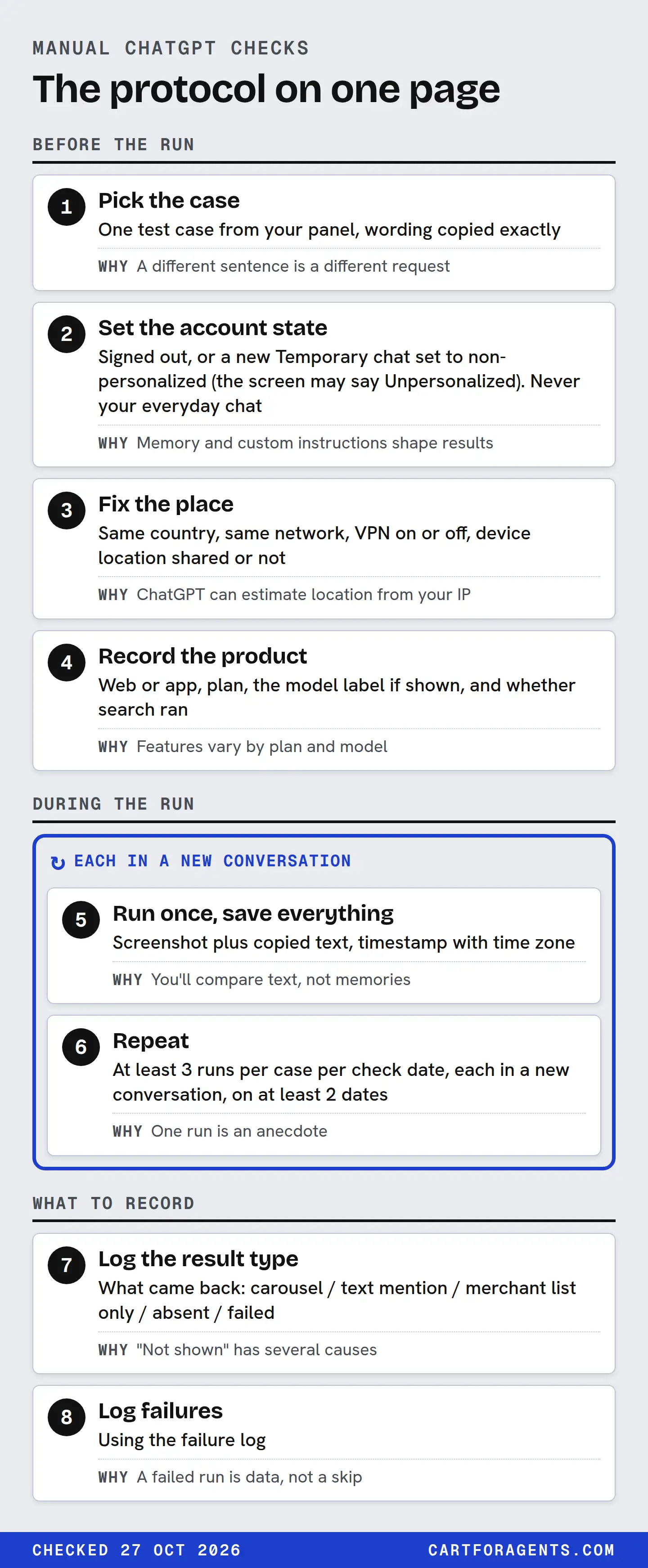
Run every manual ChatGPT check under a written protocol. Use the exact wording from your panel, a fresh conversation and a recorded account state: signed out, or a Temporary chat set to non-personalized (OpenAI’s term; the screen may say Unpersonalized). Record the country and network you ran it from, and the model label if ChatGPT shows one.
Repeat each check at least three times, on more than one day. Log what actually came back (product cards, the merchant list, prices, labels, citations, or a failure) rather than a yes or a no. Even then, you’re seeing your own sessions under your own conditions. Repeated checks can’t show what ChatGPT tells other shoppers, and they can’t prove why a result changed. The protocol below is our proposal, with every setting tied to what OpenAI’s help pages say today.
The protocol on one page
| Step | What to do | Why |
|---|---|---|
| 1. Pick the case | One test case from your panel, wording copied exactly | A different sentence is a different request |
| 2. Set the account state | Signed out, or a new Temporary chat set to non-personalized (the screen may say Unpersonalized). Never your everyday chat | Memory and custom instructions shape results |
| 3. Fix the place | Same country, same network, VPN on or off, device location shared or not | ChatGPT can estimate location from your IP |
| 4. Record the product | Web or app, plan, the model label if shown, and whether search ran | Features vary by plan and model |
| 5. Run once, save everything | Screenshot plus copied text, timestamp with time zone | You’ll compare text, not memories |
| 6. Repeat | At least 3 runs per case per check date, each in a new conversation, on at least 2 dates | One run is an anecdote |
| 7. Log the result type | What came back, using the fields below | “Not shown” has several causes |
| 8. Log failures | Using the failure log | A failed run is data, not a skip |
The repeat count matches our monitoring plan, which this protocol plugs into. Your test cases should come from a shopping-intent panel, not from whatever wording occurs to you that day.
Before the run: pin the context
Account state
OpenAI says ChatGPT’s shopping carousel considers your query and your context, such as Memory or Custom instructions (Shopping with ChatGPT Search, checked October 27, 2026). Your everyday account may carry memories and instructions about your own store. Testing from it is like checking your shop’s search ranking on a phone that has visited the shop a hundred times.
| Account state | What OpenAI documents | Use it for |
|---|---|---|
| Signed out | People who aren’t signed in can use web search. Whether shopping results appear signed out: not documented on the pages we read | A low-context baseline, if results appear |
| Temporary chat, non-personalized (may show as Unpersonalized) | Doesn’t use memory, custom instructions or plugins, and doesn’t create memories. The choice is fixed once the chat starts. Account and workspace restrictions still apply | Your default for signed-in checks |
| Regular chat with Memory on | Memory can draw on past chats, saved memories, custom instructions, files and connected apps, depending on plan and region | Only when you deliberately test a personalized shopper, with that shopper’s context written down |
Sources: Temporary chat in ChatGPT, Memory in ChatGPT and Searching the web with ChatGPT. OpenAI also says limited safety context may still be used even with personalization off. “Non-personalized” means less context, not none.
Place and market
OpenAI says ChatGPT may estimate your location from your IP address, that a VPN or network location may change that estimate, that precise device location is optional and off by default, and that location saved in memory can influence results. So record the country, whether a VPN was on, and whether device location was shared. Keep each of these the same across repeats.
OpenAI’s shopping help page doesn’t list countries; it says only that shopping is available in ChatGPT on mobile and web. OpenAI’s merchant page is clearer: “Shopping is currently live in the U.S. and will expand to additional regions over time.” So run your baseline set from the US. Runs from anywhere else are a separate test of whether shopping appears there at all. Peec, a vendor, reports that as of October 2026 ChatGPT’s US shopping drew products from feeds OpenAI indexes itself, while Europe still drew from Google Shopping. That’s a vendor’s reading of debug traces, and we haven’t verified it. Either way, never pool runs from different countries into one count.
Model versus product
You’re testing ChatGPT, a product, not a model. The product decides when to search, what to show and how to rank merchants. The model is one part of it. Record the model label if the interface shows one, and write “not shown” if it doesn’t. Don’t guess.
It matters because features can depend on the model. OpenAI’s own search page, for example, says restaurant reservation search works only with two named models. Nothing on the shopping page says the same about product results, but a run on a different model is a different condition.
Also record the plan. OpenAI says web search is available on Free, Go, Plus, Pro, Business, Enterprise and Edu, subject to each plan’s usage limits.
During the run
Paste the exact wording. Don’t add “please” or fix a typo. If the panel case has a full brief and a one-line ask, they’re two separate cases.
Don’t ask follow-ups unless the protocol says so. If ChatGPT asks you a clarifying question, log it in the failure log, then answer with a scripted reply you wrote in advance (“No preference” or the constraint from the case) and mark the run as branched.
Keep shopping research apart. OpenAI describes it as a separate mode you start from selected products. It asks follow-up questions, may use merchant data supplied through the Agentic Commerce Protocol plus public product information, and returns a buyer’s guide after a few minutes (Using shopping research in ChatGPT). If you test it, give it its own cases and its own rows.
Save a screenshot and the copied text. A shared link isn’t enough on its own: OpenAI says Memory Sources aren’t included when you share a conversation by link.
What to record: the result type, not a yes or no
“Did we show up?” hides at least eight different outcomes. OpenAI’s shopping page describes most of them, and each needs its own field.
| What came back | What OpenAI says about it | What to log |
|---|---|---|
| Product cards in a carousel | Shown when ChatGPT perceives the product as relevant to the intent | Your position, or “absent”. The other products’ positions |
| Title and description on the card | ChatGPT may generate simplified versions | The exact text. Any wrong fact |
| Labels such as “Budget-friendly” | Generated by ChatGPT; not guarantees | The label, word for word |
| Review summary | Model-generated from public websites; not verified by OpenAI | Copy it. Note any claim your reviews don’t support |
| Price | From third-party providers; may be the first merchant’s, not the lowest; may lag after updates | Price shown, your live price, and the time |
| Merchant list | Ranked on factors like availability, price, quality and maker or primary-seller status | Your position in the list, and who sits above you |
| Instant Checkout | The help page says it may show for some eligible products and merchants; the merchant page says OpenAI is moving away from it toward checkout on merchant-owned sites | Shown or not shown |
| Citations or Sources | Web-search answers may include citations | How many were shown, and whether your domain was one |
Plan for checkout on your own site. On October 27, 2026 the two OpenAI pages disagreed. The shopping help article still describes Instant Checkout for some eligible products and merchants. The merchant page says: “We’re moving away from a standalone Instant Checkout experience in ChatGPT and prioritizing better shopping discovery and merchant-owned checkout experiences,” with purchases “completed on merchant-owned websites or apps.” Keep logging whether Instant Checkout appears, but expect the buyer to land on your checkout. Shopify documents no ChatGPT direct-checkout setting. Re-check both pages before acting.
Two more need care.
Citations. OpenAI doesn’t document a fixed number of citations per answer. Record the count you saw on each run. If a check depends on a citation, also record whether your page or someone else’s was cited for the fact that matters.
A text mention without a card. Log it as its own result. Being named in prose and being shown as a product card are different outcomes.
Then add one judgement per run, against the case’s constraints: every stated fact correct, a wrong fact, wrong variant, or offer mismatch (price, stock or seller). One rule overrides the repeat schedule. If ChatGPT states a wrong fact about your product, log it and trace the source that day. Don’t wait for three runs.
The log template
Add these columns to the ledger in our monitoring plan. It already covers the check ID, product, market, time and owner.
| Column | Allowed values | Notes |
|---|---|---|
| Account state | signed out / temporary non-personalized / regular with memory | Never blank |
| Location setup | Country; VPN on or off; device location on or off | Same on every repeat |
| Surface and plan | web or app; plan name | |
| Model label | As shown, or “not shown” | Never inferred |
| Search ran | yes / no / unclear | Did the answer show sources or product results? |
| Mode | standard chat / shopping research | Separate rows, separate counts |
| Run | 1, 2, 3… within the check date | |
| Result type | carousel / text mention / merchant list only / absent / failed | From the table above |
| Your position | Number, or “absent” | Carousel and merchant list separately |
| Shown text and price | Copied | For comparison with your record |
| Citations shown | Count; your domain yes or no | |
| Fact check | all correct / wrong fact / wrong variant / offer mismatch / not applicable | |
| Evidence | Screenshot and text file names |
The failure log
| Failure | What it looks like | Log as | Retry? |
|---|---|---|---|
| No search | An answer with no product cards and no sources | failed: no search | Yes, once, in a new conversation |
| No shopping results | Sources but no products | Result: absent. Note “no carousel” | No. That’s a result |
| Clarifying question | ChatGPT asks before answering | branched: answered with script | Continue with the scripted reply |
| Usage limit | A plan-limit message | failed: limit | Later, same conditions |
| Error or refusal | Error text, or a refusal | failed: error | Once |
| Wrong place | Prices in the wrong currency, or local results for the wrong area | failed: location | Fix the setup, then rerun the whole set |
Report failures beside results. “Returned in 2 of 3 runs” and “returned in 2 of 3 runs, 1 of which failed with no search” are different findings.
A worked case: the plan for one humidifier
Here is a protocol sheet for the humidifier that came back at position 4 when we searched Shopify’s agent catalog on October 26, 2026. We have not run these ChatGPT checks. The sheet is a plan. The only real row is the catalog baseline beside it, which comes from our saved snapshot.
| Field | Value |
|---|---|
| Cases | HUM-01 (full brief) and HUM-05 (one-line ask) from the worked panel |
| Account state | Temporary chat, non-personalized |
| Location setup | United States, no VPN, device location off. Any run from Canada is a separate set testing whether shopping appears there at all, never pooled |
| Surface and plan | Web; plan recorded |
| Model label | As shown |
| Repeats | 3 runs per case per date, on 2 dates a week apart |
| Fact to watch | Noise. The record says “runs quietly enough to leave on overnight” and gives no decibel figure |
| Baseline row | Shopify Catalog search, no buyer context, October 26, 2026: returned at position 4 of 10, coverage “up to 400 square feet”, noise in words only |
Why compare against a catalog row at all? Shopify’s search preview can show how a query might look in an AI channel, but Shopify says AI channels often re-rank results with their own logic. A catalog result is the input to a route, not ChatGPT’s answer. Our note on catalog limits lists what a catalog finding can and can’t claim.
What would each result let this merchant say?
- Shown in 0 of 6 runs, no failures: “Under these conditions, on these dates, ChatGPT did not show this product for these two requests.” Not “ChatGPT can’t see us.”
- Shown, but described as “quiet” with no figure, or with a figure we never published: a fact problem. Trace it and fix the source that day.
- Shown in some runs and not others: that’s what probabilistic systems do. Repeat on another date before reading anything into it.
What one check can’t prove
What other shoppers see. Every run is your session. Nobody outside ChatGPT can see a particular shopper’s conversation.
Why something changed. A product that appears after you edit a description may have appeared because of the edit, a model change, a competitor’s stock-out or a different day. Keep an unchanged control product in the panel. Count a change only when it holds across repeats on two dates and the control didn’t move the same way, as our monitoring plan sets out.
Sales. None of this measures orders. Shopify reports sales, orders, sessions and conversion by AI channel in its agentic storefronts analytics. That’s a separate measurement, kept in a separate field.
Rank as a number. “Position 3” in one carousel on one run is an observation, not a ranking. Report counts with their conditions: “shown in k of n runs, signed out, United States, web, on these dates.”
How we checked
On October 27, 2026 we read OpenAI’s help pages on shopping with ChatGPT search (updated that day), Temporary chat, Memory, web search and shopping research. We also read OpenAI’s merchant page, Shopify’s agentic storefronts management page and Peec’s US and Europe article. Every documented statement here paraphrases what those pages said on that date. Where a page was silent we wrote “not documented” rather than inferring.
The baseline row comes from a Shopify Global Catalog search we ran on October 26, 2026 with Shopify’s catalog command-line tool, top 10 results, no buyer context, re-read on October 27. We did not run any ChatGPT checks for this page and show no ChatGPT results. Checked on 2026-10-27; ChatGPT settings and features change, so re-check before acting.
Your next step
Pick two cases from your panel: one your product should win and one it should lose. Open a Temporary chat set to non-personalized, note your country, network and model label, and run each case three times in new conversations. Fill in one log row per run, including any failures. Run the same six checks again next week, and compare rows, not impressions.