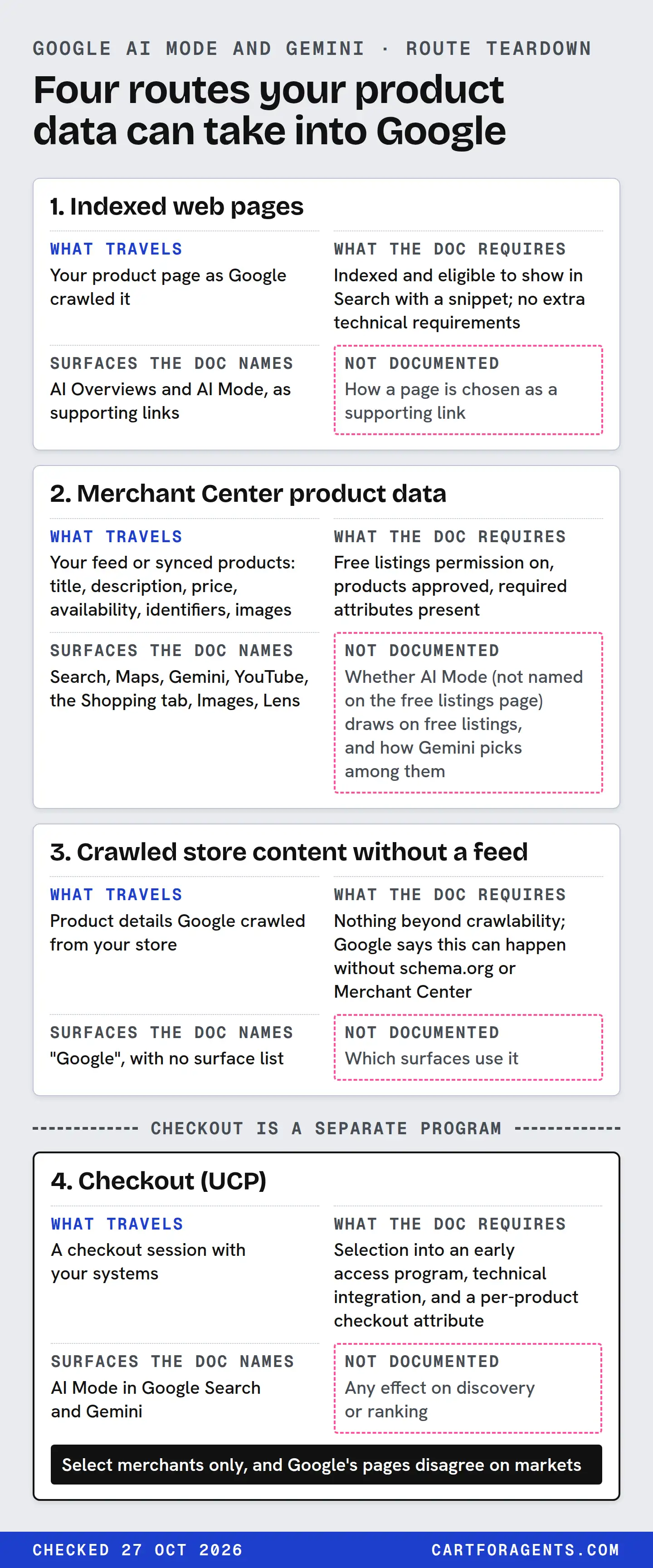
Google documents three separate ways your products can reach its AI shopping answers, and they fail for different reasons. Your indexed product pages can be supporting links in AI Overviews and AI Mode. Your Merchant Center product data feeds free listings, which Google says can appear in Gemini. Checkout through the Universal Commerce Protocol (UCP) is a third, separate program for select merchants.
Check each route on its own terms. A page that isn’t indexed won’t be fixed by a better feed. A feed full of disapproved products won’t be fixed by better copy. And checkout eligibility does nothing for discovery in any Google document we read. None of these routes comes with a promise of a recommendation, and Google publishes no weights.
Everything below was checked against Google’s and Shopify’s public documentation on October 27, 2026. Re-check before acting, because these pages change.
The route teardown
Here is what each route is, what Google or Shopify actually documents about it, and where the documentation stops.
What each route carries
| Route | What travels | What the doc requires | Surfaces the doc names |
|---|---|---|---|
| 1. Indexed web pages | Your product page as Google crawled it | Indexed and eligible to show in Search with a snippet; no extra technical requirements | AI Overviews and AI Mode, as supporting links |
| 2. Merchant Center product data | Your feed or synced products: title, description, price, availability, identifiers, images | Free listings permission on, products approved, required attributes present | Search, Maps, Gemini, YouTube, the Shopping tab, Images, Lens |
| 3. Crawled store content without a feed | Product details Google crawled from your store | Nothing beyond crawlability; Google says this can happen without schema.org or Merchant Center | “Google”, with no surface list |
| 4. Checkout (UCP) | A checkout session with your systems | Selection into an early access program, technical integration, and a per-product checkout attribute | AI Mode in Google Search and Gemini |
Availability, controls and what isn’t documented
| Route | Market, rollout and account | Your controls | Not documented |
|---|---|---|---|
| 1. Indexed pages | No market limit stated on the AI features page | robots.txt for Googlebot; nosnippet, data-nosnippet, max-snippet, noindex | How a page is chosen as a supporting link |
| 2. Merchant Center | Free listings work in a long list of countries, including the US and Canada. For Shopify stores, Shopify says the Google AI Mode and Gemini route is still rolling out to eligible stores | Free listings permission; product visibility; feed contents | Whether AI Mode (not named on the free listings page) draws on free listings, and how Gemini picks among them |
| 3. Crawled content | Not stated | Crawl and indexing controls | Which surfaces use it |
| 4. Checkout | Select merchants only, and Google’s pages disagree on markets | The checkout eligibility attribute, product by product | Any effect on discovery or ranking |
The rows are separate on purpose. They answer different questions, and the most common mistake is reading a green light on one row as a green light on another.
Route 1: your product pages as web results
Google’s guide to AI features is unusually direct. There are “no additional requirements to appear in AI Overviews or AI Mode, nor other special optimizations necessary.” To be a supporting link, “a page must be indexed and eligible to be shown in Google Search with a snippet.” It says you don’t need “new machine readable files, AI text files, or markup”, and that there’s no special schema.org structured data to add.
The best practices it does list are ordinary ones: allow crawling in robots.txt and at your CDN, link to important pages internally, put important content in text, support it with good images and video, make structured data match the visible page, and keep Merchant Center and Business Profile information current.
It also says AI Mode may use “query fan-out”, issuing several related searches across subtopics and data sources to build one answer. In practice, a shopper’s long question can be broken into smaller searches. A product page that states the facts behind those smaller questions in plain text gives each of them something to match. That’s our inference from the description, not something Google measured for us.
How to check it:
- Google recommends verifying your site in Search Console to find technical issues, and points to its URL Inspection tool to see the HTML that Googlebot received.
- Make sure no nosnippet, max-snippet or noindex directive is limiting the page by accident. Those are the controls Google names for limiting what Search shows.
- Google says traffic from AI Overviews and AI Mode is counted inside the Performance report’s “Web” search type. There’s no separate AI Mode line in what the doc describes, so you can’t isolate it there.
One control is often misread. Google-Extended, per this page, limits AI training and grounding in “some of Google’s other systems”. For Search, including its AI features, the control is robots.txt for Googlebot.
Route 2: Merchant Center data and free listings
This is the product-data route. Google’s free listings page says eligible products “can appear at no cost on Google Search, Google Maps, Gemini, YouTube, the Shopping tab, Google Images, and Google Lens.”
Two details in that page matter for AI shopping.
Permission is not placement. Google says the free listings status “controls permission to show products for free across Google, but doesn’t guarantee that your products will be shown.” The matching runs on “the data that you provide to us.”
Gemini is named, AI Mode isn’t. The free listings page lists Gemini as a place products may show. It doesn’t mention AI Mode. The AI features guide, separately, tells site owners to keep Merchant Center information up to date. We don’t know how AI Mode uses Merchant Center data, and we won’t guess.
For Shopify stores, Shopify’s help says products reach Google AI Mode and Gemini “through the Google & YouTube sales channel”, and that this is “rolling out to eligible stores.” That route is separate from Shopify Catalog, which Shopify names as the route for ChatGPT and Microsoft Copilot. So checking your Shopify Catalog record tells you about those assistants, not about Google.
That separation has a practical edge. In one Shopify agent-catalog search we saved, for “humidifier for dry winter air large room quiet top fill”, a decibel figure was in the description of 4 of the 10 listings. It was in the description or Shopify-generated metadata of 6 of 10, and in no titles. Shopify generates some of that metadata itself. No document we read says whether Shopify’s generated catalog fields travel to Merchant Center. If a buying fact lives only there, check that it’s also in the description or attributes you send to Google.
The detailed diagnostic for this route, including approval states, required attributes and price mismatches, is in our Merchant Center free listings checklist.
What Google says shapes shopping results
Google Shopping’s help page says products are “ranked based on relevance, as well as your search terms and other Google activity,” and may be personalized from searches, views and saved shopping preferences. Results labelled “Top recommendations” are “selected based on relevance to your search, ratings, price, and product features.” The same page says recommendations are researched and written with the help of AI, and that “generative AI is experimental and info quality may vary.”
That’s a statement about Google Shopping. It’s reasonable to expect overlap with Gemini and AI Mode, but no page we read says the same rules apply there.
Store-level signals
Google’s Store Quality program scores shipping, returns, browsing and purchase experience. It uses delivery time and cost, return window and cost, image resolution and count, site speed and accepted e-wallets. You’re enrolled automatically once you have approved products. The Top Quality Store badge is offered in Australia, Canada, Great Britain, India, Japan, New Zealand and the US. Google’s own example says a fixed rating “may boost their visibility and performance on the Shopping tab.” Nothing on the page mentions AI Mode or Gemini.
Route 3: crawled content you didn’t send
Google’s free listings page says products crawled from your store “can show up on Google” even if they aren’t marked up with schema.org or added to Merchant Center. Shopify makes a related point from its side: if a product can be discovered in a Google web search, “the same product could also be found by a customer using Google Gemini.”
Two consequences:
- Turning off free listings doesn’t hide you. Google says crawled product details and some Merchant Center content may still be shown. The control is crawl and indexing directives.
- Your product page is a data source even when your feed is perfect. If the page and the feed disagree, you now have two versions of the product in Google’s hands. Google asks merchants to match Merchant Center data to the online store “such as prices.”
On Shopify, setting a product to Unlisted is the way Shopify describes to hide it from AI channels completely. It also removes it from your sitemap, Google and your own store search.
Route 4: checkout is a separate program
Google’s Merchant Center help says checkout powered by the Universal Commerce Protocol puts a checkout button “on eligible product listings in AI Mode in Google Search and on Gemini.” It’s for select merchants, you stay the seller of record, and only listings with the native_commerce (checkout eligibility) attribute show the Buy button. Google’s developer guide requires a Merchant Center account in good standing with approved free listings before you start.
So checkout sits on top of route 2; it doesn’t replace it. Google’s own pages disagree about which countries it covers. Our checkout preflight lays out the conflict, the excluded product types and the attribute rules. For discovery, the useful fact is simpler: no document we read says checkout eligibility helps a product get recommended.
Worked case: one store, four routes
Hypothetical store, for illustration only. A small Shopify store sells a top-fill humidifier. It has the Google & YouTube channel installed. Its product page states “26 dB on the lowest setting, 450 sq ft, up to 40 hours per fill.” Here’s how the teardown reads for it:
| Route | Check | What a pass looks like | What a fail looks like |
|---|---|---|---|
| 1. Indexed page | URL Inspection in Search Console | Indexed, no snippet restrictions, facts in visible text | Not indexed, or the facts sit only in an image |
| 2. Merchant Center | Product status, and the description Google received | Approved; the description or attributes carry the same 26 dB, 450 sq ft and 40 h | “Not approved” or “Limited”; or the synced description omits the numbers that are on the page |
| 3. Crawled content | Compare page and feed | Same price, stock and facts | The page shows a sale price the feed doesn’t |
| 4. Checkout | Program status | Not pursued yet, so nothing to check | Recording “no checkout” as a discovery problem |
The last row is the trap. A store that isn’t in the checkout program hasn’t failed discovery. Those are different questions, answered by different documents.
What this store still can’t know is whether AI Mode or Gemini shows the humidifier for any particular shopper. Google’s shopping results are personalized, and Google documents no rank you can look up. Our visibility audit guide covers how to test that without overreading one screenshot.
The verification checklist
Work top to bottom. Each step uses only checks that Google or Shopify document.
- Name your route. On Shopify, confirm the Google & YouTube channel is installed and synced. Shopify says the AI Mode and Gemini route is still rolling out to eligible stores. If you use another platform or a direct feed, confirm your Merchant Center account is receiving products.
- Check indexing. In Search Console, inspect your top product URLs. Confirm they’re indexed and not limited by noindex or snippet directives.
- Check free listings permission. Google says it’s on by default for new accounts. Its doc places the status on a “Free listings” card under Marketing methods. We haven’t verified that screen.
- Check product status. Approved, Limited or Not approved. A product that isn’t approved can’t use route 2.
- Read what Google received. Compare the title, description, price and availability in Merchant Center with your live page. Your key buying facts should be in both, with units.
- Match price and stock. Google asks for Merchant Center data to match the store. A mismatch is a disapproval risk, covered in the free listings checklist.
- Keep checkout separate. Only if you’re pursuing UCP checkout, run the checkout preflight. Otherwise, leave it out of your discovery diagnosis.
- Date your findings. Write down the date and the doc version you checked. Several of these pages say their settings are being updated.
For how Google’s routes compare with ChatGPT, Perplexity and Copilot, see the platform comparison. For ChatGPT’s equivalent checks, see our ChatGPT guide.
What this guide can’t tell you
This guide reads public documentation. It isn’t a test of what AI Mode or Gemini actually show. We didn’t log in to Merchant Center, Search Console or a Shopify admin. Where a step names a screen, we’re quoting the doc, not describing a screen we’ve seen. Google’s statements about Shopping results may not carry over to AI Mode or Gemini. The worked store is hypothetical. The humidifier counts come from one unpersonalized Shopify catalog search, not from Google. Checked on October 27, 2026; re-check before acting.
Your next step
Pick your best-selling product. Write its three most important buying facts, with units, on one line. Then find each fact in two places: the visible text of the live product page, and the description or attributes Merchant Center shows for that product. Any fact that’s in one place but not the other is your first fix on Google’s routes.