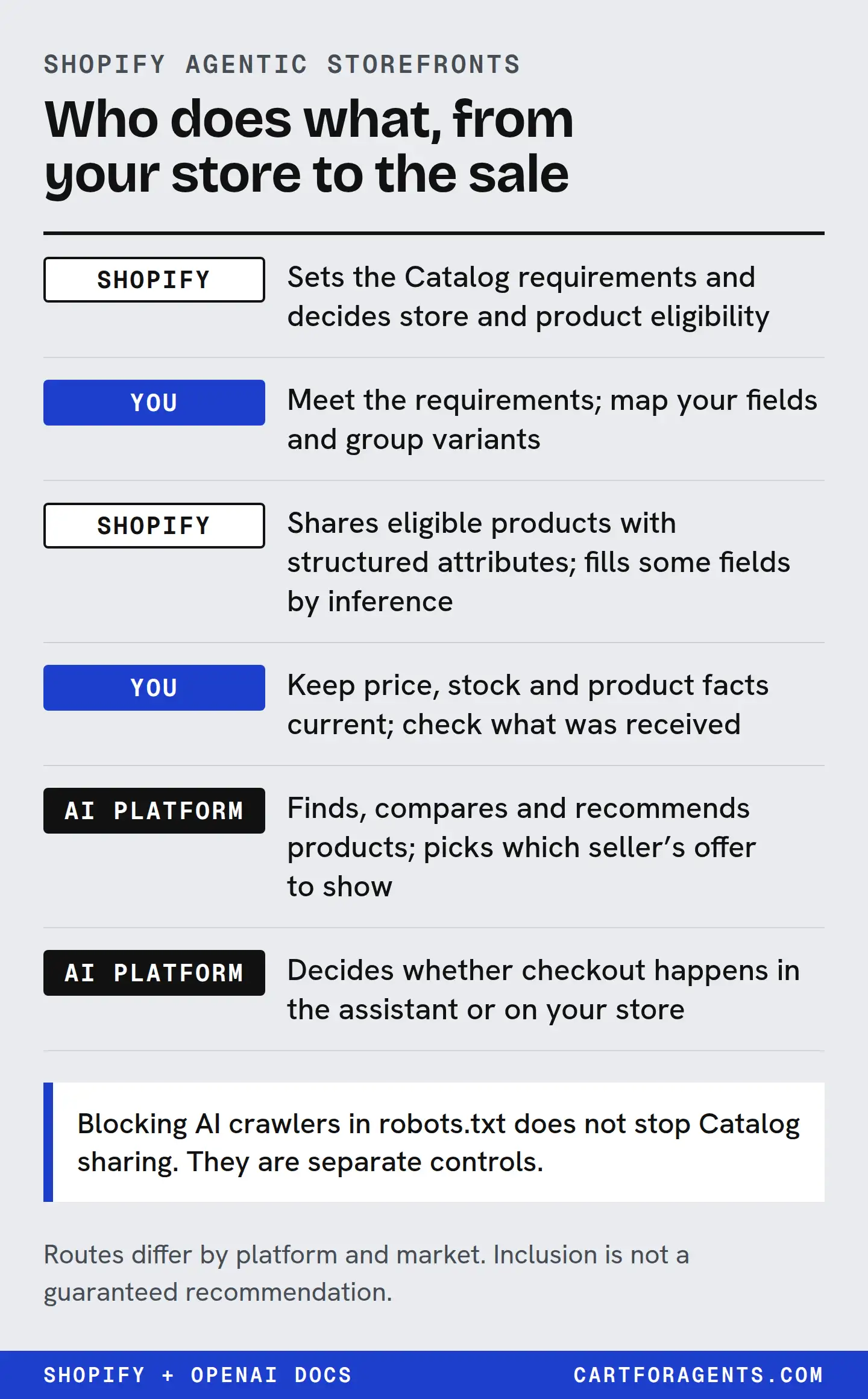
Shopify can send your products to AI channels. It can’t make an assistant recommend them, and it can’t make a shopper buy. Between those two facts sits a list of jobs, and most of the confusion comes from not knowing whose job each one is.
The short version: you confirm the store and each product are eligible, map the right data into Shopify Catalog, keep price, stock and facts accurate, and read what actually goes out. Shopify decides eligibility, enriches some fields and distributes. The assistant decides what to show. The buyer decides whether to pay. And blocking crawlers in robots.txt doesn’t stop Shopify Catalog from sharing your products.
The responsibility map
Keep this map. One row per job. For every row, write down what you saw and the date: the status, the setting or the text. If a row’s owner isn’t you, that dated note is usually the useful action, not changing something.
Before your product leaves Shopify
| Job | Who owns it | What you do | Not guaranteed |
|---|---|---|---|
| Store eligibility | Shopify decides; you meet the requirements | Check Sales channels → Agentic → Sources → Shopify Catalog for a product count or “Ineligible” | Eligibility is reviewed over time and can be lost |
| Product eligibility | Shopify decides; you supply the basics | Title, at least one image, price above zero, published with a real URL, not Unlisted, not hidden from search engines | Inclusion is not ranking |
| Product category | Shopify classifies from your product information | Make the title and description say plainly what the product is | You can’t see Shopify’s classification directly |
| Data mapping | You | If titles, descriptions or categories live in metafields, metaobjects, tag prefixes or title separators, review Shopify Catalog Mapping | Mapping a field doesn’t mean every assistant uses it |
| Variant grouping | You, then Shopify | Group separate products that are really variants of one product | Grouping changes the listing, not the pick |
| Compare-at prices | You | Choose whether Shopify Catalog shares them | Strikethrough display depends on the assistant |
| Price and stock | You keep them true; Shopify sends updates | Fix the source in Shopify, not just the theme | OpenAI says price and shipping changes can take time to appear in ChatGPT |
| Generated fields | Shopify | Compare the description, specs and features you see downstream with what you wrote | Shopify marks these “Inferred” and says they may be absent or inaccurate |
Routes and switches
| Job | Who owns it | What you do | Not guaranteed |
|---|---|---|---|
| Shopify Catalog to ChatGPT and Copilot | Shopify distributes; you can opt out | Leave it on, or remove Shopify Catalog access for either | Opting out doesn’t remove web discovery |
| Google AI Mode and Gemini | Google & YouTube sales channel | Install the channel and keep Merchant Center data current | Shopify says this route is still rolling out |
| Meta surfaces | Facebook and Instagram channel | Manage it in that sales channel | Not covered further here |
| Open-web crawlers | You (robots.txt); Shopify handles bot management | Edit robots.txt.liquid only if you mean to change open-web access | Robots rules are advisory, and they don’t touch Shopify Catalog |
| Agent discovery files | Shopify serves them; you can customize | Read /agents.md, /llms.txt and /llms-full.txt on your own store | They don’t replace Shopify Catalog, and no ranking benefit is documented |
| Hiding a product everywhere | You | Set it to Unlisted | Also removes it from sitemaps, Google and your own store search |
| B2B-only products | Shopify detects; you confirm | Use Shopify B2B catalogs, or hide wholesale-only items | Custom B2B setups may not be detected |
After the record leaves Shopify
| Job | Who owns it | What you do | Not guaranteed |
|---|---|---|---|
| Which products an assistant shows | The assistant | Make the facts specific, true and in text | Any rank, mention or share of answers |
| Which seller is shown for the same product | The platform | Keep price, stock and shipping competitive and accurate | OpenAI lists availability, price, quality and maker status as factors, without weights |
| Checkout inside an assistant | The platform’s program, plus your enrolment | Check each program’s setting in your admin and its eligible countries. For ChatGPT, prefer Shopify’s store-checkout path and OpenAI’s merchant-page policy over assuming Instant Checkout. For Google UCP, re-check market pages — they conflict | Availability by store, product and country |
| Paying | The buyer | Nothing | An order |
Which route are you on?
Shopify’s current help page names three routes, and they’re not the same pipe.
Shopify Catalog is what ChatGPT and Microsoft Copilot use. OpenAI’s help page agrees: for Shopify merchants, product data is “already integrated into ChatGPT through Shopify Catalog” and “no additional work is required.”
The Google & YouTube sales channel is how products reach Google AI Mode and Gemini. Shopify says this is rolling out to eligible stores, and that direct checkout for Google users “might not yet be available in your store.”
The Facebook and Instagram channel is the route to Meta surfaces.
Beyond those, Shopify notes products can be found by web crawling and indexing, or through feeds you already share for other purposes such as Google ads. So “I’m not eligible for Shopify Catalog” doesn’t mean “I’m invisible to AI,” and “I opted out” doesn’t mean “I’m hidden.”
Check the gates before anything else
Start in your admin: Sales channels → Agentic → Sources → Shopify Catalog. You’ll see one of three things: a number of products, an “Ineligible” warning, or a message that eligibility details are temporarily unavailable.
If it says Ineligible, click it. Shopify publishes the list of reasons and the fix for each: a plan that doesn’t support Shopify Catalog (the rule is Starter or higher, with an exception for Agentic-plan stores that haven’t yet moved their online store to a paid plan), a password-protected store, a B2B-only store, development mode, account standing, and a few that need Shopify Support.
Account standing is the one founders ask about. Shopify lists the steps it considers: verify your email, turn on two-step authentication, complete identity and business verification, sell to real customers, fulfil orders promptly, keep chargebacks low, pay Shopify invoices on time and resolve policy issues. It doesn’t publish a sales or review threshold, and neither do we.
If the store is eligible but a product is missing from the count, check the product rules: title, image, price above zero, published with a URL, not Unlisted, not hidden from search engines, no sensitive content, and not in an excluded category. Shopify classifies categories from your product information, which can differ from the category you picked. A product whose title and description don’t say what it is risks landing as “Uncategorized,” which Shopify excludes.
Check what Shopify sends, and what it writes for you
Shopify says Catalog sends your title, description, options, images, price, availability and other key attributes, and keeps them updated. If your real data lives in metafields or custom structures, Shopify Catalog Mapping is where you point Shopify at the right source.
Then there’s the part merchants don’t expect. In Shopify’s Global Catalog, several fields are marked Inferred: the description, options, attributes, technical specs, top features, selling points and condition. Shopify says these are “generated or enriched by Shopify,” “might not always be present or might vary in accuracy,” and should be treated “as discovery and merchandising signals, not as merchant-authored source text.”
Here’s what that looks like in practice. On October 26, 2026, we searched Shopify’s Global Catalog for “humidifier for dry winter air large room quiet top fill.” One returned listing said “21dB Quiet.” Another, at position 4, said only that it “runs quietly enough to leave on overnight.” Both phrases came back in the description field, one of the fields Shopify marks Inferred.
So from the record alone, nobody can say whether either merchant wrote those exact words, or whether Shopify enriched them. The fix is the same either way: put the measured value, with its unit and condition, in your own product text, and then check that it survives the trip. If the merchant behind “runs quietly” has a measurement, their own description is the place it needs to be. If they don’t, the honest line is “noise level not tested,” not an invented number.
Keep crawler controls and Catalog controls apart
These three controls do different things, and it’s easy to assume one covers the others.
- Blocking AI crawlers in robots.txt or at the network layer affects only open-web discovery. Shopify says it “doesn’t stop your product data from being sent by Shopify Catalog to the agentic storefronts that you’ve activated.” Robots rules are also advisory; not every crawler follows them.
- Removing Shopify Catalog access for ChatGPT or Copilot stops that route, but your products “might still be displayed through other external discovery and listing methods.”
- Setting a product to Unlisted is the only way Shopify describes to hide it from AI channels completely, and it also removes it from your sitemap, Google and your own store search.
And separately: every Shopify store now serves /agents.md, /llms.txt and /llms-full.txt automatically, with your store name, policies and links. You don’t need an app to create them. Shopify says they don’t replace Shopify Catalog, and no platform we checked documents a ranking benefit from them.
Inclusion is not checkout
Being in Shopify Catalog doesn’t mean a shopper can buy inside an assistant. When we sent 162 shopper searches to Shopify Catalog on October 26, the first variant of every one of the 1,620 returned listings was flagged as not eligible for native checkout. That was an unpersonalized search with no country set, so it shows the flag on those records, not that in-assistant checkout never happens.
Checkout runs through separate programs with their own rules. Microsoft said in January 2026 that Shopify merchants would be automatically enrolled in Copilot Checkout after an opt-out window, managed from the Shopify admin, and its program page currently limits eligibility to English-language merchants selling to US buyers in US dollars. Shopify says direct checkout for Google users is still rolling out. OpenAI’s help article still mentions Instant Checkout for “some eligible products and merchants,” while its merchant page says it is moving away from standalone Instant Checkout and that purchases complete on merchant sites or apps. Shopify documents no ChatGPT direct-checkout setting. Check each program for your own store and country.
Your next check
Take one product you care about and fill in four lines, with today’s date:
- Gate: Does the Agentic section show Shopify Catalog as eligible, and is this product counted?
- Source: Which field holds this product’s most important fact, and does Shopify Catalog Mapping point at it?
- Received text: Wherever you can see the record downstream, does that fact still read the same, with its unit?
- Route and checkout: Which routes are switched on for this store, and which checkout programs show this store as enrolled?
Any line you can’t answer is your next job. If it belongs to Shopify or the assistant, write down what you saw and when. If it belongs to you, fix the source.