Agentic commerce means an AI assistant helps someone find, compare or buy a product, often inside a chat. For a Shopify merchant, the useful question isn’t “am I visible in AI?” It’s “at which stage does my product drop out, and is that stage mine to fix?”
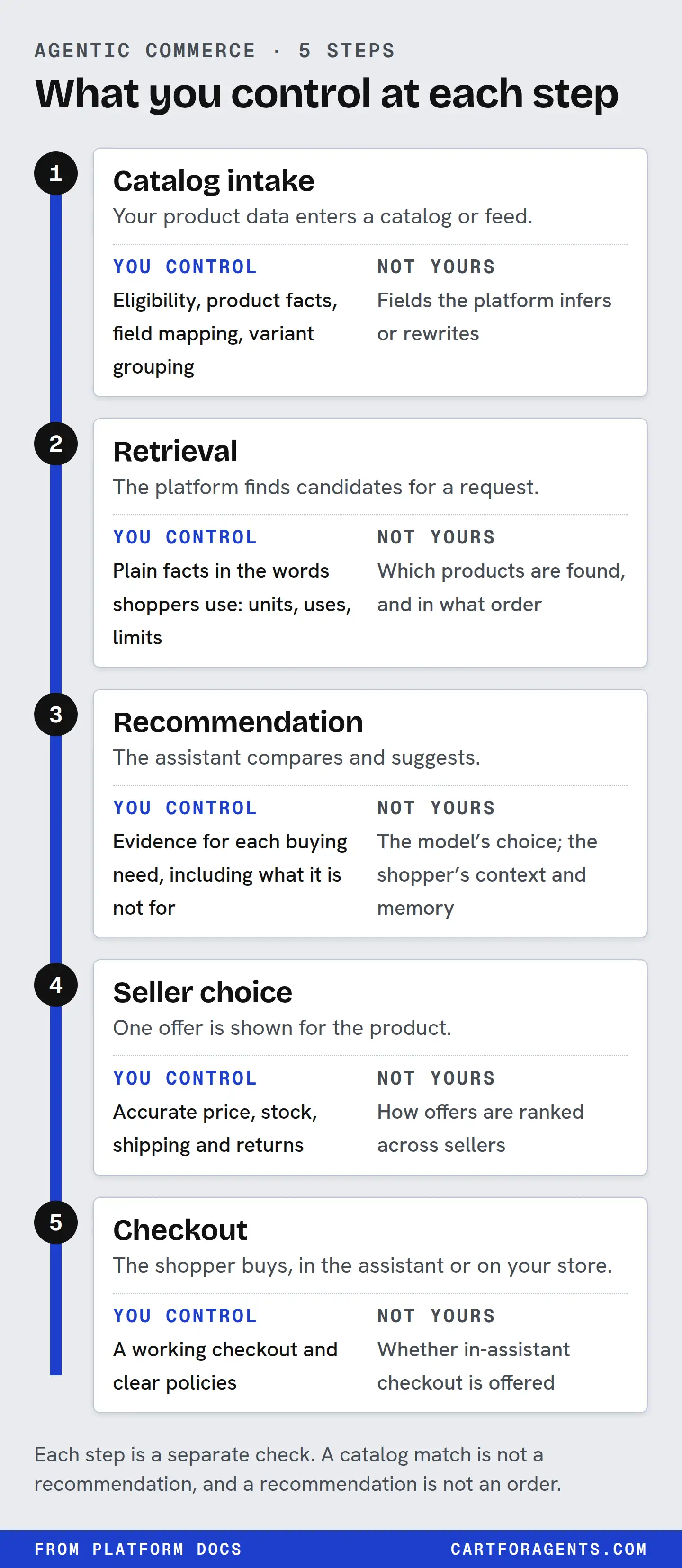
A product passes through five stages: it gets into a catalog, it’s retrieved for a shopper’s request, it’s recommended, a seller is chosen, and checkout happens. You control the facts and the offer. You don’t control the assistant’s choices. Being in a catalog is not a recommendation, and a recommendation is not an order.
The five stages, and who decides each one
This is the map. In order: your product data reaches a catalog an assistant uses; the assistant pulls a shortlist for a shopper’s request; it compares that shortlist and recommends; if several stores sell the same item, one offer is shown first; and the shopper buys, inside the assistant or on your site.
| Stage | Who decides | What you control | What to check |
|---|---|---|---|
| 1. Catalog intake | Shopify (eligibility), the platform, your channel settings | Plan, store standing, the basics on each product, which sales channels are on | The Agentic section of your Shopify admin: a product count, or an “Ineligible” reason |
| 2. Retrieval | The assistant or catalog search, plus the shopper’s words and context | Whether the facts a shopper asks for are written on the product as text | The record that comes back for a realistic request |
| 3. Recommendation | The assistant | Truthful, specific facts with units, honest limits, real reviews | Whether each part of a real customer question has a sourced answer |
| 4. Seller choice | The platform | Price, stock, shipping terms, being the maker | Price and stock agree on your page, your feeds and the catalog |
| 5. Checkout | The platform’s checkout program, then the shopper | Opting in or out where offered, policies, shipping | Whether in-assistant checkout exists for your store and country |
Passing a stage proves only that stage. Being in the catalog doesn’t mean an assistant will show you, a shortlist isn’t a recommendation, a recommendation isn’t your offer winning, and checkout being available doesn’t mean anyone buys.
Two things about this table matter more than the rest.
First, stage 1 is a gate, not a score. Shopify’s requirements are concrete: a title, at least one image, a price above zero, a published product with a real URL, not Unlisted, not hidden from search engines, a plan at Starter or above (Shopify makes an exception for Agentic-plan stores that haven’t yet moved their online store to a paid plan), and an account in good standing. Passing them gets your product into Shopify Catalog. It doesn’t move it up anyone’s list.
Second, stages 2 to 5 belong to someone else. You can make your product easier to find, match and choose. You can’t make an assistant pick it, and nobody honest can promise you that.
Follow one product through the stages
Here is a real shelf, not a hypothetical. On October 26, 2026, we sent Shopify Catalog the shopper request “humidifier for dry winter air large room quiet top fill” and kept the ten listings it returned, exactly as received.
Stage 1 and 2: both passed. Every listing in that top 10 was, by definition, in the catalog and retrieved for the request.
Stage 3: this is where the words start to matter. Four of the ten product descriptions stated a noise level in decibels (21 dB, 26 dB, 28 dB and 26 dB). One of them said “21dB Quiet.” Two more listings had a decibel figure only in metadata Shopify generated, not in the description, and no title stated one. The listing at position 4 gave a room size, but on noise its description said only that it “runs quietly enough to leave on overnight.”
Put yourself in the assistant’s place. The shopper said “quiet.” It can compare 21 dB against 28 dB. It can’t compare “quietly enough to leave on overnight” against anything. That sentence might describe a quieter machine than the 21 dB one, but nothing on the record lets anyone check.
We tested that idea in a simulation. We gave six AI models a shortlist of seven real humidifier listings plus one invented product, and asked each to pick two of the eight. Picking at random, the invented product would be chosen 25% of the time.
| Model | Vague copy | Noise, coverage, tank and runtime as a spec line |
|---|---|---|
| Claude (3 models) | 3 of 180 | 134 of 180 |
| GPT-6.1-Sol | 0 of 60 | 20 of 60 |
| Gemini 3.8 Flash | 6 of 60 | 19 of 59 |
| Gemini 3.1 Pro | 3 of 54 | 15 of 55 |
Vague copy was shut out by every model. Stating facts got the product considered. In a second test with an invented lip gloss, the version with its facts in the description won on every model (168 of 180 on Claude, 49 to 60 of 60 on the others), while the vague version was never picked.
The humidifier totals hide a clean split. On GPT and both Gemini models, the factual version was picked in every session where the shopper gave a detailed brief (20 of 20, 19 of 19 and 15 of 15), and in none where the shopper gave a one-line ask or no context (0 of 40 on each model). That detailed brief asked for room coverage and runtime. In the snippets the models saw, only our listing stated a room size, and it was the only listing under USD 90 that did. Several competitors already stated a runtime. For a plain “quiet humidifier” ask, the models chose real competitors that already stated 21, 26 or 28 dB, one of them at about half the price. Claude picked the factual version more often across the board (59, 32 and 43 of 60 for the same three briefs).
So facts didn’t win by being facts. They won when they answered a need the shopper had stated and the other listings didn’t. One caution: we wrote that detailed brief to fit the test product, so it shows facts matching stated needs, not what a random shopper would ask.
This is a simulation with an invented product inside a shortlist we handed over. It isn’t what ChatGPT or Gemini show real shoppers, and it says nothing about stages 1, 2, 4 or 5.
Stage 4 and 5: not visible in the record. The catalog snapshot can’t show which seller an assistant would favour or whether anyone bought. In that snapshot, the first variant of every returned listing was flagged as not eligible for native checkout. That was an unpersonalized search with no country set, so it shows the flag on those records, not that nobody can buy inside an assistant.
A mistake worth learning from: ours
Matching works both ways. In the same snapshot, we searched for “toddler snowsuit rated for minus 30.” Our first checker reported that the top listings didn’t state a temperature rating. Two of them did state a -30 °C figure. Position 2’s title says it “protects to -30 °C.” Position 9 rates only the hood’s insulation to “-30°C.” Our tool didn’t know that “minus 30” and “-30 °C” are the same thing.
The lesson for anyone checking listings: normalize numbers and units before you call a fact missing. The lesson for merchants: write the value as a number with its unit, in text, and keep that wording the same in your title, description and spec table. A rating that only appears on a product photo can’t be matched at all.
What you control, and where control stops
| You control | You don’t control |
|---|---|
| Whether your store and products meet Shopify Catalog requirements | Whether an assistant retrieves your product for a given request |
| The facts on each product: values, units, test conditions, what it is not for | How an assistant weighs those facts against price, reviews and the shopper’s history |
| Which fields Shopify reads, using Shopify Catalog Mapping for custom data | Fields Shopify generates or enriches, which it marks as “Inferred” in its catalog |
| Price, stock and shipping accuracy across your page and feeds | How quickly each platform picks up a change |
| Opting your products out of Shopify Catalog for ChatGPT and Copilot | Discovery through web crawling or other listings after you opt out |
| Being the maker or primary seller | Which seller a platform shows first when several sell the same item |
| Your policies, and joining checkout programs where they’re offered | Whether a shopper buys, and what the assistant writes about you |
Three of those right-hand rows surprise most merchants.
Assistants rewrite you. OpenAI says ChatGPT may generate simplified product titles and descriptions and add labels like “Budget-friendly” or “Most popular,” which it says are not guarantees. It also says reviews and ratings shown are not verified by OpenAI. What the shopper reads may not be your sentence.
The shopper’s context changes the answer. OpenAI says ChatGPT considers the query plus context such as Memory and Custom instructions, and that a stated budget makes price matter more. Two shoppers typing the same words can get different products. That’s why “what does ChatGPT say about my product?” has no single answer, and why we never claim to see it.
Seller choice is separate from product choice. For products sold by several stores, OpenAI lists availability, price, quality and whether the merchant is the maker or primary seller as factors in which merchant appears. A great description doesn’t settle that.
Which stage to check first
Don’t start with the most interesting stage. Start with the earliest one you can verify. A missing fact can’t matter if the product never reached the catalog.
| What you see | Start at | First action |
|---|---|---|
| Your Shopify admin shows “Ineligible” next to Shopify Catalog | Stage 1 | Click it, read the reason, follow Shopify’s listed fix |
| The product is eligible, but customers ask you questions the page never answers with a number | Stage 3 | Write the missing fact with its unit and condition, or write “not tested” |
| The product title doesn’t say what the product is | Stage 2 | Put the product type and main measurable trait in the title and first line |
| You sell a brand that other stores also sell | Stage 4 | Check that price, stock and shipping match across your page and feeds |
| You expected checkout inside an assistant and don’t see it | Stage 5 | Check that platform’s checkout program, its eligible countries and your enrolment |
If you want a structured way to test a change once you know the stage, our optimization guide lays out a control-and-change plan. If the gap is in the facts themselves, the product data guide has a per-SKU template.
Where this guide’s evidence comes from
Every claim in this guide is listed with its source and its limits. In short:
- Documented: Shopify’s help pages and developer docs, OpenAI’s ChatGPT shopping help page, and Google’s AI features guidance. These describe stated inputs and rules. They don’t reveal ranking weights, and they change often.
- Observed: 162 shopper requests we sent to Shopify Catalog on October 26, 2026. They show what the returned records said on one evening. The method, receipts and limits are published.
- Simulation: the vague-versus-specific humidifier picks across six models. Invented product, a shortlist we supplied, no live shopping. The full write-up has every model and shopper brief.
Nothing here is a live measurement of what an assistant tells shoppers. We can’t see private conversations, and nobody outside the platforms can.
Your next check
Pick one product and one question a customer actually asked you about it, in their words. Then:
- Open Sales channels → Agentic in your Shopify admin and note whether Shopify Catalog shows a product count or “Ineligible.”
- If it’s eligible, read your product page as if you were the assistant. Does each part of the customer’s question have an answer written as text, with a unit where a unit applies?
- Write down the first stage where the answer is “no” or “I can’t tell.” That’s your starting point. Fix that, then move to the next stage.
If you’d like a second set of eyes on that one product, the free check below reads it the way an agent would and emails you what’s there, what’s missing and how to fix it.