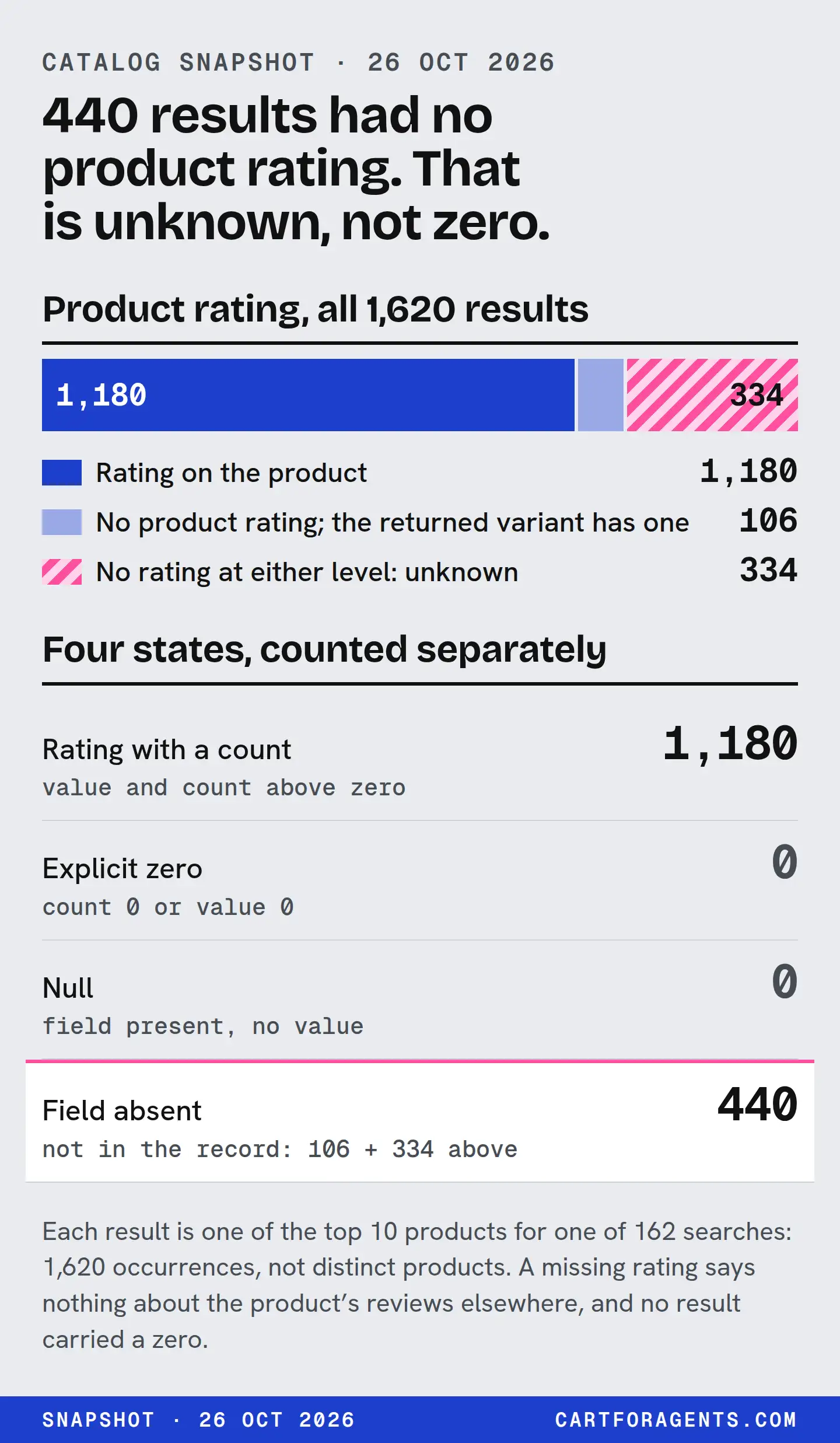
We read 1,620 results that Shopify’s agent catalog returned for 162 shopping searches on October 26, 2026. The product-level rating was present on 1,180 and absent on 440. Of the 440, 106 had a rating on the variant returned and 334 had neither. Not one rating, at either level, carried a review count of zero.
So an absent rating here never meant “0 reviews”. It meant we don’t know. If you summarize review data, keep four states apart (absent, null, explicit zero, positive), report how many records had the field, and calculate averages only over the ones that did. A blank isn’t a quality signal, and this snapshot shows no ranking threshold. It’s a catalog snapshot, not a live ChatGPT result.
The four states, and how to count each
Every review summary should start by sorting records into these states. The field paths are the ones in Shopify’s catalog response, which follows the Universal Commerce Protocol.
| State | What the record looks like | What it means | How to count it |
|---|---|---|---|
| Absent | No rating key at all |
Unknown | In the coverage denominator; out of averages and medians |
| Null | "rating": null |
Unknown, explicitly empty | Same as absent, but log it separately |
| Explicit zero | "rating": {..., "count": 0} |
Known: no reviews | A real zero. Counts toward review totals; no average to report |
| Positive | "rating": {"value": 4.8, "scale_max": 5, "count": 81} |
Known: rated | Counts toward everything, at the level it came from |
There’s a fifth case worth a row in your code even if you never see it: a rating with a value but no count. The protocol’s rating schema requires value and scale_max but makes count optional. A 4.8 with no count is a known average from an unknown number of reviews. Keep it out of any count-based summary.
The protocol also allows a count of zero (its minimum is 0), so a record can say “zero reviews” explicitly. That’s why absent and zero must stay apart. They’re different things a record can say.
What the 1,620 results actually contained
Here is the audit at both levels. Every product in the response came with exactly one variant, so “variant rating” means the rating on the only variant returned, not on the product’s whole range of variants.
| State | Product rating (products[].rating) |
Variant rating (products[].variants[0].rating) |
|---|---|---|
| Absent (no key) | 440 | 451 |
| Null | 0 | 0 |
Explicit zero (count: 0) |
0 | 0 |
| Positive | 1,180 | 1,169 |
| Total | 1,620 | 1,620 |
Putting the two levels together:
| Product rating | Variant rating | Results |
|---|---|---|
| Present | Present | 1,063 |
| Present | Absent | 117 |
| Absent | Present | 106 |
| Absent | Absent | 334 |
Three things stand out.
- Every blank was a missing key, never a null. Code that only checks for
nullwould miss every one of the 440. - The levels don’t stand in for each other. In 1,001 of the 1,063 results with both ratings, the two review counts differed. The variant count was lower in 709 and higher in 292. So the variant figure isn’t simply a share of the product figure, and you can’t swap one in for the other without saying so.
- Small counts do appear. Of the 1,180 product ratings present, 65 had a single review and 142 had between 2 and 9. So the blanks don’t look like a simple minimum-review cutoff, though we can’t rule out other rules. The documentation we read doesn’t say what decides it.
All 1,180 product ratings used a 1-to-5 scale. The 106 results with only a variant rating are the ones a product-level-only summary throws away. The 334 with neither are genuinely unknown in this response.
The mistake we made: zero-filling
Our first script for these searches did the thing this page warns against. When a product had no rating, it recorded 0 reviews. Then it took the median.
With that zero-fill, 28 of the 162 searches showed a median of 0 reviews. In 25 of those 28, at least one result carried a product rating. In the other 3, no result did, so the honest answer was “unknown”, not “zero”. An outside reviewer caught it the same day, and the score built on those numbers is retired. Its full anatomy is in our write-up of the retired visibility score.
Here is the error worked through on two searches you can find elsewhere on this site.
“toddler snowsuit rated for minus 30”
| Way of summarizing | Result |
|---|---|
| Zero-filled median of 10 product ratings | 0 reviews |
| Product rating present | 4 of 10 (counts 146, 116, 11 and 139) |
| Median of the present counts | 127.5, from 4 results |
| Variant rating present | 9 of 10 |
“humidifier for dry winter air large room quiet top fill”
| Way of summarizing | Result |
|---|---|
| Zero-filled median of 10 product ratings | 0 reviews |
| Product rating present | 3 of 10 (counts 310, 17 and 1) |
| Median of the present counts | 17, from 3 results |
| Variant rating present | 7 of 10 |
“Median 0 reviews” made both shelves sound unreviewed. In fact most results on both carried a rating at one level or the other. The snowsuit shelf had one result with no rating at either level. The humidifier shelf had three.
The honest version leads with coverage: “product rating on 4 of 10; median 127.5 among those”. It’s clumsier, and it’s true. Notice too that a median of four values is fragile. The denominator is the point, not the number. On the humidifier shelf, the product with a 5.0 product rating from 1 review carried a 4.8 variant rating from 11. Same product, two very different amounts of evidence.
Denominator rules for any review summary
These are our proposed rules. They aren’t a standard; they’re what we now do.
- Report coverage first. “Rating present on k of n” comes before any average.
- Calculate only over present values, and give the n. Never replace a blank with 0, a guess or an average.
- Pick one level and name it. Product rating or variant rating, never a silent mix. If you fall back from one to the other, count the fallbacks.
- Keep explicit zeros. A record that says
count: 0has told you something. Count it as zero reviews and report no average for it. - Log absent and null separately, even though both mean unknown. They can come from different parts of a pipeline.
- Keep value-only ratings out of count summaries. A 4.8 with no count is a known average from an unknown number of reviews.
- Count occurrences honestly. Our 1,620 results include repeated products. Say “results”, not “products”, unless you’ve de-duplicated.
- Don’t read missingness as quality or rank. Absent means the record didn’t carry it, nothing more.
Why this matters for a Shopify store
Review data is one of the things shopping assistants say they use. OpenAI’s help page gives an example in which ChatGPT may consider available options, price, reviews and ease of use. Shopify’s Global Catalog lets an agent filter a search by variant rating, with a minimum score and a minimum number of reviews. How a search with that filter treats a product whose variant carries no rating isn’t something the documentation we read spells out, and our searches didn’t use the filter. We can’t tell you that a missing rating hurts you. We can tell you that a missing rating can’t help a reader that’s looking for one.
The practical question for you is narrower: does your rating reach the record?
- Pick your best-reviewed product.
- Have a developer pull its catalog record. Shopify’s Global Catalog documentation shows the
catalog lookupcommand for a product or variant ID. - Check
ratingon the product and on the variant. Note value, scale and count for each, or note that the key is absent. - Compare those with the review count on your product page.
If the catalog record carries no rating while your page shows reviews, that’s a gap worth asking Shopify support or your review app about. The documentation we read doesn’t say how these fields are filled, so we won’t guess at the fix. If the counts differ between levels, now you know why: they’re different figures.
Never fill the gap with invented, copied or incentivized reviews. A blank is unknown. A fake number is a liability.
How we checked
The searches ran on October 26, 2026 through Shopify’s public Global Catalog, using Shopify’s own command-line tool (catalog search, top 10 per search, no buyer, country or currency context). 162 searches across 16 categories; beauty had 12 searches and the other categories 10 each. Every response returned 10 results and was saved as received.
For this page, on October 27 we re-read all 162 saved responses and, for each result:
- classified
ratingon the product and on its returned variant as absent (no key), null, present without a count, present withcount: 0, or present with a positive count; - recorded the count and scale where present;
- compared product and variant counts where both were present;
- re-ran our original script’s review summary, unchanged, to reproduce the zero-filled medians.
We also read the protocol’s Rating, Product and Variant schemas (version 2026-08-25, the version the responses declare) and Shopify’s Global Catalog documentation on October 27. Nothing here was a fresh catalog query, so live records may differ. Our catalog research page has the full snapshot method. Related audits from the same snapshot: humidifier noise evidence by field and the minus-30 temperature-matching error.
Your next step
Open the catalog record for one product with real reviews and write down four things: is rating present on the product, is it present on the variant, what count does each carry, and does either match your product page? If you report on review data anywhere, in a dashboard, a deck or an audit, add a “present on k of n” line above every average.