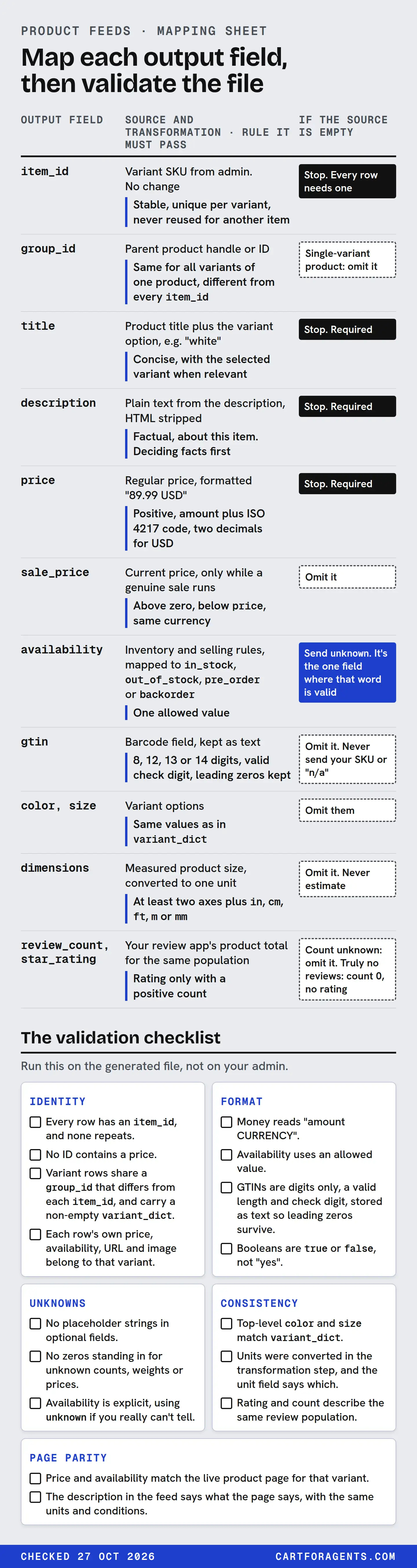
Keep a mapping sheet with one row per output field. Each row says which system and field the value comes from, every transformation applied on the way, the rule the output has to pass, and what you send when the source is empty. Then check every upload twice: against the destination’s current spec, and against the live product page.
When you don’t know a value, leave it out. Don’t fill it with “n/a”, a zero or a guess. OpenAI’s feed spec says exactly that, and it’s good practice for any feed.
A clean feed makes your facts readable. None of the platform documents we checked says a clean feed guarantees display or rank. The sheet and checklist below are our proposal, worked on a hypothetical store.
Why a feed needs its own map
Most stores don’t write a feed. A plugin, an app or a channel generates it from the store’s admin, and from then on nobody looks at what comes out. That’s fine until a fact changes shape on the way: a unit gets swapped, a sale price lands in the regular-price field, or a placeholder gets sent as if it were data.
You can see copies drifting in what Shopify’s agent catalog returns today. On October 26 we saved the top 10 results for 162 shopper-style searches. Three records show the problem:
| Record | What the description said | What the generated spec said |
|---|---|---|
| Backpack, position 8 | “Height: 11.2 inch Width: 7.5 inch Depth: 2.4lbs” | “Depth 2.4 in” |
| Humidifier, position 5 | “up to 32 hours” of runtime | “Up to 36 hours” |
| Toddler snowsuit, position 9 | A hood with insulation “rated to -30°C” | Insulation “rated to -30°C”, with no hood |
Those generated lines aren’t a merchant feed. Shopify marks fields like the description, specs, top features and selling points as Inferred: generated or enriched by Shopify, and to be treated as discovery signals, “not as merchant-authored source text”. We can’t see how they were produced. But they show the three ways a copy goes wrong: the unit changes, the value changes, or the scope disappears. A feed you build yourself can fail the same three ways, and a mapping sheet is how you catch it.
Know which contract you’re writing for
“The feed” usually means several outputs, each with its own rules. Before you map anything, write down which ones you produce.
| Route | How product data arrives | What you control | Availability, as documented |
|---|---|---|---|
| ChatGPT, direct feed | A file upload in OpenAI’s Products format | Every row and field | Shopping is live for US users. The standard upload targets the US. Merchants apply; a self-serve platform is planned “later this year” |
| ChatGPT and Copilot, through Shopify | Shopify Catalog, from your Shopify admin | Your product data, plus Shopify Catalog Mapping for custom fields | OpenAI says Shopify catalogs are already integrated. Catalog needs the Starter plan or higher, or the Agentic plan without a published online store, plus account standing |
| Google AI Mode, Gemini, Shopping | Merchant Center, including the Google & YouTube channel for Shopify stores | Merchant Center attributes | Varies by country and program. Not covered in detail here |
On Shopify, the Catalog fields come from your admin by default. If your real title or description lives in metafields, Shopify’s help page says you can source it with Shopify Catalog Mapping, and that you can choose whether Catalog shows compare-at prices to AI agents. We haven’t seen that screen ourselves.
Google says you don’t need special files or special markup to appear in AI Overviews or AI Mode. It does list keeping your Merchant Center information up to date among ordinary best practices. For ChatGPT’s own format, our ChatGPT feed guide covers the field contract and its schema versions. This page is about the step before that: getting every value from the right source, unchanged.
The mapping sheet
One row per output field, per destination. The examples use OpenAI’s field names, because that spec states its rules most explicitly. Add a column, or a second sheet, for Google’s attribute names.
| Output field | Source and transformation | Rule it must pass | If the source is empty |
|---|---|---|---|
item_id |
Variant SKU from admin. No change | Stable, unique per variant, never reused for another item | Stop. Every row needs one |
group_id |
Parent product handle or ID | Same for all variants of one product, different from every item_id |
Single-variant product: omit it |
title |
Product title plus the variant option, e.g. “white” | Concise, with the selected variant when relevant | Stop. Required |
description |
Plain text from the description, HTML stripped | Factual, about this item. Deciding facts first | Stop. Required |
price |
Regular price, formatted “89.99 USD” | Positive, amount plus ISO 4217 code, two decimals for USD | Stop. Required |
sale_price |
Current price, only while a genuine sale runs | Above zero, below price, same currency |
Omit it |
availability |
Inventory and selling rules, mapped to in_stock, out_of_stock, pre_order or backorder |
One allowed value | Send unknown. It’s the one field where that word is valid |
gtin |
Barcode field, kept as text | 8, 12, 13 or 14 digits, valid check digit, leading zeros kept | Omit it. Never send your SKU or “n/a” |
color, size |
Variant options | Same values as in variant_dict |
Omit them |
dimensions |
Measured product size, converted to one unit | At least two axes plus in, cm, ft, m or mm |
Omit it. Never estimate |
review_count, star_rating |
Your review app’s product total for the same population | Rating only with a positive count | Count unknown: omit it. Truly no reviews: count 0, no rating |
Three columns do most of the work.
Source forces you to name one system per field. If the price can come from your admin, a repricing app or a spreadsheet, the sheet makes you choose. Our price and stock guide covers choosing the authoritative source and logging disagreements.
Transformation is where facts break. Any step that strips HTML, converts a unit, joins options into a title or rounds a price belongs here, written out. OpenAI’s spec says units are not inferred from the market, so convert before you upload, and that you shouldn’t round a price into a different payable amount.
If the source is empty is the column most feeds skip. OpenAI’s spec is unusually direct: for optional fields, “omit an unknown value”, don’t use placeholder strings such as null, unknown or n/a, and “an empty value does not mean zero or false”. Its review fields make the same split. A review_count of 0 means no reviews, while an omitted count means unknown. Google’s Store Quality program makes a related point about its own program: leaving information out doesn’t get you penalized, you just don’t get that program’s benefits. Unknown is a state you report honestly. It isn’t a gap to paper over.
The validation checklist
Run this on the generated file, not on your admin. The facts that matter are the ones that left the building.
Identity
- Every row has an
item_id, and none repeats. - No ID contains a price. OpenAI’s spec: “Never include price in an offer ID.”
- Variant rows share a
group_idthat differs from eachitem_id, and carry a non-emptyvariant_dict. - Each row’s own price, availability, URL and image belong to that variant.
Format
- Money reads “amount CURRENCY”. “$69.99” fails.
- Availability uses an allowed value. “In Stock” fails.
- GTINs are digits only, a valid length and check digit, stored as text so leading zeros survive. Our identifier guide covers when a product legitimately has none.
- Booleans are
trueorfalse, not “yes”.
Unknowns
- No placeholder strings in optional fields.
- No zeros standing in for unknown counts, weights or prices.
- Availability is explicit, using
unknownif you really can’t tell.
Consistency
- Top-level
colorandsizematchvariant_dict. OpenAI’s spec says neither representation reconciles conflicts for you. - Units were converted in the transformation step, and the unit field says which.
- Rating and count describe the same review population. A rating never appears without a positive count.
Page parity
- Price and availability match the live product page for that variant. Google’s price rules say the amount and currency should match your landing page and checkout.
- The description in the feed says what the page says, with the same units and conditions.
Worked case: one hypothetical product, two drafts
Hypothetical store and product, not a real listing. A small shop sells its own 4 L top-fill humidifier in white and black. The admin shows a price of 69.99 and a compare-at price of 89.99. White has stock. Black has none and doesn’t sell when out of stock. No GTIN has been licensed yet. The shop has no reviews.
A quick export produced this first row for the white variant (shortened):
{"item_id":"HUM4-WHT","group_id":"HUM4-WHT","listing_has_variations":true,
 "variant_dict":{"color":"White"},"color":"Ivory","offer_id":"HUM4-WHT-69.99",
 "price":"$69.99","availability":"In Stock","gtin":"n/a","star_rating":"0.00"}
We ran it through a script that encodes only rules OpenAI’s spec states. It failed eight checks:
| Problem | Rule it breaks | Fix |
|---|---|---|
group_id equals item_id |
Group ID must differ from each item ID | HUM4 |
| “Ivory” vs “White” | Top-level options must match variant_dict |
Use the variant option as the single source |
Price inside offer_id |
Never include price in an offer ID | example-home-HUM4-WHT |
| “$69.99” | Amount plus currency code | See the price decision below |
| “In Stock” | Allowed values only | in_stock |
gtin “n/a” |
No placeholders. A GTIN needs digits and a check digit | Omit the field |
star_rating “0.00” with no count |
Rating needs a matching positive count | Drop the rating. Send review_count 0, because zero reviews is true |
The price needed a decision, not just formatting. OpenAI defines price as the regular price and sale_price as a current sale price below it. Shopify’s price is what the customer pays today. Is 89.99 a genuine regular price, or an anchor nobody ever paid? If it’s genuine, send 89.99 as price and 69.99 as sale_price, and update the feed when the sale ends: the spec says sale-window dates don’t schedule price changes. If it isn’t genuine, send 69.99 as price and no sale price. Shopify asks a related question when you choose whether Catalog shows compare-at prices to AI agents (strikethrough), or only the current price. Write the answer in the sheet’s transformation column so the next export makes the same call.
The corrected white row:
{"item_id":"HUM4-WHT","group_id":"HUM4","listing_has_variations":true,
 "variant_dict":{"color":"White"},"offer_id":"example-home-HUM4-WHT",
 "title":"Top-fill humidifier, 4 L, white",
 "description":"Top-fill cool-mist humidifier with a 4 L tank.",
 "url":"https://example.com/products/top-fill-humidifier?variant=white",
 "brand":"Example Home","seller_name":"Example Home",
 "image_url":"https://example.com/images/hum4-white.jpg",
 "price":"89.99 USD","sale_price":"69.99 USD","availability":"in_stock",
 "color":"White","review_count":0}
The black row is the same, with its own ID, URL and image, and out_of_stock. Both passed.
Look at what isn’t there. There’s no runtime, no noise level, no room size and no dimensions. Our hypothetical shop hasn’t measured them, so the honest feed leaves them out. Passing validation only means the row is well formed. Whether the description states the facts a shopper asks about, with units and conditions, is a separate job, covered in our description guide and our requirement-by-requirement check. In our supplied-snippet simulation, vague copy was almost never picked, and stated facts got a listing considered. A valid row with a vague description is still vague.
How we checked
On October 27, 2026 we read the current OpenAI file-upload Products spec, ChatGPT’s merchants page and help article, Shopify’s Catalog help pages and Global Catalog reference, and Google’s AI features, Shopping and Merchant Center pages listed in the sources. Each rule in the sheet and checklist is quoted or paraphrased from the spec it names.
The worked check used a short script that tests only rules OpenAI’s spec states: required fields, placeholder strings, allowed availability values, the money format, sale price below price in the same currency, GTIN length and check digit, group and item IDs, option consistency, prices in offer IDs, and ratings without counts. The draft row failed the eight checks in the table. Both corrected rows passed. The script is not OpenAI’s validator.
The three divergent records come from our saved Shopify Catalog snapshot of October 26, 2026 (162 searches, top 10 each, no buyer context): position 8 for “anti theft backpack for city travel”, position 5 for “humidifier for dry winter air large room quiet top fill”, and position 9 for “toddler snowsuit rated for minus 30”. We compared each description, with HTML removed, against the generated lines in the same record. Material brand names are withheld.
Your next step
Export one product’s feed row from every channel you use: your ChatGPT or Merchant Center file, and what Shopify Catalog sends if you’re on Shopify. Fill in the mapping sheet for that product only, then run the checklist on the exported rows, not on your admin. Every placeholder you delete and every unit you trace back to a real measurement is a fix you’ve made at the source, not in one copy.