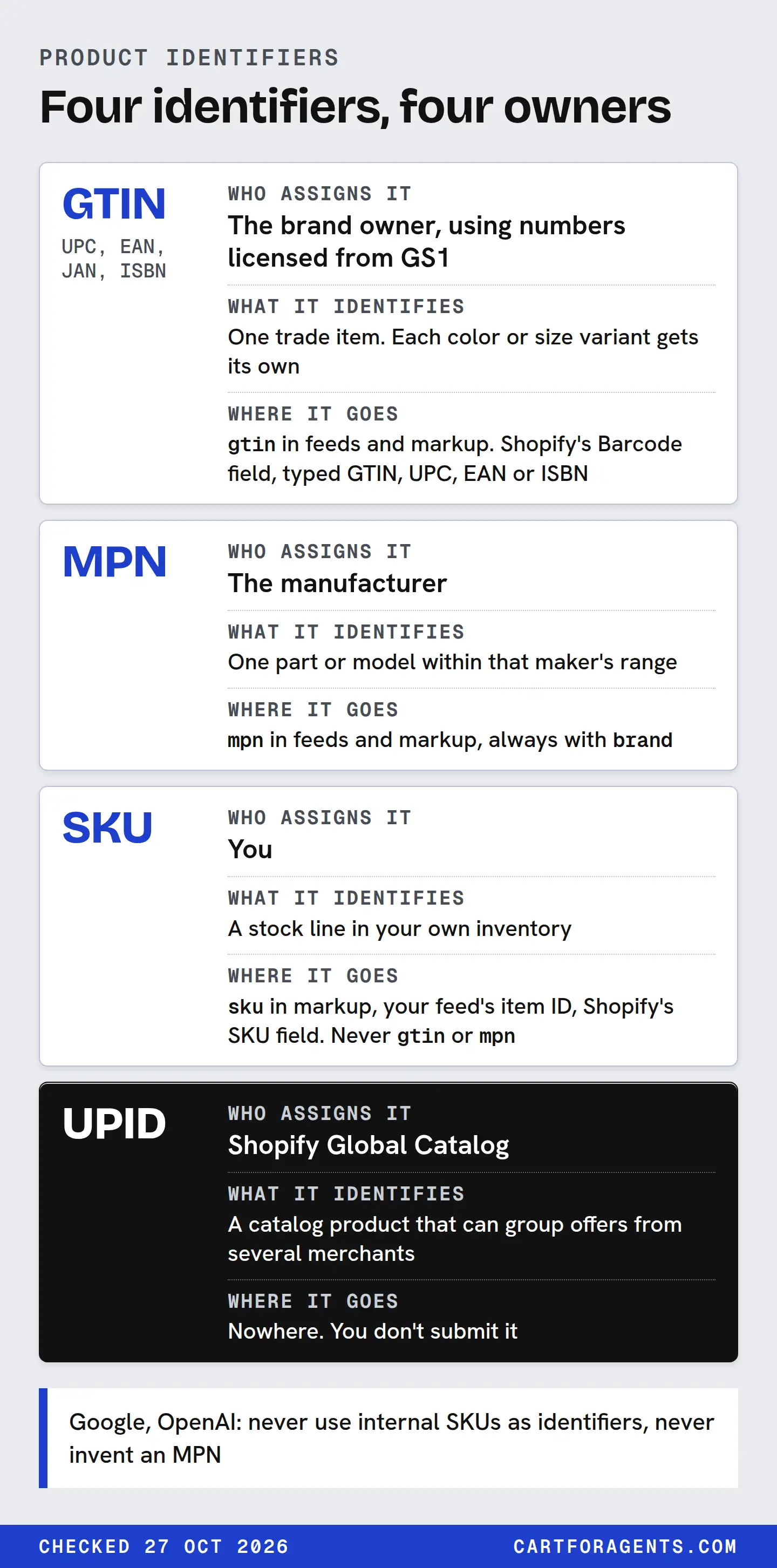
Send a GTIN only when one has been assigned to that exact variant, and copy it digit for digit. Send the MPN the manufacturer assigned, alongside the brand. Keep your SKU as your own internal ID, and never put it in a GTIN or MPN field. Shopify assigns the UPID, so you don’t set it.
When a product legitimately has no GTIN, leave the field empty, and say so where the channel asks. Never fill it with a guess or a placeholder.
Every rule here is quoted from Google, OpenAI, Shopify, schema.org or GS1 pages read on October 27, 2026. The decision table is our proposed summary of those rules.
Four identifiers, four owners
Most identifier mistakes come from one confusion: treating whatever code you have as the code a field asks for. Each code has an owner, and the owner decides what it means.
| Identifier | Who assigns it | What it identifies | Where it goes |
|---|---|---|---|
| GTIN (UPC, EAN, JAN, ISBN) | The brand owner, using numbers licensed from GS1 | One trade item. Each color or size variant gets its own | gtin in feeds and markup. Shopify’s Barcode field, typed GTIN, UPC, EAN or ISBN |
| MPN | The manufacturer | One part or model within that maker’s range | mpn in feeds and markup, always with brand |
| SKU | You | A stock line in your own inventory | sku in markup, your feed’s item ID, Shopify’s SKU field. Never gtin or mpn |
| UPID | Shopify Global Catalog | A catalog product that can group offers from several merchants | Nowhere. You don’t submit it |
Schema.org’s definitions draw the same lines. A GTIN identifies trade items “using numeric identification codes”. An MPN is “the Manufacturer Part Number”. A SKU is “a merchant-specific identifier”.
On who assigns a GTIN, the two sources word it differently, and both hold. GS1 US says barcodes from GS1 “identify your company as the brand owner of that product”. Google’s identifier page says identifiers are “assigned to each product by the manufacturer”. For most products the brand owner and the manufacturer are the same company. For a private label made by a contract factory they can differ, and GS1’s wording points to the brand owner.
Shopify’s admin keeps the SKU and barcode fields apart too. It calls SKUs “an optional code that identifies the product within your business”. It lets you add up to 20 barcodes to a product or variant, each typed as Custom, GTIN, UPC, EAN, ISBN, ASIN or NS-PID. Custom is the default type, so check which type your barcodes actually carry. NS-PID is for “a model number, part number, or style code” used on EU customs declarations, which makes it the closest Shopify barcode type to an MPN.
The identifier decision table
Work down the table one variant at a time. Each answer comes from the source in its last column.
| Your situation | GTIN | MPN and brand | Source |
|---|---|---|---|
| You resell another brand’s product and its packaging carries a barcode | Send that GTIN, per variant | Send the maker’s MPN and brand if you have them | Google: identifiers are assigned by the manufacturer; include what you have |
| You resell a branded product but don’t have its GTIN | Leave it blank. Ask the manufacturer | Send them if you have them | Google: leave the attribute blank, don’t include identifiers from similar products. Shopify: request it from the manufacturer |
| Your own brand, and you’ve licensed GTINs from GS1 | Send the GTIN you assigned to each variant | Send the brand. Send an MPN if you keep model numbers | GS1 US: each variation requires a unique barcode |
| Your own brand, no GTINs licensed | Leave it blank | Brand is your brand. Google says a manufacturer may supply an MPN of its own choosing | Google: a store brand or sole seller “generally won’t have a GTIN” |
| Custom, handmade or one-of-a-kind items | Leave it blank | Brand is your store name. MPN is optional for custom-made goods | Google: GTIN, MPN and identifier_exists pages |
| A bundle you put together | The main product’s GTIN | The main product’s MPN and brand | Google: bundles you created use the main product’s identifiers |
| Apparel sizes | Each size has its own GTIN | All sizes often share one MPN | Google: GTIN and MPN pages |
| You only have your SKU | Leave it blank | Leave it blank, unless you are the manufacturer | Google, OpenAI: never use internal SKUs as identifiers, never invent an MPN |
The missing-ID row is legitimate. Google’s GTIN page says “Some products don’t have a GTIN assigned, and so you don’t need to submit one”. For a new product that really has none, its identifier_exists page says to send no, but “only … if you’re certain”. It also warns that Merchant Center flags products marked that way when there’s evidence an identifier exists. OpenAI’s spec says to omit gtin if it’s unassigned, and not to “invent a value to replace a missing GTIN”. Blank is an honest answer. A made-up number isn’t.
What a wrong value costs. Google says incorrect identifiers can get products disapproved. It also says products that have an assigned GTIN but are submitted without one “may have limited visibility”. That’s Google’s statement about its own Shopping surfaces. We found no comparable statement from ChatGPT, Copilot or Perplexity about identifiers and visibility, so don’t read one into it.
Formatting a GTIN so it survives
A real GTIN can still break between your admin and the channel. Three checks catch most of it.
Length and check digit. OpenAI’s spec wants exactly 8, 12, 13 or 14 digits “including a valid check digit”, with no spaces or dashes. Google asks for the check digit to be “present and correct”. The check digit is the last digit, and you can compute it yourself.
Take the example UPC that appears in Shopify’s CSV help, 012345678905. Drop the last digit, then work right to left, multiplying the digits alternately by 3 and by 1:
| Digits, right to left | 0 | 9 | 8 | 7 | 6 | 5 | 4 | 3 | 2 | 1 | 0 |
|---|---|---|---|---|---|---|---|---|---|---|---|
| Weight | 3 | 1 | 3 | 1 | 3 | 1 | 3 | 1 | 3 | 1 | 3 |
| Product | 0 | 9 | 24 | 7 | 18 | 5 | 12 | 3 | 6 | 1 | 0 |
The products sum to 85. The check digit is whatever brings that up to the next multiple of 10: 5. That matches the last digit, so the number is well formed. Well formed doesn’t mean assigned to your product, though. GS1 points to its Verified by GS1 service for checking that a GTIN is validly assigned.
Leading zeros. Open that file in a spreadsheet and 012345678905 can become 12345678905, which is 11 digits and fails every length rule. Keep the barcode column as text. OpenAI’s spec says “Preserve leading zeros”. Schema.org’s note that left-padding is “not required or encouraged” is about something else: adding extra zeros to pad a 12-digit code out to 14. Shopify’s CSV help shows a padded form, gtin:00012345678905. Both forms are valid GTIN lengths. What breaks the number is losing a zero that belongs to it.
Restricted ranges. Google says not to submit GTINs in the restricted ranges, which start with 02, 04 or 2, or in the coupon ranges, which start with 05, 98 or 99. If a barcode you were handed starts that way, ask where it came from before you treat it as a GTIN.
Where the UPID fits
Shopify’s Global Catalog is the catalog AI agents query across Shopify merchants. Its documentation says search results “are clustered by Universal Product ID (UPID) and include offers from multiple merchants”. Its lookup call accepts IDs written as gid://shopify/p/{upid}, variant IDs and Shopify product URLs, and groups “multiple IDs that resolve to the same product”.
Two things aren’t documented on that page: how a UPID gets assigned, and which product data decides that two listings are the same product. It’s tempting to assume GTINs drive the grouping. The page doesn’t say so, and you should plan without that assumption.
Our own snapshot fits the documented shape. On October 26 we saved the top 10 Shopify Catalog results for 162 shopper-style searches. All 1,620 result occurrences carried a product ID in the gid://shopify/p/ form, covering 1,612 distinct IDs. None of the 1,620 first variants included a SKU or barcode field in the search response.
That doesn’t mean the merchants had no barcodes. A search response is a summary, and the Universal Commerce Protocol’s variant schema does define optional sku and barcodes fields, the latter “for cross-reference and correlation”. It just means the identifier a shopping agent saw first was Shopify’s, not the merchant’s.
The practical point: you can’t edit a UPID, so put your effort into the identifiers you own, and keep them right. Our Global Catalog guide covers how the catalog groups and returns offers.
Worked case: a hypothetical private-label backpack
Hypothetical store, not a real listing. A two-person shop sells its own brand of travel backpack, made to its design by a contract factory. It comes in black and grey, in 20 L and 28 L, so there are four variants. Its Shopify SKUs follow the pattern TRV-BLK-20. The factory’s quote calls the model “B-218”. The shop hasn’t licensed any GTINs.
| Field | First draft | Corrected | Why |
|---|---|---|---|
gtin |
TRV-BLK-20 |
(empty) | A SKU isn’t a GTIN, and this one fails the digit rule. No GTIN is assigned |
mpn |
B-218 |
Empty, unless you assign your own model number as the manufacturer | Google lets a manufacturer supply an MPN of its own choosing, but says not to put internal SKUs in identifier fields. Who counts as manufacturer for a private label is your call; we don’t make it. The factory’s code may identify the factory’s own product, not yours |
brand |
(empty) | The shop’s brand name | Google treats brand as an identifier in its own right, so send it whether or not there’s a GTIN |
identifier_exists |
(not sent) | Decide case by case | Google recommends no for new products without a GTIN, MPN or brand, and only when certain. This product has a brand, so read the page against your exact case |
sku |
TRV-BLK-20 |
TRV-BLK-20 |
Correct as it is. Keep it in your feed’s item ID and in markup’s sku |
Now suppose the shop licenses GTINs. GS1 US lists a single GTIN at $30 with no renewal fee, and says each variation requires a unique barcode. Its example is 3 sizes x 3 colors = 9 barcodes, so this shop needs 4. It assigns one per variant, enters each in Shopify’s Barcode field typed GTIN, not Custom, and sends them in gtin. Once a GTIN exists, identifier_exists stays unset. We checked GS1 US only. Sellers in Canada or elsewhere should check their own GS1 office.
None of this replaces product facts. An identifier tells a system which product a row is about. It doesn’t say the bag fits under an airline seat. That’s the job of the description and the spec, covered in our requirement-by-requirement check and our description guide. For carrying these values into a feed without changing them, see the feed mapping sheet. For page markup, see product schema markup.
How we checked
On October 27, 2026 we read Google Merchant Center’s pages on unique product identifiers, GTIN, MPN and identifier_exists; OpenAI’s file-upload Products spec; schema.org’s gtin, mpn and sku definitions; Shopify’s product details and CSV help pages and Global Catalog reference; the Universal Commerce Protocol variant schema (version 2026-08-25); and GS1 US’s get-started guide. Every rule in the decision table is quoted or closely paraphrased from the page named in its row. The check-digit table uses the standard GS1 calculation.
The snapshot numbers come from our saved Shopify Catalog search results of October 26, 2026: 162 searches, top 10 results each, one unpersonalized context, one variant returned per product. We counted product IDs in the gid://shopify/p/ form, distinct product IDs, and first variants carrying sku or barcodes keys. Merchant names are withheld.
Your next step
Export your products with SKU and Barcodes columns, and open the file as text so leading zeros survive. For each variant, find its row in the decision table. Check every barcode’s type, length and check digit. Delete any value that came from a guess, a similar product or your own SKU, and write down which products legitimately have no GTIN, so the blank is a decision rather than an accident.