In Shopify’s Global Catalog, a product is a cluster under one Universal Product ID (UPID). Each variant inside it is a purchasable item with its own price, stock, checkout link and seller. So one product can carry offers from several shops.
That means “how many products?” has four honest answers: search results, UPIDs, variants and sellers. Name the unit behind every number.
And don’t read Catalog order as a recommendation. Shopify says agentic storefronts re-rank its results. OpenAI says that once a shopper picks a product, ChatGPT ranks the merchants offering it on factors such as availability, price, quality and being the maker or primary seller.
This guide is built from Shopify’s developer documentation, the Universal Commerce Protocol it follows, and OpenAI’s help page, checked October 27, 2026.
The identity diagram
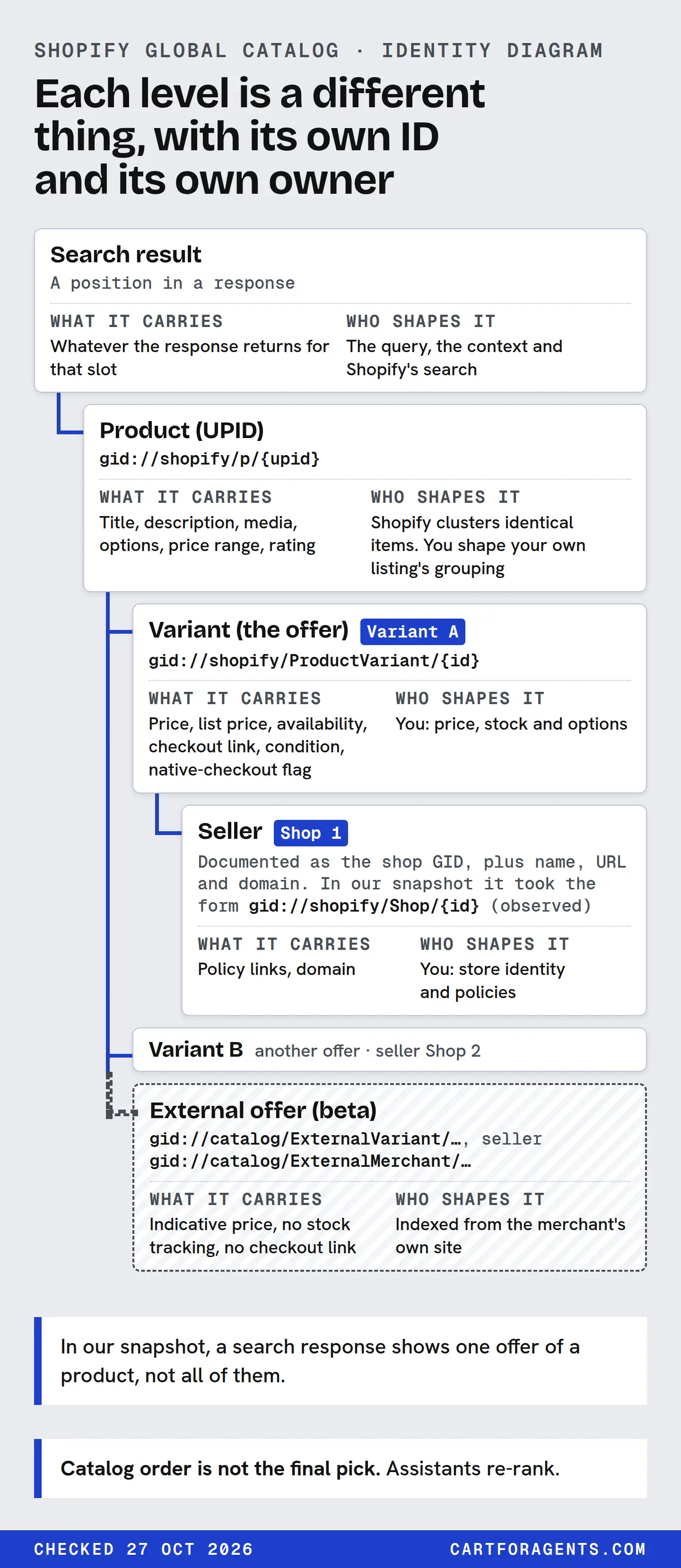
Read it top to bottom. Each level is a different thing, with its own ID and its own owner.
Search result (one position in one response)
 └─ Product cluster: UPID  gid://shopify/p/…
     ├─ Variant A  gid://shopify/ProductVariant/…   ← an offer
     │    price · availability · checkout_url · eligible.native_checkout
     │    seller: Shop 1  gid://shopify/Shop/…  (format observed in our snapshot)
     ├─ Variant B  gid://shopify/ProductVariant/…   ← another offer
     │    seller: Shop 2  gid://shopify/Shop/…
     └─ External variant (beta)  gid://catalog/ExternalVariant/…
          seller: gid://catalog/ExternalMerchant/…  · no checkout_url
The same levels as a table:
| Level | ID format (as documented) | What it carries | Who shapes it |
|---|---|---|---|
| Search result | A position in a response | Whatever the response returns for that slot | The query, the context and Shopify’s search |
| Product (UPID) | gid://shopify/p/{upid} |
Title, description, media, options, price range, rating | Shopify clusters identical items. You shape your own listing’s grouping |
| Variant (the offer) | gid://shopify/ProductVariant/{id} |
Price, list price, availability, checkout link, condition, native-checkout flag | You: price, stock and options |
| Seller | Documented as the shop GID, plus name, URL and domain. In our snapshot it took the form gid://shopify/Shop/{id} (observed) |
Policy links, domain | You: store identity and policies |
| External offer (beta) | gid://catalog/ExternalVariant/…, seller gid://catalog/ExternalMerchant/… |
Indicative price, no stock tracking, no checkout link | Indexed from the merchant’s own site |
Three points in that table are worth slowing down for.
The offer lives on the variant. The Universal Commerce Protocol defines a variant as a purchasable item with option selections, price and availability, with optional seller context. Shopify’s extension adds the checkout URL and the shop’s ID. So in Shopify’s model, “other merchants offering this” means other variants from different sellers inside one product, not different products.
Two kinds of grouping happen. Inside your store, Shopify Catalog consolidates variants and groups identical items. By default it follows your Combined Listings setup, and you can switch on custom grouping in the Shopify Catalog Mapping tool (how that works). Across stores, Shopify clusters identical items from several merchants under one UPID. Shopify doesn’t document how it decides two shops’ items are the same product, so don’t claim to know.
External offers share the product ID format. In beta, Shopify can return items indexed from merchants’ own websites under the same gid://shopify/p/… format, with their own variant and seller ID formats. They have no checkout link, native checkout is always false, prices are indicative and stock isn’t tracked. Shopify says coverage is currently merchants selling to the United States, and only API clients it has enabled can request them.
How an agent walks the diagram
Shopify describes a two-step flow:
| Step | Tool | What comes back | What it means for you |
|---|---|---|---|
| 1. Discover | search_catalog (text, image or similar items) or lookup_catalog (known IDs or product URLs) |
Results clustered by UPID, including offers from multiple merchants | Your product has to be found and clustered correctly |
| 2. Evaluate | get_product with a product or variant ID |
Options with available and exists signals, plus pricing and seller checkout links for the chosen variant |
The shopper’s chosen size or colour has to exist, be in stock and be priced right |
Two details change how you read results. The protocol says a business should return the most relevant variant first, the best match for the query and context. Platforms treat that first variant as “featured”. So the variant a search shows depends on the search. And lookup_catalog groups several IDs that resolve to the same product into one product in its response, which is why “I looked up three URLs and got one product” can be correct.
Count units explicitly
Here’s how the four units came out in our own snapshot: 162 searches through Shopify’s Global Catalog on October 26, 2026, top 10 each, no buyer context.
| Unit | Count | What it is not |
|---|---|---|
| Search results | 1,620 | 1,620 products |
| Distinct product IDs | 1,612 (8 appeared in two searches) | 1,612 physical products |
| Variants returned | 1,620 (exactly one per result) | Every variant, or every offer, of those products |
| Distinct seller IDs | 1,056 | Every shop that sells those products |
Every result carried exactly one variant. So in this search route, we saw one offer per product, never several sellers under one UPID. That isn’t evidence that clustering doesn’t happen. Shopify documents that evaluation, the get_product step, is where pricing and seller links for the chosen variant come from, and we didn’t run that step. It’s a reminder that a search response shows one offer of a product, not all of them.
Of the eight product IDs that appeared twice, seven came back with the same first variant both times. One came back with a different variant from the same seller. Same product, different featured offer, because the search was different.
When titles match but IDs don’t
We also found 31 titles (compared ignoring case) that came back under more than one product ID, 29 of them inside a single search. In 20 of the 31, the IDs belonged to different sellers. In 11, to one seller.
That could be several things: the same product that wasn’t clustered, different products with a generic title, or one shop listing each colour as its own product. A title can’t tell you which, and we didn’t open the pages to find out. Our seller-concentration research works through three shelves by hand and gives the counting rules: count sellers by ID, never by name.
Catalog order is not the final pick
A Catalog result order is an input. Three documented facts sit between it and what a shopper sees:
- Assistants re-rank. Shopify says agentic storefronts “often re-rank results based on their own logic”, and calls its own admin preview a directional signal.
- Merchant choice is a separate ranking. OpenAI says that when a shopper selects a product, ChatGPT may show a list of merchants offering it, ranked on factors like availability, price, quality and whether the merchant is the maker or primary seller. Being in the right product cluster doesn’t settle which seller is shown first.
- Some orders can be paid. Shopify says a saved catalog configuration can have promoted placement enabled. Our searches didn’t use a saved catalog, so organic and promoted orders shouldn’t be mixed in any analysis.
So “we’re position 3 in Catalog for this query” is a fact about Catalog search, for that query and context, on that day. It isn’t a fact about ChatGPT. Our research note lists what to rule out before making that jump.
What this means if you sell on Shopify
If you make the product: one documented merchant factor favours you. OpenAI names being “the maker or primary seller”, though it doesn’t say how it decides who that is. Keep what you control consistent: your brand in the vendor field (Shopify lists Vendor among the details AI platforms consider), complete variants and accurate stock. Resellers of your product may sit in the same cluster and compete on price and availability.
If you resell someone else’s product: you’re probably one offer among several in a cluster you don’t control. What you do control is the offer itself: price, stock, shipping and policies. Which seller appears first is the platform’s ranking, not yours.
Either way, get your own variants right. Shopify Catalog groups your variants into your listing. Shopify says the Shopify Catalog Mapping tool can group separate products into one listing, and flags products that “need review” when two variants in a group share the same option combination. A shopper’s agent evaluates by variant, so a size that’s in stock but listed under the wrong product can be missed when the agent checks the chosen product’s options. Our variant guide covers binding facts to the right variant.
Identity checklist
For any product you care about, write down:
- Its product ID (
gid://shopify/p/…), from a lookup by your product URL. - Whether other sellers appear under the same ID, from a
get_productcall. If they do, note their seller IDs and prices. - Which variant a search features for your top three customer queries. It may differ by query.
- Your variant’s offer fields: price, list price, availability,
running_low, and the native-checkout flag. - The unit behind every number you report: results, product IDs, variants or seller IDs.
- What you didn’t check: buyer context, country, promoted placement and any assistant’s own ranking.
How we checked
On October 27, 2026 we read the Global Catalog and Global Catalog extension pages on shopify.dev, the Universal Commerce Protocol catalog specification (version 2026-08-25, the version our saved responses declare), Shopify’s help pages on Catalog mapping and managing agentic storefronts, and OpenAI’s shopping help page. The seller ID format gid://shopify/Shop/{id} is what our saved records show; Shopify’s extension page describes the field only as the shop GID.
We then re-read our saved responses for 162 Global Catalog searches, taken October 26, 2026 through Shopify’s command-line tool (catalog search, top 10, no buyer, country or currency context). A script collected each result’s product ID, its returned variant’s ID and its seller ID. It counted distinct product IDs, repeats across searches, variants per result and distinct seller IDs. It also grouped results by title, compared ignoring case and surrounding spaces, and counted titles that appeared under more than one product ID. We did not query the catalog again.
Your next step
Ask a developer to look up your best-selling product by its URL in Shopify’s Global Catalog, then call get_product on the ID that comes back. Write down the product ID, every seller ID under it, and which variant comes first. If you’re the only seller, your work is the offer: price, stock and variants. If you’re not, add the other seller IDs to your notes and watch the merchant factors OpenAI lists, starting with availability and price.