An AI shopping agent researches, compares and sometimes completes a purchase for a shopper. The platforms differ mainly in how far toward the sale they go: some stop at a link to your store, some run checkout inside the conversation.
For a Shopify store, the controls documented today come down to three:
- Distribution: which channels receive your products, through Shopify Catalog or, for Google, Merchant Center.
- Checkout: whether direct checkout is on, where a channel offers it.
- Facts: the product facts and store policies you publish.
None of those switches decides whether an assistant recommends your product. They decide whether it can. Everything below was checked on October 27, 2026 and will change; re-check before acting.
Six things an agent can do, and which ones you control
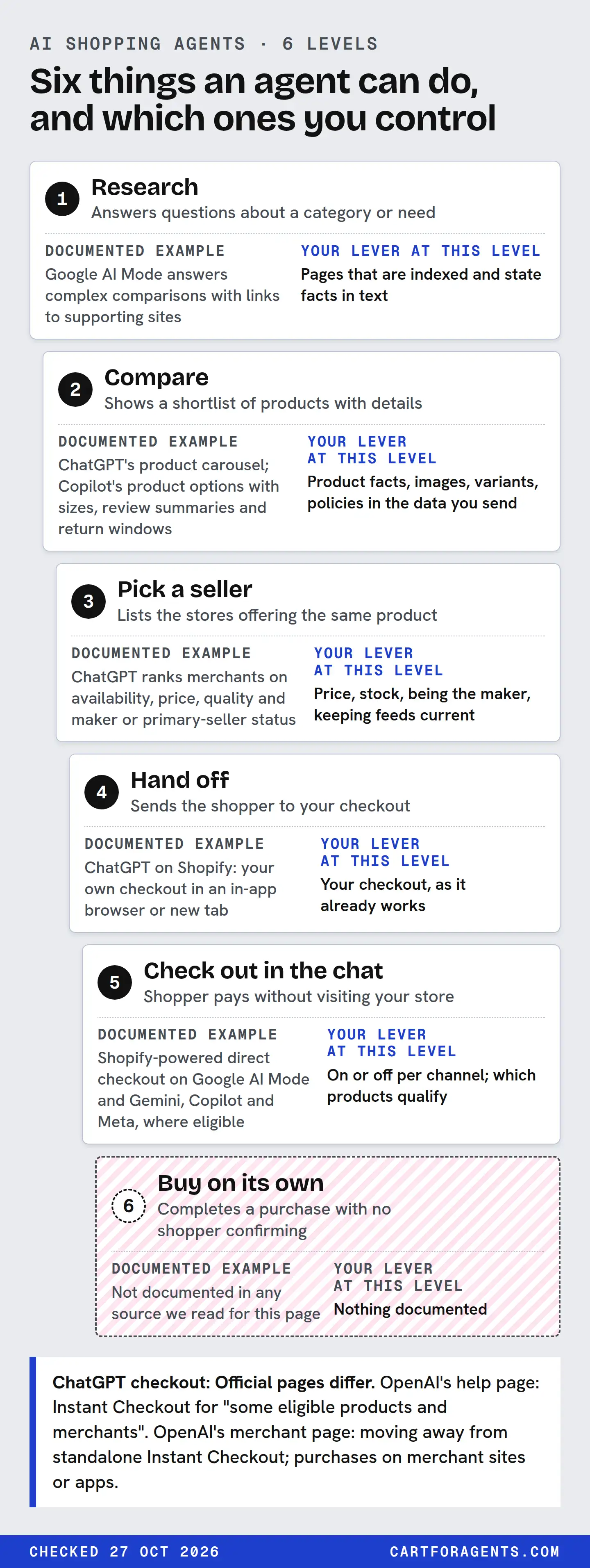
Vendors describe “AI shopping agents” as if they all do the same thing. They don’t. Here’s a ladder we use to compare them. It’s our proposed classification, not a platform term.
| Level | What the agent does | Documented example | Your lever at this level |
|---|---|---|---|
| 1. Research | Answers questions about a category or need | Google AI Mode answers complex comparisons with links to supporting sites | Pages that are indexed and state facts in text |
| 2. Compare | Shows a shortlist of products with details | ChatGPT’s product carousel; Copilot’s product options with sizes, review summaries and return windows | Product facts, images, variants, policies in the data you send |
| 3. Pick a seller | Lists the stores offering the same product | ChatGPT ranks merchants on availability, price, quality and maker or primary-seller status | Price, stock, being the maker, keeping feeds current |
| 4. Hand off | Sends the shopper to your checkout | ChatGPT on Shopify: your own checkout in an in-app browser or new tab | Your checkout, as it already works |
| 5. Check out in the chat | Shopper pays without visiting your store | Shopify-powered direct checkout on Google AI Mode and Gemini, Copilot and Meta, where eligible | On or off per channel; which products qualify |
| 6. Buy on its own | Completes a purchase with no shopper confirming | Not documented in any source we read for this page | Nothing documented |
Two boundaries are worth saying out loud.
Level 5 still has a person in it. Shopify describes direct checkout as the customer clicking Buy, filling in shipping and payment details, and clicking a Pay now button. That’s checkout inside a chat window, not an agent spending money unprompted.
Level 6 is not something you can opt into today. We found no merchant documentation for fully autonomous purchasing on these channels. If someone sells you “agent-ready checkout for autonomous buyers”, ask which platform document they’re working from.
The platform-control matrix
This is the original part of this page: what each assistant does for a shopper, set against what a Shopify merchant controls. The rows are the channels Shopify documents in its agentic storefronts section. Perplexity and Amazon work differently and have their own guides: Perplexity shopping and Amazon Rufus.
What the assistant does for the shopper
| Channel | Research and compare | Seller choice | How the purchase happens |
|---|---|---|---|
| ChatGPT | Product options with images and details when a question shows shopping intent; considers the query, Memory and Custom instructions; “Try on” for clothes; save to Library | After a product is picked, a list of merchants ranked on availability, price, quality and maker or primary-seller status | Official pages differ. OpenAI’s help page: Instant Checkout for “some eligible products and merchants”. OpenAI’s merchant page: moving away from standalone Instant Checkout; purchases on merchant sites or apps. Shopify: your own checkout, in an in-app browser or new tab |
| Google AI Mode and Gemini | Google Search: AI Mode for complex comparisons with supporting links. Separately, Google Shopping labels some results “Top recommendations” by relevance, ratings, price and product features (Shopping surface, not a documented AI Mode seller-rank rule) | Not documented in the sources we re-read | Shopify lists direct checkout for the US, Canada and Australia, rolling out; Google’s own pages say US first, Canada and Australia later. Others go to your store |
| Microsoft Copilot | Find products, compare options, deals; a personalized Shopping homepage; options based on the prompt, “likely engagement”, merchant data and other factors | Shows retailers in product details | Pages differ. Microsoft support: Buy goes to the retailer’s purchase page. Shopify: direct checkout for eligible stores, shown only to US customers |
| Meta (including Muse) | Not covered here; Meta’s own documentation wasn’t re-read for this page | Not documented in the sources we re-read | Shopify: direct checkout on Meta surfaces, including Muse when available, for customers in the US, Canada, Mexico, Brazil, Japan and Singapore |
| Shop (Shopify’s own app) | An AI agent helps customers discover and buy products available through Shopify Catalog | Not documented in the sources we re-read | Controlled in the Shop channel’s selling method settings |
What you control as the merchant
| Channel | How your products get there | Can you switch data access off? | Checkout control |
|---|---|---|---|
| ChatGPT | Shopify Catalog, on by default for eligible stores. OpenAI also takes direct feeds by application | Yes: per-channel Catalog access. Takes up to 7 days; web crawling can still surface you | No ChatGPT direct-checkout setting in Shopify. OpenAI’s help page still mentions Instant Checkout for some eligible products and merchants, but its merchant page says it’s moving away from it; plan for checkout on your own site |
| Google AI Mode and Gemini | Google & YouTube sales channel, with product and shipping sync on, or Merchant Center directly | Shopify’s Google page describes no Catalog toggle for Google; discovery runs through Merchant Center | Direct checkout on or off; on by default where eligible |
| Microsoft Copilot | Shopify Catalog | Yes: per-channel Catalog access | Direct checkout on or off; on by default where eligible |
| Meta | Shopify Catalog. Shoppable ads also need the Facebook and Instagram by Meta channel with sync on | Yes: per-channel Catalog access | Direct checkout on or off; on by default where eligible |
| Shop | Shopify Catalog; all products published to your online store are discoverable | Not in the Agentic section. Only Unlisted status or seo.hidden, which also hides the product from Google |
Shop channel selling method |
Read the matrix this way: the left columns are things the platform decides, the right columns are things you decide. Notice how little of the left you can touch. You can’t choose whether ChatGPT shows your product or which merchant it lists first. You can choose whether it receives your data at all, and how good that data is.
The switches, and what each one doesn’t do
Shopify’s documentation describes these controls in the Sales channels > Agentic area of the admin. We haven’t viewed those screens in a live store for this page, so the wording below is the documentation’s.
| Control | What it does | What it doesn’t do |
|---|---|---|
| Allow Shopify to manage for me (default on) | All channels active, direct checkout on where offered, automatic enrolment in new agentic storefronts | Doesn’t make any channel recommend you |
| Shopify Catalog access, global or per channel | Stops third-party agentic storefronts receiving your products through Catalog. Takes up to 7 days, and turns off direct checkout too | Doesn’t remove you from web crawling and indexing, and doesn’t affect Shop |
| Auto enroll new storefronts | Lets you keep current channels but stop being added to new ones | Doesn’t change existing channels |
| Other channels group | Opts you in or out of smaller and emerging agents, such as startups and new partners testing Catalog access | Doesn’t name which agents are in the group |
| Direct checkout, per channel | On: buyers pay in the chat. Off: they’re sent to your store | Doesn’t hide your products; they’re still discoverable |
Unlisted or seo.hidden |
Hides a product from Shop, third-party agentic storefronts and search engines | Isn’t AI-only. You lose Google too |
| robots.txt rules for AI crawlers | Affects open-web crawling only; Shopify calls these rules advisory | Doesn’t stop Catalog sending your data to channels you’ve activated |
| Shopify Catalog Mapping | Changes which fields feed Catalog (for example, metafields) and how variants group into one listing; picks price or compare-at price as the list price | Doesn’t fix a wrong fact at its source |
Underneath all of these is eligibility. A store has to be in Shopify Catalog before most of these switches matter. Shopify’s requirements include the Starter plan or higher and no password-protected storefront. There’s one exception: a store on the Agentic plan that hasn’t yet published its online store to a paid plan can still be included through agentic storefronts. Products need a title, at least one image, a price above zero and an identifiable product URL. The account also has to meet standing rules, such as genuine sales to real customers and a low chargeback rate. Our Shopify Agentic Storefronts guide maps those gates in detail.
A worked case: one store, five channels
Here’s a hypothetical store, invented to show how the matrix plays out. It sells a humidifier, a humidifier-plus-filters bundle, and a monthly filter subscription. It ships to the US and Canada, is eligible for Shopify Catalog, has its Terms of service, Privacy policy and Return and refund policy filled in, and leaves “Allow Shopify to manage for me” on.
| Channel | US shopper | Canadian shopper | Bundle and subscription |
|---|---|---|---|
| ChatGPT | Can discover it; buys on the store’s own checkout | Not covered: Shopify’s ChatGPT page requires selling to US customers, and OpenAI says shopping is live for US users | Bought on the store’s own checkout, like everything else |
| Google AI Mode and Gemini | Direct checkout if it has rolled out to the store; needs a valid Merchant Center account | Not confirmed: Shopify lists Canada, but Google’s onboarding pages say US first, Canada later | Not supported in direct checkout; buyers go to the store |
| Microsoft Copilot | Direct checkout, on by default | Direct checkout is shown only to US customers | Not supported in direct checkout |
| Meta | Direct checkout, including Muse when available | Canada is a listed market | Not supported in direct checkout |
| Shop | Discoverable; checkout per Shop channel settings | Not stated on the pages we read | Not stated on the pages we read |
Four decisions fall out of that table for this store:
- Keep the core humidifier sold on its own. Bundles and subscriptions aren’t supported in the Google, Copilot and Meta direct checkouts, so a store that only sells the bundle would lose the in-chat purchase on all three.
- Expect a measurement gap. Shopify says Google Analytics and custom pixels don’t fire in those direct checkouts; only server-to-server pixels do. If direct-checkout orders don’t show up in Google Analytics, that’s documented behaviour, not a missing sale. Shopify’s agentic storefronts reports count sales across referrals and direct checkout.
- Put disclosures early. Each of the four channel pages asks for relevant legal disclosures in the first 6,000 characters of the product description. A humidifier’s safety warnings belong near the top, not after the FAQ.
- Don’t promise Canadian shoppers in-chat checkout everywhere. Shopify lists Canada for Google, but Google’s own pages say US first and Canada later; Meta lists it; Copilot’s direct checkout doesn’t.
Notice what isn’t on that list: anything that makes an assistant choose this humidifier. That’s decided by the product’s facts, reviews, price and the shopper’s own request. Our guide to how shopping agents choose products covers what the evidence says about that.
Where the documents disagree
Two conflicts are worth knowing before you plan around checkout, and a third affects Meta.
ChatGPT checkout. OpenAI’s help page, as we read it on October 27, still says ChatGPT “may also show an Instant Checkout option” for some eligible products and merchants. OpenAI’s merchant page says it’s “moving away from a standalone Instant Checkout experience” and that purchases are completed on merchant-owned websites or apps. Shopify’s ChatGPT page has no checkout setting at all. For a Shopify store, plan for buyers landing on your own checkout.
Copilot’s Buy button. Microsoft’s consumer help page says selecting Buy takes the shopper to the retailer’s purchase page. Shopify says Copilot offers a Shopify-powered direct checkout for eligible stores, shown to US customers. Both can be true for different merchants or rollout stages. Check what your own admin shows.
Meta’s data route. Shopify’s Selling on Meta page says products reach Meta through Shopify Catalog, with the Facebook and Instagram by Meta channel needed for shoppable ads. Shopify’s general Catalog page says products reach Meta surfaces through the Facebook and Instagram by Meta channel. If you sell on Meta, keep both routes healthy until Shopify’s pages agree.
For route-by-route detail beyond the controls, see our comparison of AI shopping platforms. For how these jobs split across your team, see SEO, AEO, GEO and ACO. To turn the matrix into tasks, use the GEO for ecommerce backlog.
Your next step
Open the matrix’s “What you control” table and fill in one more column for your own store: on, off or not eligible, for each channel. Then list which of your best-selling products are bundles, subscriptions or customizable, since those can’t use in-chat checkout on Google, Copilot or Meta. That gives you two concrete gaps to check in your admin, rather than a vague sense of being “in AI”.