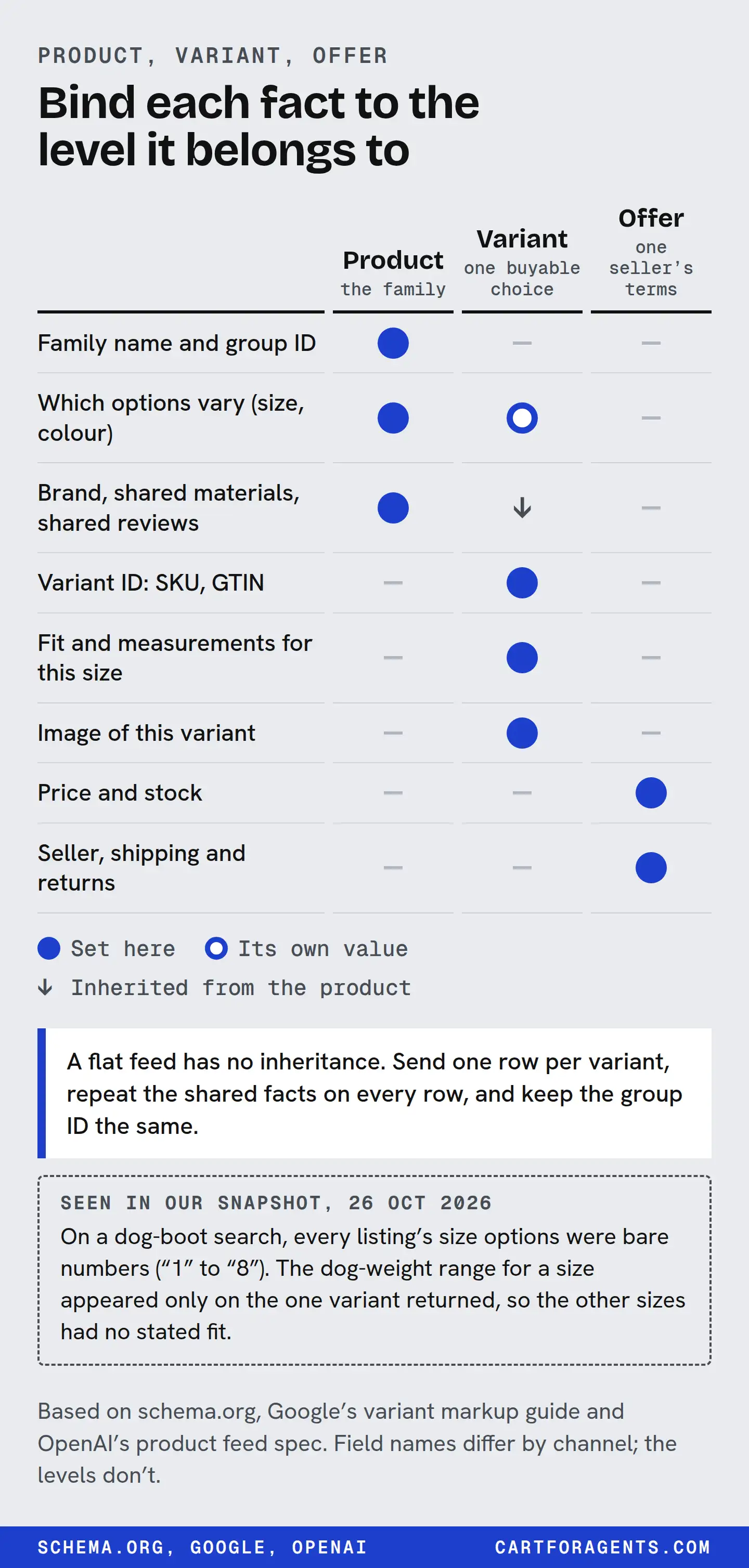
Give every variant you sell its own stable ID, price, stock status, image and URL. Give it its own value for every fact that changes between siblings: the size range it fits, its capacity, its coverage, the reviews it actually carries. Only put a fact on the parent listing when it is true of every variant, because schema.org and Google read a parent-level property as shared by all of them.
Keep the offer separate from the product. Price, stock, seller and returns change on their own schedule and sometimes per market. Then open one received record and check that the facts sit on the right variant.
This guide is a matrix you fill in, built from Google’s, schema.org’s, OpenAI’s and Shopify’s own documentation, plus what Shopify’s agent catalog returned on October 26, 2026. It doesn’t show what any assistant tells a shopper.
Three levels, three jobs
Most variant mistakes come from putting a fact on the wrong level. There are three:
| Level | What it is | Its ID | Never |
|---|---|---|---|
| Group (parent) | The product as a family: “Wool winter coat” | A parent ID: Shopify product, productGroupID, group_id |
Sold on its own. It has no single price or stock |
| Variant | The exact thing that ships: “Wool winter coat, green, size small” | SKU or GTIN, item_id |
Reused for a different item, or shared between sizes |
| Offer | One seller’s terms for that variant: price, stock, shipping, returns | offer_id or the seller’s variant listing |
Built with the price inside the ID |
The published variant formats all use this split, in their own words:
| Level | Schema.org / Google markup | OpenAI product feed | Shopify |
|---|---|---|---|
| Group | ProductGroup with productGroupID, variesBy, hasVariant |
group_id, listing_has_variations=true |
The product; Catalog Mapping can also group separate products |
| Variant | Product with sku or gtin, isVariantOf |
One row per variant: item_id, variant_dict |
The variant and its option values |
| Offer | Offer on each variant Product |
price, availability, offer_id, seller_name per row |
Variant price and inventory; checkout link |
Google says each variant needs a unique ID in its markup, a name more specific than the group’s, and its own preselectable URL that shows the right image, price and availability. OpenAI’s feed reference wants a separate row for each selection, each with its own price, availability, URL and images, and IDs that stay the same when price, stock, title or images change. It also says, plainly, that neither its top-level fields nor its variant map will reconcile conflicting values for you.
If you sell on Shopify, you probably won’t upload an OpenAI feed. OpenAI says Shopify catalogs are already integrated, and Shopify says Catalog syndicates your options, price and availability. The feed reference is still the clearest public statement of how one assistant platform expects variant data to be shaped, so it’s a good spec to check your own data against.
The identity and inheritance matrix
Schema.org defines a ProductGroup as a set of products that vary only in described ways, such as size or colour. Anything you set on the group stands for a characteristic shared by every variant. That’s the leak: if your 4 L and 6 L humidifiers share one listing and the coverage figure sits on the parent, every reader, human or machine, will apply the 6 L coverage to the 4 L.
Fill this in for one product family. The middle column is the rule; the last is how it usually goes wrong.
| Fact | Where it lives | Leak to look for |
|---|---|---|
| Brand, maker, model line | Group | None if it’s really shared. A rebadged sibling from another maker is a different product |
| Material, care, shared safety warnings | Group, unless a variant differs | A “leather” group with one vegan colourway |
| Size, colour, pattern, capacity | Variant (the option values) | Bare labels (“1”, “2”, “XL2”) with no unit or meaning |
| Fit range a size covers (weight, chest, mattress depth, room size) | Variant | One size chart image shared by all sizes, so no variant states its own range |
| Performance that scales with size (coverage, runtime, load limit) | Variant | The hero SKU’s numbers written into the shared description |
| Dimensions and weight | Variant | Package dimensions given as product dimensions, or one variant’s figures used for all |
| GTIN, MPN | Variant | One barcode for the whole family. OpenAI notes a GTIN identifies the trade item, not the group |
| Reviews and rating | Group or variant, but say which | Two different rating populations on one listing with no label |
| “Not for” and compatibility limits | Variant when they differ by size or model | The small size’s limit missing because the parent says “fits all” |
| Price, sale price | Offer | One “from” price standing in for every size |
| Stock status | Offer | A parent marked in stock while the requested size is sold out |
| Shipping, returns, final sale | Offer, or store policy if truly uniform | A final-sale colourway inheriting the store’s 30-day return text |
Schema.org lets a return policy sit on an organization, a product or an offer. Use the offer when it differs by variant. In OpenAI’s feed, returns are per row, and a final-sale item is sent with accepts_returns=false.
What the platforms say about shared reviews
Reviews are the fact merchants most often leave ambiguous. OpenAI’s reference is specific: a review count and a star rating must describe the same review population. If your product page shares reviews across variants, put the same group figure on each variant and don’t add them up again. Google lets a ProductGroup carry an aggregateRating that represents all variants.
Either choice can be right. What breaks the record is not saying which one you made. The next section shows why.
A worked case: curtains and resistance bands
On October 26 we ran searches in Shopify’s agent catalog and read the records field by field. Two listings show most of the matrix’s failure modes in one place. Store names are withheld.
The first came up for “blackout curtains for nursery that block 100 percent light”. The shopper’s real question is “will it fit my window?”.
| What we looked for | What the record carried |
|---|---|
| Sizes on the product | 15, in widths of 42, 52 and 70 in and lengths from 63 to 120 in; the 70-inch widths are single panels |
| Size of the returned variant | “37W x 63L inch x 2 Panels”, which isn’t in that list |
| Shopify’s generated spec list | “Available Lengths: 84 in, 108 in, 120 in”; “Panel Width: 52 in”; “Panel Count: 2” |
| Rating | Product: 5 from 70 ratings. Returned variant: 5 from 1 |
This is the hero-SKU leak in action, whoever caused it: we can’t tell whether the generated list came from data the merchant supplied or from Shopify’s generation. It describes one width family as if it were the whole product. It leaves out four of the seven lengths and two of the three widths on the size list. It also says two panels, though three sizes are sold as one. The returned variant is a size the option list doesn’t contain at all. We can’t tell why: it could be an old variant, a renamed one or a list cut short. Either way, a shopper with a 63-inch window can’t confirm a fit from this record.
The second came up for “resistance bands for physical therapy after knee surgery”. Here the shopper needs to know the resistance of what they’re buying.
| What we looked for | What the record carried |
|---|---|
| Options on the product | 22 values mixing band sets and single bands, such as “5 Band Set, 5-140 lb (Save 6%)”, “RED - (15-30 lb)” and “RED - (15-35 lb)” |
| Returned variant | “5 Band Set (Save 10%)”, which isn’t in the list, plus a length of “41-Inch” |
| Description | “40 layers of premium latex” |
| Shopify’s generated spec list | “30-layer premium latex”; “Length: 34 inches or 41 inches” |
Three things went wrong, each at a different level:
- An offer fact sits inside the variant’s name. A discount is a price fact. Once it’s written into the option name, it goes stale: the list says “Save 6%”, the returned variant says “Save 10%”. OpenAI’s feed reference makes the same point about IDs: never put the price in one.
- Two variants share a colour but not a resistance. “RED” means 15–30 lb in one option and 15–35 lb in another. Every colour comes in pairs like this, and the pairs may well match the two band lengths, but the option names don’t say so. The resistance range is the fit fact; the colour is decoration; and the length that explains the difference isn’t in the name.
- A group fact changed between copies. The layer count is the same for every band, so it belongs at the group level, once. The description says 40, and the generated spec list says 30.
Here’s the fix, using the matrix. The bracketed values are deliberately blank, because we don’t know the real ones:
| Fact | Lives at | Fixed value |
|---|---|---|
| What’s in the set | Variant | “5-band set: [range] lb, [range] lb, …”, one range per band |
| Single-band resistance | Variant | “Red, [length] in, [x–y] lb”, so each name carries its length and one range |
| Discount | Offer | A sale price against the regular price, never inside the option name |
| Latex layers | Group | One number from the source document, in description and spec |
| Length | Variant | Its own option, if both 34 and 41 in are sold |
Shopify’s own listing insights point the same way. Its “Variant & option completeness” check looks at whether variant or option names contain acronyms or numbers that are hard for agents to understand or recommend. An option name doing the work of a size, a colour, a resistance range and a promotion at once is a lot to ask of one label.
How we checked
We ran 162 searches against Shopify’s Global Catalog on October 26, 2026, and kept the raw responses. That’s 1,620 result occurrences. The same product can appear in more than one search, so these are occurrences, not distinct products. A short script counted the fields; we then read the curtain and resistance-band records by hand.
Every search result carried exactly one variant. In all 1,620 occurrences, the result held the product, its option list and one variant record. In 758 of them, at least one option had more than one value, such as several sizes or colours. So for nearly half the results, the facts that belong to the other sizes weren’t in the search response at all. They might arrive later, when an agent looks up a specific product or variant, which Shopify’s catalog documentation describes as a separate step.
Variant titles matched product titles. In all 1,620, the returned variant’s title was identical to the product title, with no size or colour in it. That looks like how the catalog presents a search result rather than something merchants did. It means the variant’s identity travels in the option values, not the name, so those values have to be meaningful on their own.
Two rating figures, often different. 1,063 occurrences carried both a product-level rating and a rating on the returned variant. The review counts differed in 1,001 of them and the averages in 730. Only 53 matched on both. No rating anywhere had a count of zero. We don’t know how either figure is calculated. The point isn’t that one is wrong; it’s that a reader gets two numbers and no label saying which reviews each one covers. For how often ratings were missing altogether, and why missing doesn’t mean zero, see our missing review data analysis.
The variant problem shows up between records, too. In a search for “anti theft backpack for city travel”, two catalog records for what appears to be the same 28-litre backpack carried different dimensions. One said 19.7 x 11.2 x 7.5 in. The other said 11.2 in high, 7.5 in wide and 2.4 in deep. That receipt is in our catalog research. If they’re two variants, each needs its own dimensions and a name that says which is which. If they’re the same item, one of them is wrong.
Keep the differences that change the purchase
The temptation, especially with dozens of colourways, is to flatten everything into one hero SKU and let its facts speak for the family. Don’t. Separate variants aren’t clutter when they answer different shoppers.
A useful test is: would a shopper choose differently because of this difference?
| Difference between siblings | Changes the purchase? | What to do |
|---|---|---|
| Colour, same everything else | Rarely, except to match | Variant option with a plain colour name and its own image |
| Size that changes the fit range | Yes | Variant option that states the range with a unit |
| Capacity that changes coverage or runtime | Yes | Variant-level coverage and runtime, each with its condition |
| Model that changes compatibility | Yes | Variant-level compatibility, plus what it doesn’t fit |
| Material in one colourway only | Yes, for some buyers | Variant-level material; take it off the group |
| Bundle or pack count | Yes | Separate variant with its own quantity, price and GTIN if assigned |
Google’s supported list of varying properties is short: colour, size, suggested age, suggested gender, material and pattern. A difference outside that list, like coverage or runtime, still needs its own value on each variant Product. It just isn’t the property that names the variant.
For the copy itself, the description should name the variant-specific facts in its opening. Our guide to product descriptions for shopping agents covers that. If you want to see which of a shopper’s requirements each variant can actually prove, the constraint coverage guide starts from a shopper brief and works backwards.
Five leak checks
Run these on one product family before you touch the rest of the catalog:
- One fact, one level. For each row of the matrix, can you point to exactly one place it lives? If coverage appears in the parent description and in a variant field, decide which is the source and make the other a copy.
- The hero test. Read the parent description out loud for your smallest variant. Is every number still true? If not, it belongs on the variant.
- The label test. Read each option value with no context. Does “1” or “XL2” mean anything to a stranger? Add the unit and the range. (Our pet product guide shows what bare size numbers look like on dog boots.)
- The rating test. Can you say which reviews your displayed rating covers: this size, this colour, or the whole family? Say it the same way everywhere you publish it.
- The offer test. Find a size that’s out of stock right now, or a colour sold as final sale. Check that the product page, the feed and the catalog record show that status for that variant only, not for the whole family.
OpenAI says ChatGPT ranks the merchants offering a product on factors including availability and price, and that price and shipping changes can take time to show up. Clean variant identity doesn’t fix a slow offer update, but a wrong stock flag on the right variant is easier to find than one smeared across the family.
Your next step
Pick your best-selling product that comes in sizes. Fill the matrix for it: one row per fact, with the level it lives at. Then open Shopify’s search preview under Sales channels > Agentic, search for the product, and compare what comes back with your matrix. Shopify says the preview shows the raw catalog output and may differ from what an assistant displays, so treat it as a check on your data, not on your ranking. Every fact sitting on the wrong level, and every bare option label, goes on your fix list.