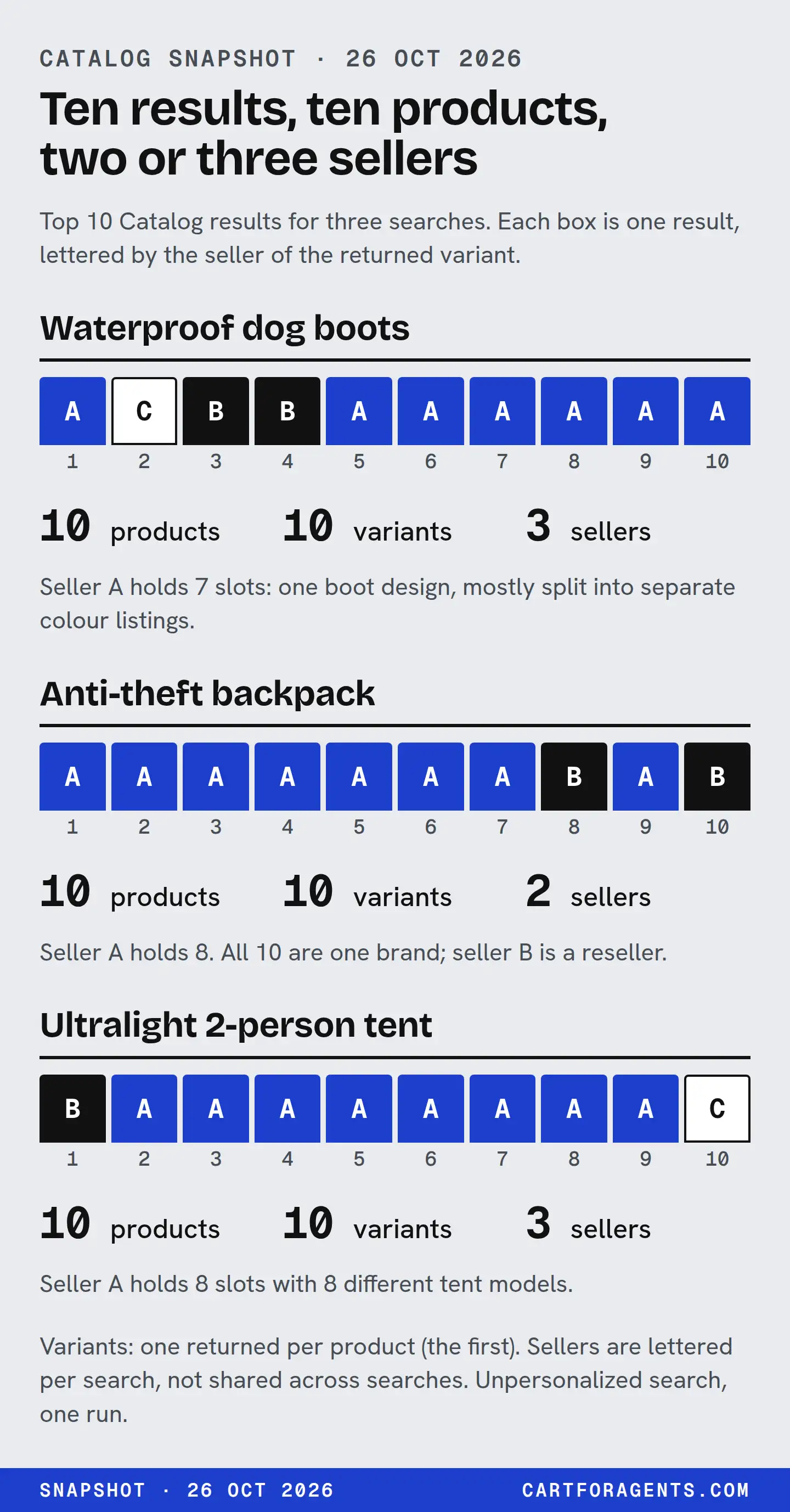
Before you say “one seller dominates this search” or “there are ten options here”, decide which of four things you’re counting: returned results, product IDs, sellers or actual designs. They come apart quickly. On October 26, 2026 we sent 162 shopper searches to Shopify Catalog, the catalog ChatGPT and Microsoft Copilot use to find Shopify products, with no buyer context, and kept the top 10 results of each. Three of those shelves show the three ways ten results can mislead: one boot listed seven times, one brand sold by two stores, and one store’s eight genuinely different tents.
None of this is what an assistant showed a shopper, and none of it says who sold more. It’s a way to count a shelf without fooling yourself.
Four counts, four different questions
| Count | Where it comes from | What it answers | What it can’t tell you |
|---|---|---|---|
| Results | Positions 1 to 10 | How much of the first page a seller or design takes | How many products exist |
| Product IDs | Each result’s product ID | How many catalog records came back | How many physical products: one design can carry several IDs |
| Sellers | The returned variant’s seller ID | How many shops share the shelf | Which seller an assistant would show for a product |
| Designs | A person reading titles and options | How much real choice the shopper got | Nothing on its own; it’s a judgement, so write down how you made it |
Two rules fall out of the snapshot before you even look at a shelf.
Count sellers by ID, never by name. Across all 1,620 results we found 1,056 distinct seller IDs but only 1,054 distinct seller names. Two names each belonged to two different shops, and one of them was a generic placeholder name. Counting by name would have merged shops that have nothing to do with each other.
A result’s seller is its returned variant’s seller. Every one of the 1,620 results came back with exactly one variant, and that variant names the seller. Shopify says search results are clustered by Universal Product ID and can include offers from several merchants. An agent then asks for the full product to see options, prices and seller checkout links for the variant the buyer picks. (Global Catalog MCP, “How it works”, checked October 27, 2026.) A search response shows one of those offers. So every seller count on this page is a count of first-variant sellers, not of everyone who sells the product.
Three shelves, recounted
| Search | Product IDs | Sellers (largest seller’s results) | What the ten results actually were |
|---|---|---|---|
| “waterproof dog boots for small dogs in deep snow” | 10 | 3 (7 of 10) | What appears to be one rain boot in 7 listings, plus 3 other boots |
| “anti theft backpack for city travel” | 10 | 2 (8 of 10) | One brand in all 10 titles; 2 models listed by both sellers, so 8 models |
| “ultralight backpacking tent for two people under 3 pounds” | 10 | 3 (8 of 10) | 8 differently named tents from one seller, plus 2 from others |
The middle column looks almost the same on all three rows. The last column shows three different shelves.
Dog boots: one boot, seven listings
Seller A held seven of the ten results. All seven had the same title, apart from a colour added at the end of five of them (“– Brown”, “– Black” and so on), and every one was priced USD 36.00 on its first variant.
| Position | Seller | What the listing is | Product rating count |
|---|---|---|---|
| 1 | A | Multi-colour listing: 10 colours and 8 sizes as options | 105 |
| 2 | C | A different boot, sold as a set of 4 | 253 |
| 3 | B | A different boot | 4,117 |
| 4 | B | A different boot | 2,916 |
| 5 | A | Single-colour listing (brown) | 1,493 |
| 6 | A | Single-colour listing (black) | 109 |
| 7 | A | Multi-colour listing: the same 10 colours as position 1 | 91 |
| 8 | A | Single-colour listing (green) | 39 |
| 9 | A | Single-colour listing (lilac) | 46 |
| 10 | A | Single-colour listing (grey camo) | 37 |
So the shelf held 10 product IDs, 3 sellers and, as far as we can tell, 4 boot designs. Green shows up twice: position 1’s returned variant is the green boot, and position 8 is a green-only listing. Brown shows up twice too: it’s an option on positions 1 and 7 and its own listing at position 5.
Each listing carried its own rating count, from 37 to 1,493. We can’t tell from the record whether these reviews overlap. But a shopper, or an agent, reading this shelf sees seven separate review totals for what looks like one product.
What a merchant should take from this: splitting colours into separate products filled seven of ten places in this response. That isn’t a recommendation. We have no evidence that it helps anyone be picked, and it splits your ratings and your facts across seven records that can drift apart. How to group variants is covered in product variant structured data. Here the point is narrower. If you count this shelf as “ten options”, you’ve counted wrong.
Backpacks: one brand, two sellers, two models twice
All ten titles named the same brand. Seller A, whose seller name reads as the brand’s official store, held positions 1 to 7 and 9. Seller B, a retailer, held positions 8 and 10, and both of its listings carried model names that seller A’s listings also carried.
| Model named in the title | Seller A (named as the brand’s official store) | Seller B (retailer) |
|---|---|---|
| The 28 L model | Position 5: USD 229.95, 32 ratings | Position 8: USD 233.00, 1 rating |
| The 25 L model | Position 3: USD 179.95, 243 ratings | Position 10: USD 182.00, no product rating in the record |
These came back as four different product IDs, not two products with two offers each. Shopify’s documentation describes clustering offers from several merchants under one product ID, so you might expect the pairs to share one. In this response they didn’t, and the record can’t tell us whether Shopify treats them as different products, different variants or simply didn’t match them. It isn’t trivial, either. Our earlier check found the two 28 L records disagreeing on depth: 7.5 in from one record’s generated spec list, and “Depth: 2.4lbs” in the other’s description, which its own generated spec list turned into “Depth 2.4 in”.
Two counting lessons here:
- Seller concentration understates brand concentration. “8 of 10 from one seller” is true. “10 of 10 from one brand” is also true, and it’s the number a shopper choosing between brands would care about.
- “Two sellers” doesn’t mean “two choices”. Two of the ten results were the same models again, from a different shop, a few dollars dearer.
If you’re the brand, this is the shelf to watch. OpenAI says that when several merchants offer a product, ChatGPT ranks them on factors like availability, price, quality and whether they’re the maker or primary seller of that item. (Shopping with ChatGPT Search, checked October 27, 2026.) A reseller’s record for your model, with a different price, one rating and different dimensions, is part of what an assistant may compare. That’s a documented list of factors without weights, not a measured effect.
Tents: one seller, eight different tents
Seller A held positions 2 to 9. Unlike the boots, each of the eight carried a different model name, and their first-variant prices ran from USD 139.00 to USD 199.00. Seller B held position 1 and seller C position 10, at USD 499.00.
This shelf is just as concentrated as the backpack one by seller count: 8 of 10. But it’s concentration of range, not duplication. A shopper here got eight distinct tents from one shop rather than one tent eight times. You can’t see that difference in any seller count. You have to read the listings.
We didn’t check whether any of these tents meet the “under 3 pounds” part of the search. That’s a separate question about stated weights, and this page is about counting.
Across all 162 searches
The three shelves above are the most concentrated kind. Most searches weren’t like them.
| Results held by the single largest seller | Searches |
|---|---|
| 1 of 10 (ten different sellers) | 23 |
| 2 of 10 | 60 |
| 3 of 10 | 35 |
| 4 of 10 | 23 |
| 5 of 10 | 6 |
| 6 of 10 | 8 |
| 7 of 10 | 2 |
| 8 of 10 | 5 |
| Total | 162 |
The median search returned 8 distinct sellers. In 21 of 162 searches one seller held 5 or more of the 10 results, and in 5 it held 8.
Product IDs were the easy count: every search returned 10 distinct IDs. Across searches, 8 IDs appeared twice, so the 1,620 results hold 1,612 distinct IDs. Seven of those eight came back with the same first variant both times. One came back with a different first variant from the same seller, which is a reminder that the variant a search shows you depends on the search.
Duplicates by design are harder to count. As a crude screen, we stripped anything after a dash from each title and looked for the same seller twice with the same remaining title. That flagged 24 of 162 searches, the dog boots being the largest case. Treat it as a pointer, not a measurement. It misses duplicates worded differently, and the same trick across different sellers mostly finds generic names (“dish soap bar”, “laundry detergent sheets”) that tell you nothing about whether two products are the same.
How to count your own shelf
You need one search a customer would type, the ten results and twenty minutes. Fill one row per result.
| Column | Where you get it | Rule |
|---|---|---|
| Position | The order the results came back | Keep it. Don’t re-sort |
| Product ID | The result’s product ID | Count distinct IDs |
| Seller ID | The returned variant’s seller ID | Count distinct IDs, never names |
| What it is | Your reading of title, options and price | “Different product”, “same design, other colour” or “same model, other seller” |
| Options listed | The product’s options | Note when other colours or sizes exist beyond the one returned |
Then report four lines, each with its unit:
- Results held by each seller ID, out of 10.
- Product IDs in the ten, and how many belong to you.
- Designs in the ten, by your written rule, and how many are yours.
- Your models listed by someone else, with their price, stock and rating count beside yours.
The fourth line is the one most merchants have never looked at, and it’s the one you can act on. If a reseller’s record for your product carries a different price, a thinner rating or different dimensions, fix what’s yours and ask them to fix theirs.
How we checked
- Source. Shopify’s public Global Catalog, searched read-only with Shopify’s command-line tool (
@shopify/ucp-cli0.9.1, catalog protocol version 2026-08-25), top 10 results, no country, currency or buyer. All 162 responses were saved between about 8:30 and 8:34 p.m. Eastern on October 26, 2026. The full collection method is on the snapshot page. - Recount. On October 27 we recounted every number on this page from the saved responses with a short script: product IDs from each result’s ID, sellers from the returned variant’s seller ID, prices from the returned variant’s price, rating counts from the product-level rating, and options from the product’s option list. We did not query the catalog again.
- By hand. We read all 30 results on the three shelves above against the saved responses. “What the listing is” and “designs” are our reading of titles, options and prices; the record doesn’t label duplicates.
- What we didn’t do. We didn’t open the product pages, ask any assistant, or check stated weights or dimensions. Seller letters A, B and C are assigned by slot count within each search (A = most results), not by first appearance, and restart for each search. Store names are withheld.
Why we’re careful about this: our first version of this study turned seller counts into part of a single score. That score is retired, and we explain why here. What’s left is the plain count, in named units.
Your next step
Run the worksheet above on one search a customer would actually type, for your best-selling product. Then answer one question: how many of the ten are really different products? If any of the ten are your own model listed by someone else, put the two records side by side and compare price, stock, rating count and every stated dimension.