After an AI assistant recommends a product, six more handoffs have to go right before you have a sale. The right variant has to be available. A seller’s offer has to be chosen. The price and stock have to still be true. The product has to ship to the shopper. The buyer has to approve the payment. And an order has to be created and confirmed.
Take one product through those handoffs in order, and mark each one pass, stops here or unknown. The first one you can’t confirm is where to look next. One limit shapes everything below: nobody outside the platforms can see a recommendation or a cart. Your own orders are the only proof the journey finished.
Six handoffs after the recommendation
Our overview of agentic commerce follows a product from catalog intake to checkout. This guide zooms in on the end of that path, from the moment an assistant has chosen to show a product to the moment an order exists. That’s where a “great recommendation, no sales” problem usually lives, and it’s the part most visibility talk skips.
| Handoff | What has to be true | Who decides |
|---|---|---|
| 1. Variant | The size, colour or capacity the shopper needs exists and is sale-ready | You (stock and options), then the agent’s choice |
| 2. Seller offer | An offer for this product is shown, and it’s yours | The platform |
| 3. Price and stock | What the shopper sees still matches your store | You keep it true; the platform decides how fast it updates |
| 4. Shipping | The product ships to the shopper, at a cost and speed they accept | You (shipping settings and policy), then the shopper |
| 5. Buyer approval | The shopper enters or approves payment and details | The buyer, inside a checkout the platform or you run |
| 6. Order | An order is created, confirmed and reported | You (fulfilment), plus the platform if it ran checkout |
Here’s what the documentation says about each.
Variant. Shopify’s Global Catalog works in two steps. A search returns products clustered by a Universal Product ID, with offers from several merchants. An agent then asks for the full product to explore options, “for example, which colors are available in size medium”, and gets pricing and seller checkout links for the variant the buyer picked. Search returns only sale-ready items unless the agent asks otherwise. So if the medium is sold out, the product can be recommended and still fail here.
Seller offer. OpenAI says that when a shopper selects a product, ChatGPT may show a list of merchants offering it, ranked on factors like availability, price, quality and whether the merchant is the maker or primary seller. It also says the first price shown typically comes from the first merchant listed. A recommendation for a product you sell is not a recommendation for your offer.
Price and stock. OpenAI says that when merchants change prices or shipping terms, “there may be some delay” before ChatGPT reflects it. Shopify says Catalog updates continuously. Neither gives a time. A shopper who clicks through to a different price than the one they were shown is a stop you can cause yourself.
Shipping. Shopify’s catalog lets an agent filter products to those that ship to a given country, region or postal code. Whether a product passes depends on your shipping settings for that place.
Buyer approval. This is the handoff no agent completes alone. Shopify says that in its browser-based checkout tools, the agent places the order “after the buyer confirms it”. Google’s checkout guide says the shopper fills in “sensitive fulfillment and payment details” in a Google interface, and that “the Agent is not involved in this part”. Our guide to AI shopping carts maps who controls each step around this boundary.
Order. Shopify says the merchant “always remains the merchant of record”. On Google’s checkout, merchants must report order created, shipped and delivered to Google by webhook. On a redirect, the order is simply an order in your Shopify admin.
Where the purchase actually happens
The route matters for handoffs 5 and 6, and the documents don’t all agree.
| Route | What the documentation says | Market and availability |
|---|---|---|
| ChatGPT | Help page: results link to sites where the shopper can purchase; “for some eligible products and merchants” an Instant Checkout option. Merchant page: “moving away from a standalone Instant Checkout”, purchases “completed on merchant-owned websites or apps”. Shopify: ChatGPT users complete the purchase on your online store checkout; Shopify documents no ChatGPT direct-checkout setting | Merchant page: “Shopping is currently live in the U.S. and will expand to additional regions over time” |
| Google AI Mode and Gemini, Microsoft Copilot, Meta (Shopify-powered direct checkout) | A setting called direct checkout lets customers buy “directly in their conversation in an AI channel”; with it off, they’re redirected to your online store | Shopify: active by default for eligible stores, where supported (off by default on the Agentic plan). For Google AI Mode and Gemini, Shopify says direct checkout is rolling out gradually to customers in the US, Canada and Australia and might not yet be available in your store |
| Google’s own UCP native checkout | Only on listings opted in with the native_commerce(checkout_eligibility) attribute; the shopper pays in a Google interface, and the agent isn’t involved in that step; you stay the seller of record | Select merchants only. Google’s pages differ on markets: one help page names the US, Canada and Australia; the onboarding pages say the hub rolls out in the US first, with Australia and Canada next year |
The two OpenAI pages conflict, so plan for ChatGPT buyers to check out on your own site, and don’t plan around Instant Checkout unless you see it confirmed for your account. On Google AI Mode and Gemini, Microsoft Copilot and Meta, Shopify says direct checkout is on by default where it’s supported and your store is eligible; turn it off and buyers go to your store. Google’s own UCP native checkout is a separate, select-merchant program, not a default for every listing.
The worksheet
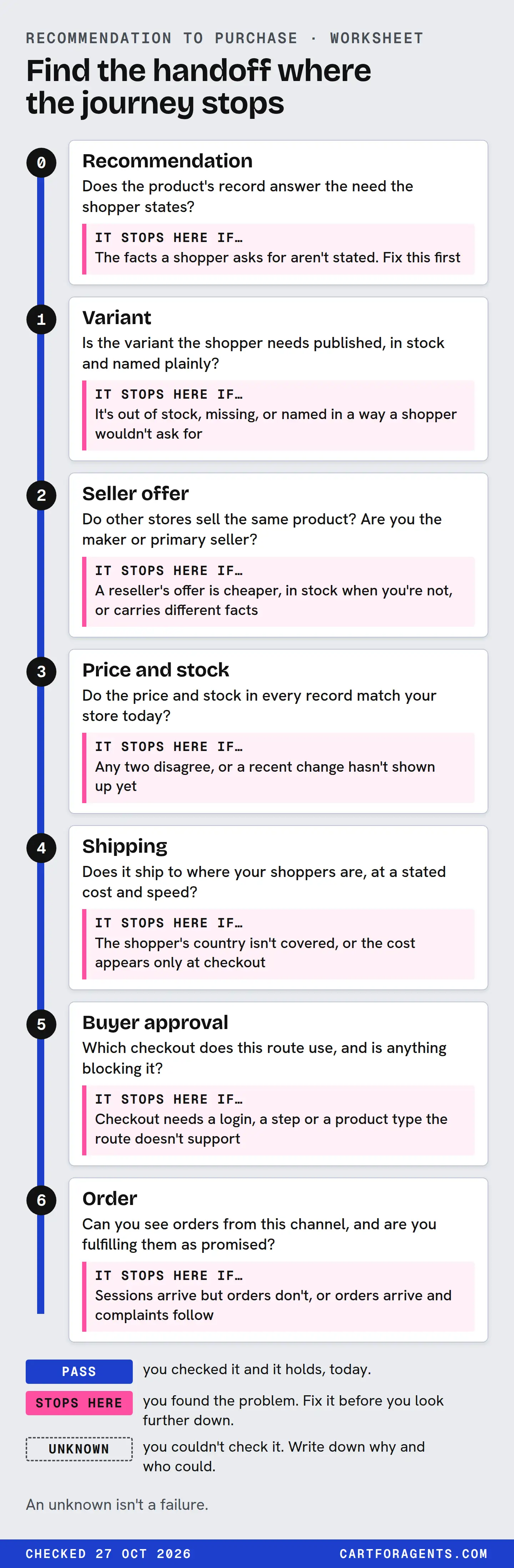
Use it for one product, one shopper need and one route at a time. Write the date on it. Each row asks one question, says where to look, and says what a stop looks like.
| Handoff | Question | Where to look | It stops here if… |
|---|---|---|---|
| 0. Recommendation | Does the product’s record answer the need the shopper states? | Your product record, read as received; a coverage check against a real customer question | The facts a shopper asks for aren’t stated. Fix this first; see product constraint coverage |
| 1. Variant | Is the variant the shopper needs published, in stock and named plainly? | Your product options and inventory; the variant record in any catalog response you can read | It’s out of stock, missing, or named in a way a shopper wouldn’t ask for |
| 2. Seller offer | Do other stores sell the same product? Are you the maker or primary seller? | Your own knowledge of resellers; the other offers on the product, where you can see them | A reseller’s offer is cheaper, in stock when you’re not, or carries different facts |
| 3. Price and stock | Do the price and stock in every record match your store today? | Your product page, any feed you send, and the catalog record | Any two disagree, or a recent change hasn’t shown up yet |
| 4. Shipping | Does it ship to where your shoppers are, at a stated cost and speed? | Your Shopify shipping settings and shipping policy page | The shopper’s country isn’t covered, or the cost appears only at checkout |
| 5. Buyer approval | Which checkout does this route use, and is anything blocking it? | The route table above; your Agentic settings for direct checkout | Checkout needs a login, a step or a product type the route doesn’t support |
| 6. Order | Can you see orders from this channel, and are you fulfilling them as promised? | Sales channels → Agentic: sales, orders, sessions and conversion per AI channel | Sessions arrive but orders don’t, or orders arrive and complaints follow |
Mark each row with one of three results:
- Pass: you checked it and it holds, today.
- Stops here: you found the problem. Fix it before you look further down.
- Unknown: you couldn’t check it. Write down why and who could.
An unknown isn’t a failure. It’s a gap in what you can see, and most rows after handoff 2 are unknown for most merchants most of the time.
A blank to copy
| Handoff | What I checked, and where | Result | Date |
|---|---|---|---|
| 0. Recommendation | Pass / Stops here / Unknown | ||
| 1. Variant | |||
| 2. Seller offer | |||
| 3. Price and stock | |||
| 4. Shipping | |||
| 5. Buyer approval | |||
| 6. Order |
A worked case: one humidifier record
On October 26, 2026, we searched Shopify Catalog for “humidifier for dry winter air large room quiet top fill”, with no country, currency or buyer set, and kept the top 10. In our coverage check, position 3 was one of only two listings whose title, description and price supported all five requirements of an example brief: a room of at least 450 sq ft, a stated decibel figure, top fill, under USD 90 and a day per fill.
So position 3 is a strong candidate at handoff 0. Here’s how far the record lets us follow it.
| Handoff | What position 3’s record says | Result |
|---|---|---|
| 0. Recommendation | Supports all five requirements in its own text. That’s coverage of our example brief, not a recommendation by any assistant | Unknown: we can’t see recommendations |
| 1. Variant | One variant returned, marked available. No product options listed on it | Pass, in this record |
| 2. Seller offer | One seller on the returned variant. That seller supplied 6 of the 10 results. In this search response, each product row returned one seller offer on the selected variant, so other sellers of the same product weren’t visible here | Unknown |
| 3. Price and stock | USD 69.99, available, on October 26 | Unknown: we didn’t compare it with the live store |
| 4. Shipping | A shipping-policy link. No shipping cost, no delivery time and no ships-to information, because we sent no country | Unknown |
| 5. Buyer approval | Flagged not eligible for native checkout. A checkout link to a cart on the seller’s own storefront, quantity 1 | Route: redirect to the seller’s checkout. Approval happens there, out of our sight |
| 6. Order | Nothing in the record | Unknown: only the seller’s admin can show it |
The record carries this product right up to a handoff: a link into the seller’s own cart. Everything after that link is the seller’s checkout and the seller’s data. If this were your product, rows 3, 4 and 6 are the ones you could close in a few minutes from your own admin. Open the live price, check that your shipping settings cover your shoppers’ countries, and look at the Agentic report for orders from each AI channel.
The record also says nothing about reviews. Position 3 had no product rating and no variant rating. That means unknown, not zero, and it isn’t a stop at any handoff we can document. Whether it affected a recommendation, we can’t tell. See missing review data for how we count absent ratings.
What the 1,620 results add
Position 3 isn’t unusual. Across all 1,620 results from our 162 searches that day, the returned variant always carried a checkout link, and almost always policy links:
| Field on the returned variant | Results (of 1,620) | What it does and doesn’t tell you |
|---|---|---|
| Checkout link | 1,620 | A redirect route existed in this context. Not that anyone bought |
| Marked available | 1,617 | Stock signal at that moment, for that one variant |
| Shipping-policy link | 1,535 | A shipping policy page exists. Not what it says or where you ship |
| Refund-policy link | 1,589 | A refund policy page exists. Not its terms |
| Not eligible for native checkout | 1,620 | The returned variant used a redirect in this no-context search. Not a store’s status in any assistant’s checkout program |
requires field with a value |
0 | Schema examples show flags such as shipping, selling plan or components. On all 1,620 returned variants the field was absent or empty, so we can’t read those flags here |
These are result occurrences, not distinct products, from searches with no buyer context. Our native-checkout research explains why the checkout flag alone tells you so little.
Reading your own numbers
Your Shopify admin shows, for each AI channel, sales, orders, online store sessions and online store conversion. Shopify says the sales figure combines sales from referrals and sales through direct checkout. Those reports are the closest thing a merchant has to evidence at handoffs 5 and 6.
They also let you guess where a product stops. This table is our proposed reading, not a cause any platform documents:
| What you see | Most likely handoff | First check |
|---|---|---|
| No sessions or orders from any AI channel | Before handoff 1: eligibility, retrieval or recommendation | The Agentic section’s product count, then the product’s facts. See our overview |
| Sessions arrive, conversion is low | Handoffs 1, 3 and 4 | The variant’s stock, the price shown against your live price, shipping cost to the shopper’s country |
| Orders from direct checkout, then returns or complaints | Handoff 6, sometimes handoff 0 | Whether the facts the shopper relied on were true and stated with their conditions |
| A reseller sells your product and you see few sessions | Handoff 2 | Your price, stock and maker status against theirs |
A caution about the first row: Shopify’s help page doesn’t explain how it decides that a visit came from an AI channel. A shopper who reads a recommendation and then types your store name into a search box may not count. Low numbers are a reason to check, not proof that a stage failed.
How we checked
- Documents. On October 27, 2026, we re-read OpenAI’s ChatGPT shopping help page and merchant page, Shopify’s Global Catalog and agent cart-and-checkout developer pages, Shopify’s help page on managing agentic storefronts, and Google’s UCP native checkout and order lifecycle guides. Quotes are from those pages on that date. The OpenAI help page showed as updated within hours of our check.
- The record. We reopened the saved Shopify Catalog response for the humidifier search, taken on October 26, 2026 with Shopify’s command-line tool, no country, currency or buyer, top 10 results. For position 3’s returned variant we read the availability flag, price, native-checkout flag, the checkout link’s host against the seller’s storefront URL, the policy link types, the product options and both rating fields.
- The counts. On October 27 we recounted all 162 saved responses with a short script: per returned variant, whether a checkout link, shipping-policy link and refund-policy link were present, the availability flag, the native-checkout flag, and whether a checkout prerequisites field existed.
- What we didn’t do. We didn’t open any checkout link or policy page, create a cart, set a country or ask any assistant anything.
Your next step
Pick the product you’d most like an assistant to sell, and one real customer question about it. Fill in the blank worksheet from the top, writing today’s date. Stop at the first row marked “stops here” and fix it. If you reach row 6 with only unknowns after row 2, open Sales channels → Agentic and read your orders by channel. That report is the only part of the journey you can see end to end.